EducationSoftwareStrategy.com
StrategyCommunity

Knowledge Base

Product

Community

Knowledge Base

TopicsBrowse ArticlesDeveloper Zone

Product

Download SoftwareProduct DocumentationSecurity Hub

Education

Tutorial VideosSolution GalleryEducation courses

Community

GuidelinesGrandmastersEvents
x_social-icon_white.svglinkedin_social-icon_white.svg
Strategy logoCommunity

© Strategy Inc. All Rights Reserved.

LegalTerms of UsePrivacy Policy
  1. Home
  2. Topics

KB482928: In Platform Analytics, the "Account Password Expiration Frequency" Column is Set to "90" When the User Password is Configured to Never Expire


Jing (Sally) Cheng

Senior Principal Consultant • MicroStrategy


Description

In Platform Analytics, the "Account Password Expiration Frequency" attribute form element is set to a default value of "90" when a user is created with the password expiration set to "Never" in the user editor. 
As a result, it is not possible to differentiate the cases when the password frequency is set to never expire versus when the user's password frequency is set to expire every 90 days. 
 

Steps to Reproduce

  • From Strategy Developer, log in to the Intelligence Server which is being monitored by Platform Analytics
  • Navigate to Administration > User Manager
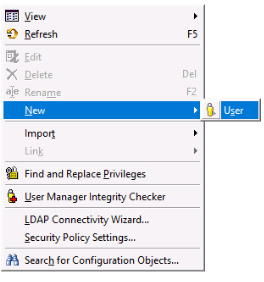
  • Right-click and create a new User
ka04W000001Iv7iQAC_0EM44000000gVDt.jpeg
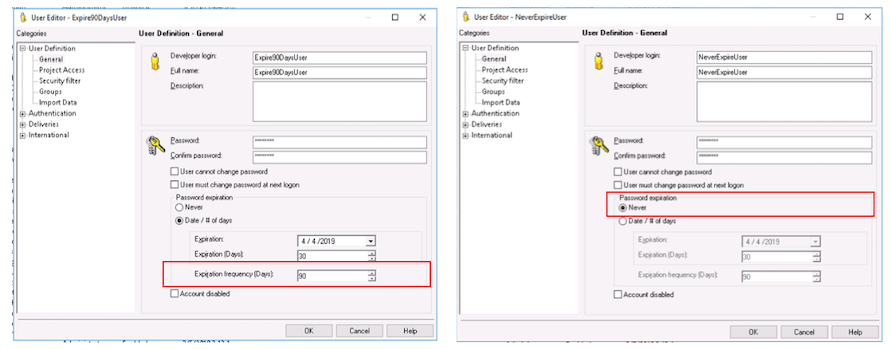
  • In the user editor, set the password expiration to Never
  • Repeat the steps and create another user with the Expiration Frequency (days) set to 90
ka04W000001Iv7iQAC_0EM44000000gVGd.jpeg
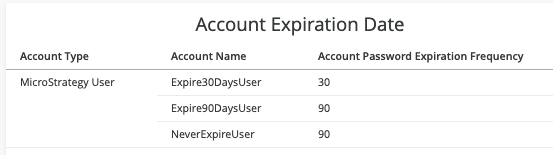
  • Create a new report in Platform Analytics including the Account attribute, including choosing to display the 'Password Expiration Frequency' attribute form.
  • Execute the report. Notice that for all users with the password expiration set to never, the frequency is populated with a default value of "90". The same is true for the user whose password frequency was set to 90 days. 
ka04W000001Iv7iQAC_0EM44000000gVGx.jpeg


Why is this happening?

This is a known issue in Strategy 2019, in which the way the information was being sent by the Intelligence Server into the Platform Analytics telemetry was incorrect. If you are encountering this issue, please log a case with your Tech Support Liaison, referencing this article, so that you may be updated when a resolution is available.
 

Relevant Knowledge Base Articles

KB482927 In Platform Analytics, the "Account Password Expiration Date" Column is Set to "1/1/1970 12:00:01 am" When the User Password is Configured to Never Expire.


KB482928


Comment

0 comments

Details

Knowledge Article

Published:

March 5, 2019

Last Updated:

March 5, 2019