Starting with the release of Strategy ONE (March 2024), dossiers are also known as dashboards.
CONTENTS:
In Strategy web, when a normal user login he will see the Create button as below and can perform these actions:
Create New Dossier, New Report, New Document, New Custom Group, New Metric, New Prompt, New Filter and Add External Data, Upload Strategy File.

This article describes how to remove the Create button on web which means disable all above privileges for a specific user.
STEPS:
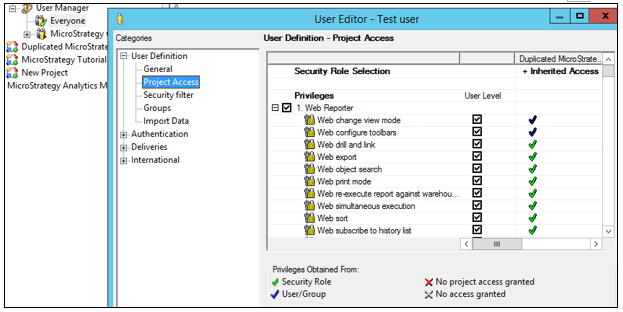
1. Go to developer – Administrator – User Manager – edit the user. Open Project Access and the page looks like below.
2. Un-check all below listed privileges one by one:
*Access Data (Files) from local, URL, DropBox, Google Drive, Sample Files, Clipboard
*Access Data from Cloud App (Google Analytics, Salesforce Reports, Facebook, Twitter)
*Access Data from Databases, Google BigQuery, BigData, OLAP, BI tools
Web create dossier
Web create new report

* Web define Intelligent Cube report
**Web document design
**Web manage document datasets
Web use customer group Editor
Web use filter Editor
Web use Metric Editor
Web use prompt editor
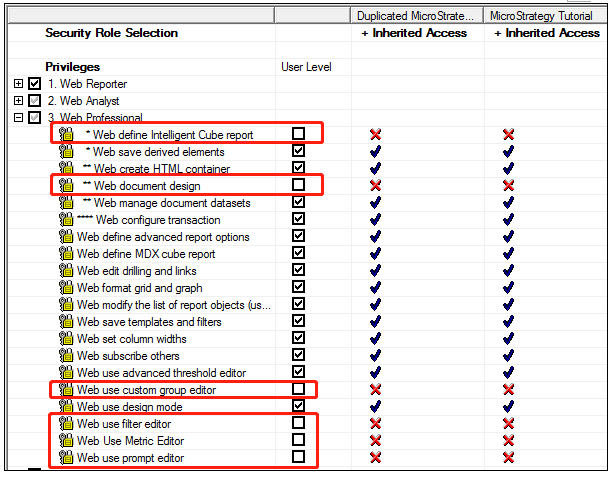
3. Save the change, and then login as the user. The user will not see the Create button anymore.

NOTE: In Strategy 10.4 and below, the privilege “Web create dossier” was named as “Web create dashboard”.
