EducationSoftwareStrategy.com
StrategyCommunity

Knowledge Base

Product

Community

Knowledge Base

TopicsBrowse ArticlesDeveloper Zone

Product

Download SoftwareProduct DocumentationSecurity Hub

Education

Tutorial VideosSolution GalleryEducation courses

Community

GuidelinesGrandmastersEvents
x_social-icon_white.svglinkedin_social-icon_white.svg
Strategy logoCommunity

© Strategy Inc. All Rights Reserved.

LegalTerms of UsePrivacy Policy
  1. Home
  2. Topics

KB482942: How to Upgrade the Platform Analytics Project for a Critical Update Release


Jing (Sally) Cheng

Senior Principal Consultant • MicroStrategy


Starting with the release of Strategy ONE (March 2024), dossiers are also known as dashboards.

Background


Platform Analytics has 4 components that make up its architecture:
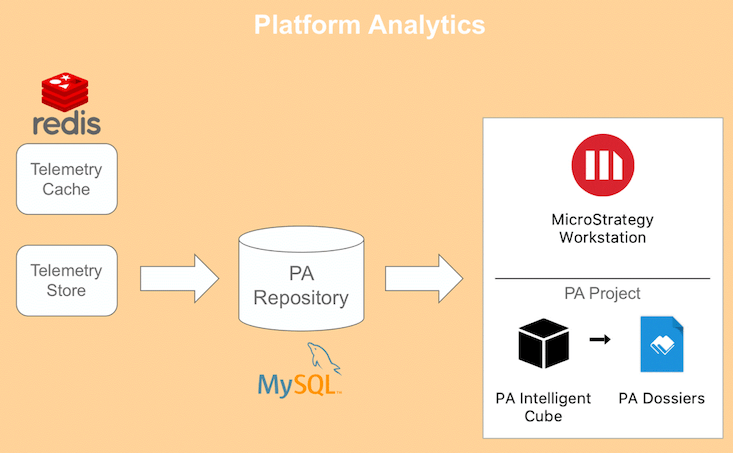
 

  • Platform Analytics Store: This component reads the data that the Intelligence Telemetry and Identity Telemetry producers send to the Telemetry Server layer, transforms this data, and loads it in the Platform Analytics Repository.
  • Telemetry Cache: This component is used to improve the processing performance of the Platform Analytics Store.
  • Platform Analytics Repository: This data warehouse stores all the Strategy telemetry processed by the Telemetry Store. This data is then used by the dossiers included with Platform Analytics project.
  • Platform Analytics Project: This Strategy project contains the out-of-the-box schema and application objects for Platform Analytics, including the standard Platform Analytics dossiers, attributes, metrics, and cubes.


ka0PW0000001JWMYA2_0EM44000000gXGz.jpeg

After applying a critical update to your Platform Analytics environment, the Telemetry Store, Telemetry Cache and Platform Analytics Repository will each be upgraded to reflect the critical update fixes.
However, the Platform Analytics Project must be upgraded using Configuration Wizard as a second step. This guide provides the steps to upgrade the Platform Analytics Project as well as tune the project.

Note: These steps assume that the critical update has already been applied to the environment hosting the Platform Analytics components. 


Steps to Upgrade the Platform Analytics Project

  • Launch Configuration Wizard on the Intelligence Server machine hosting the Platform Analytics Project
  • From the Welcome screen, select Create Platform Analytics project.
    • Although the Platform Analytics project has already been created, these steps will be treated as an upgrade
  • Complete the steps for the project creation wizard. For details about each step, see the the official documentation steps.
  • After the administrator credentials have been provided, a warning will appear stating that an existing Platform Analytics project exists, and it will be overwritten. See the warning message below:
ka0PW0000001JWMYA2_0EM44000000gXHx.jpeg
  • Click Yes and continue with the remainder of the Platform Analytics Project Creation. 


Steps to Tune the Platform Analytics Project


After the Platform Analytics project has been upgraded for the critical update, you must execute the .scp script in order to tune the Platform Analytics project. Follow the official documentation guide for these steps. 
Your Platform Analytics project should now be upgraded with all of the fixes included in the latest critical update release. 
KB482942


Comment

0 comments

Details

Knowledge Article

Published:

March 8, 2019

Last Updated:

March 21, 2024