Starting with the release of Strategy ONE (March 2024), dossiers are also known as dashboards.
There are several components involved in the Platform Analytics Architecture. At times, you may want to check the status of those services to verify overall system health.This document provides steps to start, stop and check status of those services.
View the image below for a view of the architecture:
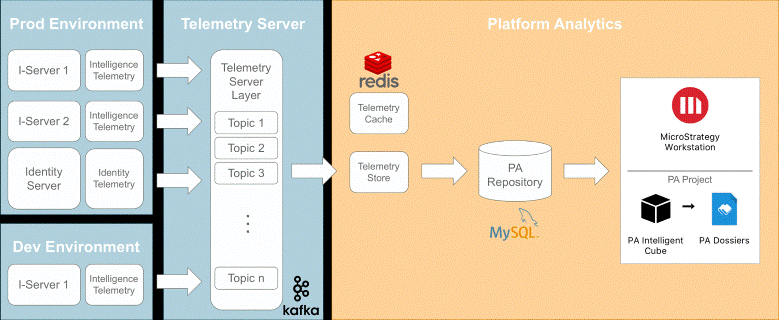
Below utilities are available under <Installation Directory>/MessagingServices/Kafka/kafka_2.13-3.1.0/bin/
1. Start Zookeeper.
./zookeeper-server-start.sh -daemon ../config/zookeeper.properties
./zookeeper-server-stop.sh
./kafka-topics.sh -zookeeper <IP>:<Port> --list
./kafka-topics.sh -zookeeper 10.27.21.170:2181 --list
Below utilities are available under <Installation Directory>/MessagingServices/Kafka/kafka_2.13-3.1.0/bin/
1. Start Kafka Broker.
./kafka-server-start.sh -daemon ../config/server.properties
./kafka-server-stop.sh
./kafka-console-consumer.sh --bootstrap-server <IP>:<Port> --topic <Topic Name> --from-beginning
./kafka-console-consumer.sh --bootstrap-server 10.27.21.170:9092 --topic Mstr.PlatformAnalytics.ChangeJournal.AttributesAndForms --from-beginning
./kafka-console-consumer.sh --bootstrap-server <IP>:<Port> --topic <Topic Name>
./kafka-console-consumer.sh --bootstrap-server 10.27.21.170:9092 --topic Mstr.PlatformAnalytics.ChangeJournal.AttributesAndForms
Below are the commands to fetch data from a particular topic:
1. Fetch all the data from a particular topic
./kafka-console-consumer.sh --bootstrap-server <IP>:<Port> --topic <Topic Name> --from-beginning
./kafka-console-consumer.sh --bootstrap-server 10.27.21.170:9092 --topic Mstr.PlatformAnalytics.ChangeJournal.AttributesAndForms --from-beginning
./kafka-console-consumer.sh --bootstrap-server <IP>:<Port> --topic <Topic Name>
./kafka-console-consumer.sh --bootstrap-server 10.27.21.170:9092 --topic Mstr.PlatformAnalytics.ChangeJournal.AttributesAndForms
./kafka-console-consumer.sh --bootstrap-server <IP>:<Port> --topic Mstr.PlatformAnalytics.IsReportStats
./kafka-console-consumer.sh --bootstrap-server <IP>:<Port> --topic Mstr.PlatformAnalytics.IsReportSQLStats
./kafka-console-consumer.sh --bootstrap-server <IP>:<Port> --topic Mstr.PlatformAnalytics.ChangeJournal.CubesReportsDossier
./kafka-console-consumer.sh --bootstrap-server <IP>:<Port> --topic Mstr.PlatformAnalytics.DistributionServices.Subscriptions
./kafka-console-consumer.sh --bootstrap-server <IP>:<Port> --topic Mstr.PlatformAnalytics.LicenseAuditorTelemetry
./kafka-console-consumer.sh --bootstrap-server <IP>:<Port> --topic Mstr.IdentityServer.ActionLog
./kafka-console-consumer.sh --bootstrap-server <IP>:<Port> --topic Mstr.PlatformAnalytics.UsherLookup -from-beginning
You can start/stop or check the status of redis using below commands:
1. Stop Redis.
redis.sh stop
redis.sh start
redis.sh status
You can start/stop or check the status of the Telemetry Store using below commands:
1. Stop Consumer.
./platform-analytics-consumer.sh stop
./platform-analytics-consumer.sh start
./platform-analytics-consumer.sh status
You can start/stop or check the status of the Platform Analytics Lookup Producer using below commands:
1. Stop Producer.
./platform-analytics-usher-lookup-producer.sh stop
./platform-analytics-usher-lookup-producer.sh start
./platform-analytics-usher-lookup-producer.sh status
In Platform Analytics warehouse, there are different sets of tables populated from different data pipelines. The Intelligence Server Lookup tables are populated by Change Journal, some Fact tables are populated using Statistics (basic and advanced) data pipeline, and Licensing Fact tables and lookup tables are populated with data from Licensing topics.
To confirm that all the producers are producing data, check the following tables.
1. Verify Fact tables are receiving statistics data.
Basic Statistics:
To check if new data is inserted in access_transactions table, run the following query:
SELECT count(*) FROM platform_analytics_wh.access_transactions
SELECT count(*) FROM fact_sql_stats ORDER BY sql_start_timestamp desc limit 10;
SELECT object_type_id, count(*) from lu_object group by object_type_id;
SELECT count(*) FROM platform_analytics_wh.lu_account where account_name !="<Empty>";
SELECT count(*) FROM platform_analytics_wh.fact_user_entity_resolved_privilege;
There are three cubes in the Platform Analytics Project under the
Shared\Utilities\Directory:
To check if the cubes are published:
