Starting with the release of Strategy ONE (March 2024), dossiers are also known as dashboards.
SUMMARY:
This Knowledge Base article describes an issue in which check-boxes do not display in a drop-down filter on a Dossier when accessed via a Share Link in Internet Explorer.
SYMPTOM:
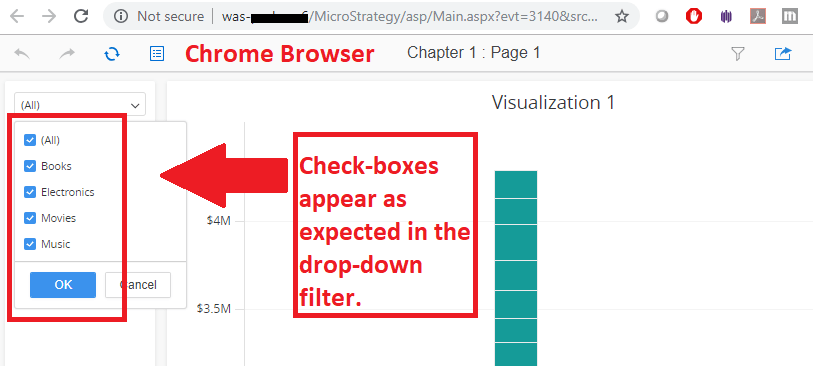
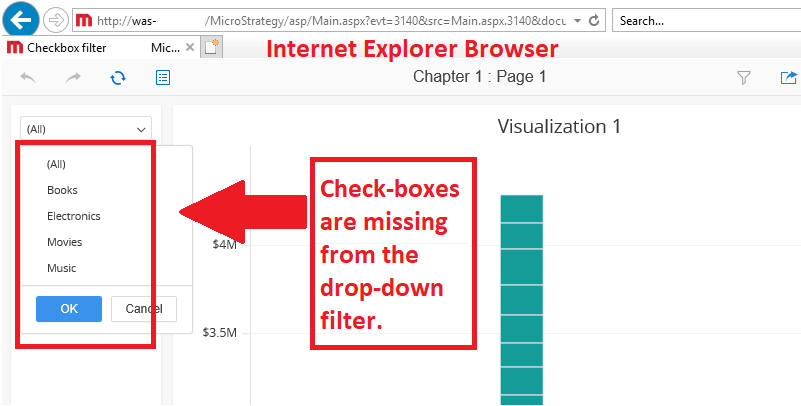
In Strategy Web 2019, when using a Share Link to access a Dossier with a drop-down filter that allows multiple selections, check-boxes do not appear when using an Internet Explorer browser. This issue does not occur and works as expected (check-boxes appear) when navigating to the Dossier through the Strategy Web folders. The issue is not reproducible in Chrome and is specific to the Internet Explorer browser.
The image below shows the expected behavior as seen in Chrome where the check-boxes are present in the drop-down filter:
The image below shows the problematic behavior in Internet Explorer in which the check-boxes are missing in the drop-down filter:
STEPS TO REPRODUCE:
Follow these steps to reproduce the issue in a Strategy Tutorial Project:
CAUSE:
This is an identified defect in Strategy Web 2019.
ACTION:
This issue has been addressed in Strategy Web 2019, Update 1. Upgrade to this version to take advantage of this fix.
