EducationSoftwareStrategy.com
StrategyCommunity

Knowledge Base

Product

Community

Knowledge Base

TopicsBrowse ArticlesDeveloper Zone

Product

Download SoftwareProduct DocumentationSecurity Hub

Education

Tutorial VideosSolution GalleryEducation courses

Community

GuidelinesGrandmastersEvents
x_social-icon_white.svglinkedin_social-icon_white.svg
Strategy logoCommunity

© Strategy Inc. All Rights Reserved.

LegalTerms of UsePrivacy Policy
  1. Home
  2. Topics

KB483129: How to import data from Salesforce in MicroStrategy Desktop/Workstation 11.x and above.


Community Admin

• Strategy


This document provides information on how to use data import connectors in MicroStrategy Desktop/Workstation 11.x and above.

Starting with the release of Strategy ONE (March 2024), dossiers are also known as dashboards.
In Strategy Desktop and Workstation 11.0 and above, it is not required to configure OAuth parameters to import data from Salesforce. A Salesforce OAuth application has been registered by Strategy and preconfigured in Desktop and Workstation. You can use this application to connect to Salesforce without creating a Salesforce application or configuring any Oauth parameters, for example, a Client ID and a Client Secret.
However, you can connect to your own Salesforce application if you'd prefer.
How to Connect to Your Own Salesforce Application

  • Create a new dossier and click New Data.
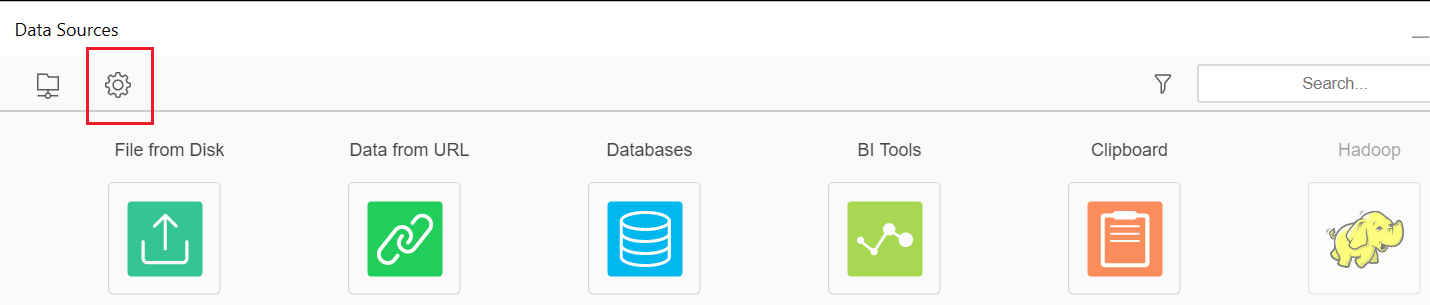
  • On the Data Sources dialog, click Customize Shortcuts.
ka0PW0000001JX1YAM_0EM2R000000gve6.jpeg
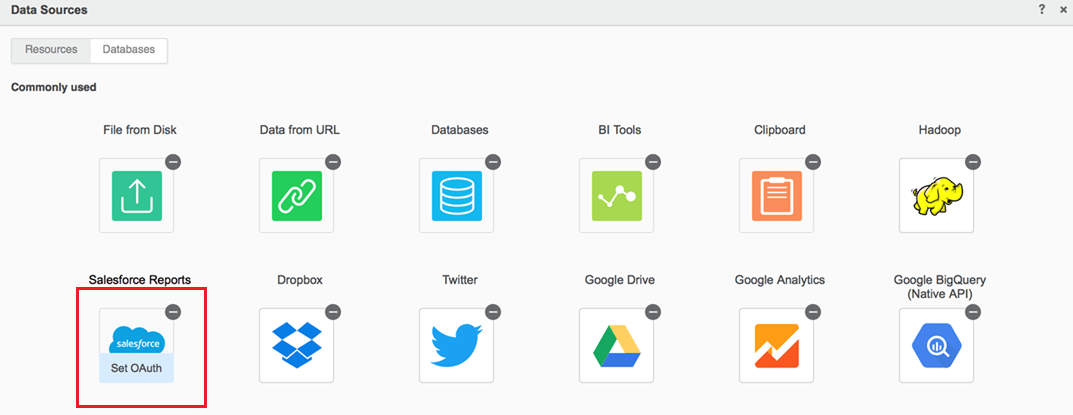
  • Under Salesforce Reports, click Set OAuth.
ka0PW0000001JX1YAM_0EM2R000000gveB.jpeg
  • Enter the Client ID and Client Secret.

Note: When registering the OAuth application on Salesforce, set the Callback URL to http://localhost.
The other data connectors, such as Dropbox, Twitter, Google Drive, Google Analytics, and Google BigQuery (Native API), work the same way in Strategy Desktop and Workstation 11.0 and above.
  KB483199


Comment

0 comments

Details

Knowledge Article

Published:

April 25, 2019

Last Updated:

March 21, 2024