EducationSoftwareStrategy.com
StrategyCommunity

Knowledge Base

Product

Community

Knowledge Base

TopicsBrowse ArticlesDeveloper Zone

Product

Download SoftwareProduct DocumentationSecurity Hub

Education

Tutorial VideosSolution GalleryEducation courses

Community

GuidelinesGrandmastersEvents
x_social-icon_white.svglinkedin_social-icon_white.svg
Strategy logoCommunity

© Strategy Inc. All Rights Reserved.

LegalTerms of UsePrivacy Policy
  1. Home
  2. Topics

KB483197: In Web and Developer 10.x and 2019, an error message appears when a document is requested from History Lists


Catie Willett

Content Engineer • Strategy


In MicroStrategy Web and Developer 10.x and 2019, an error message appears when a document is requested from History Lists. This kb article provides a workaround.

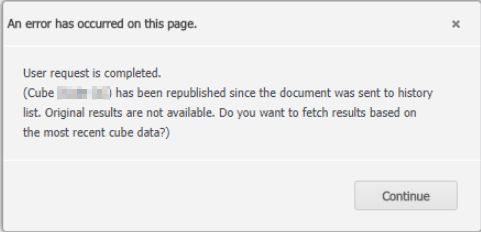
When a  document is requested from History Lists in Strategy Web or Developer, the following error appears:
"Cube x has been republished since the document was sent to history list. Original results are not available. Do you want to fetch results based on the most recent cube data?"
 

Steps to Reproduce

  • Create an Intelligent Cube.
  • Create a document using your new Intelligent Cube.
  • Execute the document and send the results to your History List.
  • Confirm the results can be requested from History.
  • Re-publish the Intelligent Cube you created in step 1.
  • Return to the History List and request the results. The error appears:
ka02R000000kcxuQAA_0EM2R000000gvXA.jpeg
  • Click Continue on the error message.
  • The History List page displays and the affected message remains Ready.
  • Click the message and the error message appears again.
  • Click Continue on the error message and you arrive back at the History List page. The document cannot be executed.


Cause


This behavior results from a limitation in how the Strategy History List works when a document is defined directly with an Intelligent Cube object. Currently, the historical data of the document is not available for a document defined with an Intelligent Cube.
 

Workaround


Strategy's Technology team plans to change this behavior so the results of the document can be displayed with the updated data after the Intelligent Cube re-published. Until this is achieved, you can use the following workaround:

  1. Create a view report based on the Intelligence Cube.
  2. Use the view report on a document.


Since the issue is specifically about documents defined directly with an Intelligent Cube, you can create a view report using the same Intelligent Cube and then add it to a document to avoid the error.
For information about a view report, see View Filters and View Reports.
KB483197


Comment

0 comments

Details

Knowledge Article

Published:

April 25, 2019

Last Updated:

April 25, 2019