The below error is received when logging into Strategy Web JSP, Mobile JSP, or Library using SAML authentication.
"Error in Login. Please contact your Administrator"
In the SAML log, the below errors are present:
-org.springframework.security.authentication.AuthenticationServiceException: Error validating SAML message

-Caused by: org.opensaml.common.SAMLException: Response doesn't have any valid assertion which would pass subject validation

-Caused by: org.opensaml.xml.validation.ValidationException: Signature is not trusted or invalid
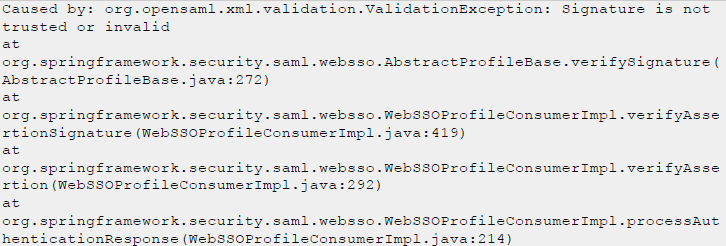
The error indicates that the signature validation for the SAML response was not successful. The signature for SAML response is signed by an IDP private key and validated by an IDP public key. The 509 certificate in the IDPMetadata.xml is used to validate the signature.
To have the signature validation pass, the 509 certificate in the SAML response should match with the 509 certificate in IDPMetadata.xml.
The 509 certificate in the SAML response and IDPMetadata.xml can be identified by
<ds:X509Certificate>.
<ds:X509Certificate>
MIIDpDCCAoygAwIBAgIGAY17o1Q+MA0GCSqGSIb3DQEBCwUAMIGSMQswCQYDVQQGEwJVUzETMBEG
A1UECAwKQ2FsaWZvcm5pYTEWMBQGA1UEBwwNU2FuIEZyYW5jaXNjbzENMAsGA1UECgwET2t0YTEU
...
nzfJPtgquPWi3RduEKSvnNdO3SjFFQA1XTXAS2R3BJF47EEIO/cwty6rdURGTQOtIIi6dkT1h3Su
/XrbFiJN0Vsg0BGaFHvAdjuJLkZZfBmv
</ds:X509Certificate>
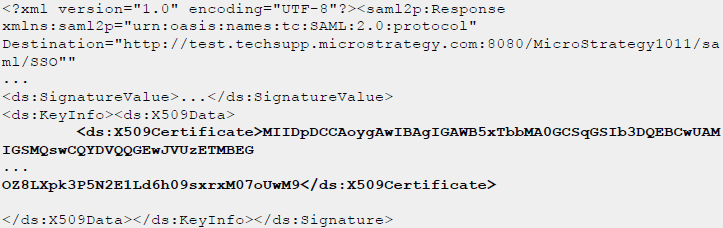
And here is an example of 509 certificate in IDPMetadata.xml:
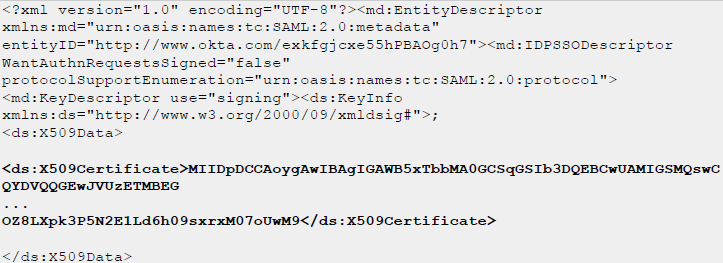
As shown in the screenshots, In both the IDPMetadata.xml and the SAML Response, the x509 Certificate can be found within the tags
<ds:X509Certificate> </ds:X509Certificate>.
Contact your IDP administrator to generate an IDPMetadata.xml that has the correct 509 certificate for signing.
KB483198
