EducationSoftwareStrategy.com
StrategyCommunity

Knowledge Base

Product

Community

Knowledge Base

TopicsBrowse ArticlesDeveloper Zone

Product

Download SoftwareProduct DocumentationSecurity Hub

Education

Tutorial VideosSolution GalleryEducation courses

Community

GuidelinesGrandmastersEvents
x_social-icon_white.svglinkedin_social-icon_white.svg
Strategy logoCommunity

© Strategy Inc. All Rights Reserved.

LegalTerms of UsePrivacy Policy
  1. Home
  2. Topics

KB483233: An Aggregate From Base (AFB) metric defined on Row Count is incorrectly calculated


Community Admin

• Strategy


In MicroStrategy 10.11 and above, Aggregate From Base metrics defined with a Row Count metric are calculated incorrectly in Connect Live mode on dossiers.

Starting with the release of Strategy ONE (March 2024), dossiers are also known as dashboards.
Symptoms

  • Dossier is created from a cube in Connect Live mode
  • Incorrect data for an aggregated value
    • E.g. You see the grand total instead of the correct value.
  • Using a derived Aggregate From Base metric made from a Row Count metric

Glossary

  • Connect Live  - mode of data access that retrieves results directly from the data source
  • Aggregate From Base (AFB) metric - uses the attributes on the dataset (the base) when dynamic aggregation is triggered
  • Dynamic aggregation - roll-up of metric values that occurs when an attribute is removed from a visualization or document

Steps to Reproduce

  • Create a new Intelligence Cube:
    1. Add External Data > Databases > Select Tables.
    2. Add the following tables from Strategy Tutorial:
      1. QTR_CATEGORY_SLS
      2. LU_QUARTER
    3. Save the cube in "Connect Live" mode.
  • Create a new dossier:
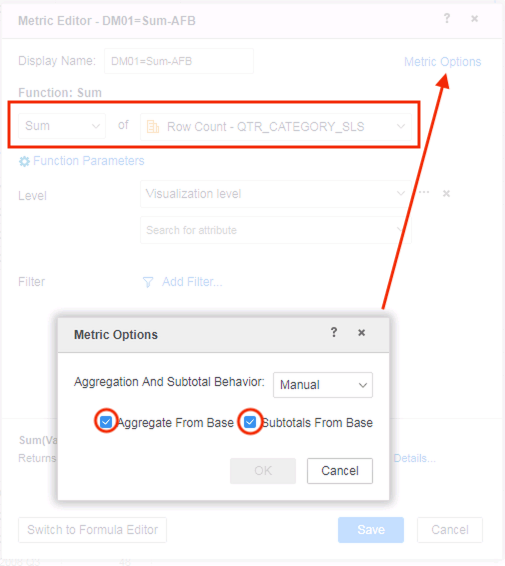
    • Create a new metric DM01=Sum-AFB with the following definition:
ka0PW0000001JXkYAM_0EM2R000000lO6S.jpeg
  • Add Year Id and DM01=Sum-AFB to a grid visualization.


The data shown is incorrect as it shows the grand total for all years instead of for each individual year.
 

iserver.requestTimeout
The XML call's socket default read timeoutConfigDefaults.propertiesdocument.polling.timeoutThe maximum waiting time when polling a job on a server. This only works for a document or dossier instance. When polling the result, you may send multiple requests to the server. This value is the total time of all of these requests. Each single request timeout value is set by iserver.requestTimeout.ConfigDefaults.propertiesisAliveRequestTimeoutMillisThe socket read request timeout value when the Auth Filter sends a GetFolderID XML API request to an Intelligence server nodesys_defaults.xmlisAliveCheckIntervalMillisThe time interval of the check when the Auth Filter sends a GetFolderID XML API request to an Intelligence server nodesys_defaults.xmlBefore fixAfter fix


Tables Accessed:
STATE_SUBCATEG_MNTH_SLS          
LU_MONTH    

SQL Statements:
...
select a12.YEAR_ID  YEAR_ID,
sum(a11.TOT_COST)  WJXBFS1
from STATE_SUBCATEG_MNTH_SLS a11      
join LU_MONTH a12  
on (a11.MONTH_ID = a12.MONTH_ID)
group by a12.YEAR_ID


Tables Accessed:
LU_QUARTER
QTR_CATEGORY_SLS 

SQL Statements:
...
select a12.YEAR_ID  YEAR_ID,
sum(a11.TOT_COST)  WJXBFS1
from QTR_CATEGORY_SLS a11
join LU_QUARTER a12         
on (a11.QUARTER_ID = a12.QUARTER_ID)
group by a12.YEAR_ID

SAP HANA DatatypeStrategy DatatypeAlphanum(n)VarChar(n)BigInt Big IntegerBinaryBinary(1)BooleanBinary(1)Char(n)Char(n)Char Varying(n)VarChar(n)DateDateDayDateDateDecimal(p,s)Decimal(p,s)DoubleDoubleFloat(n)If n>24 Double
If n<=24 Real IntegerInteger(10)LongDateTimeStampNchar(n)NChar (n)Numeric(p,s)Decimal(p,s)NVarChar(n)NVarChar(n)RealRealSecondDateTimeStampShortText(n)VarChar(n)SmallIntInteger(5)TextLongVarChar(n)TimeTimeTimeStampTimeStampTinyIntInteger(3)VarBinary(n)VarBin(n)VarChar(n)VarChar(n)Order NumberDate ShippedDate Received11/1/191/5/1921/1/191/5/1931/1/191/14/19Actual ResultExpected Result

iserver.requestTimeout
The XML call's socket default read timeoutConfigDefaults.propertiesdocument.polling.timeoutThe maximum waiting time when polling a job on a server. This only works for a document or dossier instance. When polling the result, you may send multiple requests to the server. This value is the total time of all of these requests. Each single request timeout value is set by iserver.requestTimeout.ConfigDefaults.propertiesisAliveRequestTimeoutMillisThe socket read request timeout value when the Auth Filter sends a GetFolderID XML API request to an Intelligence server nodesys_defaults.xmlisAliveCheckIntervalMillisThe time interval of the check when the Auth Filter sends a GetFolderID XML API request to an Intelligence server nodesys_defaults.xmlBefore fixAfter fix


Tables Accessed:
STATE_SUBCATEG_MNTH_SLS          
LU_MONTH    

SQL Statements:
...
select a12.YEAR_ID  YEAR_ID,
sum(a11.TOT_COST)  WJXBFS1
from STATE_SUBCATEG_MNTH_SLS a11      
join LU_MONTH a12  
on (a11.MONTH_ID = a12.MONTH_ID)
group by a12.YEAR_ID


Tables Accessed:
LU_QUARTER
QTR_CATEGORY_SLS 

SQL Statements:
...
select a12.YEAR_ID  YEAR_ID,
sum(a11.TOT_COST)  WJXBFS1
from QTR_CATEGORY_SLS a11
join LU_QUARTER a12         
on (a11.QUARTER_ID = a12.QUARTER_ID)
group by a12.YEAR_ID

SAP HANA DatatypeStrategy DatatypeAlphanum(n)VarChar(n)BigInt Big IntegerBinaryBinary(1)BooleanBinary(1)Char(n)Char(n)Char Varying(n)VarChar(n)DateDateDayDateDateDecimal(p,s)Decimal(p,s)DoubleDoubleFloat(n)If n>24 Double
If n<=24 Real IntegerInteger(10)LongDateTimeStampNchar(n)NChar (n)Numeric(p,s)Decimal(p,s)NVarChar(n)NVarChar(n)RealRealSecondDateTimeStampShortText(n)VarChar(n)SmallIntInteger(5)TextLongVarChar(n)TimeTimeTimeStampTimeStampTinyIntInteger(3)VarBinary(n)VarBin(n)VarChar(n)VarChar(n)Order NumberDate ShippedDate Received11/1/191/5/1921/1/191/5/1931/1/191/14/19Actual ResultExpected Result


Cause


This is a known issue for datasets made in Connect Live mode in Strategy 10.11 and earlier.

  • The metric is not evaluated at the correct level, leading to a grand total after aggregation.

Solution

  • Upgrade to Strategy 11.0 or above. We recommend the latest version.
  • Set Data Engine Version setting to 11.
    • The project level setting Data Engine Version can only be enabled through Workstation. For more details on enabling the setting, see Change Data Engine Version.


In the new fix, AFB metrics are calculated at their specific levels and will return correct data.
Strategy Internal Reference number for this technical note is KB483233 and DE87432.


Comment

0 comments

Details

Knowledge Article

Published:

May 1, 2019

Last Updated:

March 21, 2024