EducationSoftwareStrategy.com
StrategyCommunity

Knowledge Base

Product

Community

Knowledge Base

TopicsBrowse ArticlesDeveloper Zone

Product

Download SoftwareProduct DocumentationSecurity Hub

Education

Tutorial VideosSolution GalleryEducation courses

Community

GuidelinesGrandmastersEvents
x_social-icon_white.svglinkedin_social-icon_white.svg
Strategy logoCommunity

© Strategy Inc. All Rights Reserved.

LegalTerms of UsePrivacy Policy
  1. Home
  2. Topics

KB483246: Derived attribute with XIRR function may return blank cell


Community Admin

• Strategy


Before Microstrategy 2019, when users create derived metric using the built in XIRR function, NULL value might be returned for some data input incorrectly. The issue has been addressed in MicroStrategy 2019.

Starting with the release of Strategy ONE (March 2024), dossiers are also known as dashboards.
Symptom
Incorrect NULL value is returned as the XIRR function result for some data input, while Excel can give the correct result.
Glossary
XIRR
Steps to Reproduce
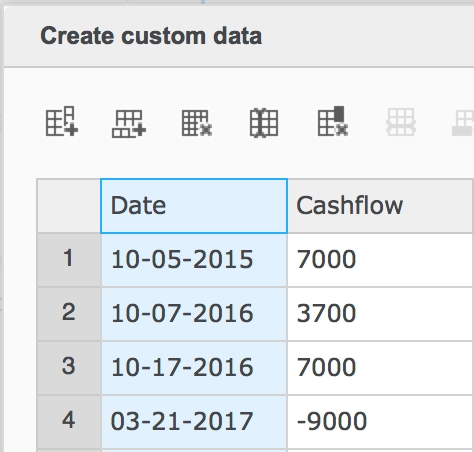
  1. Create a new dossier, add new data, use Clipboard and input the same data as below.
ka0PW0000001JZQYA2_0EM2R000000ls0T.png
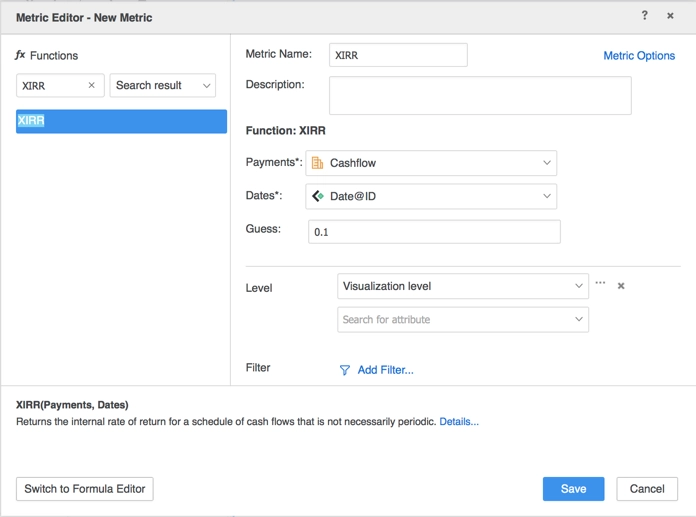
  1. Create a new derived metric.
    1. Rename the metric to XIRR.
    2. Search XIRR in function and choose it.
    3. Choose metric “Cashflow” for Payments variable and attribute “Date@ID” for Dates variable.
    4. Use default value 0.1 for Guess variable.
    5. Save the metric.
ka0PW0000001JZQYA2_0EM2R000000ls0U.png
  1. Add the derived metric “XIRR” to the grid visualization. There is no result but a blank cell shown in the grid.
ka0PW0000001JZQYA2_0EM2R000000ls0V.png

Cause
This is a known defect before Strategy 2019. The cause of this issue is the unproper implementation of the XIRR function. In the old implementation before Strategy 2019, if the initial guess value is not proper, a NULL will be returned as the result. In the new implementation, if the initial guess value does not work, we will retry other values, e.g. -0.9, -0.8, -0.7, etc. to see if a valid result can be obtained.
Solution
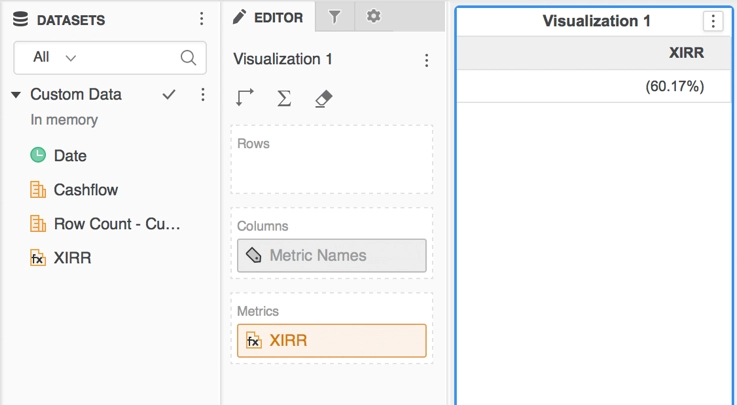
To resolve this defect, please upgrade to Strategy 2019 or above.
In the new fix, the XIRR function formula is fixed and correct result will be returned when it is used.
ka0PW0000001JZQYA2_0EM2R000000ls0W.png

Strategy Internal Reference number for this technical note is KB483246 and DE104360.


Comment

0 comments

Details

Knowledge Article

Published:

May 1, 2019

Last Updated:

March 21, 2024