EducationSoftwareStrategy.com
StrategyCommunity

Knowledge Base

Product

Community

Knowledge Base

TopicsBrowse ArticlesDeveloper Zone

Product

Download SoftwareProduct DocumentationSecurity Hub

Education

Tutorial VideosSolution GalleryEducation courses

Community

GuidelinesGrandmastersEvents
x_social-icon_white.svglinkedin_social-icon_white.svg
Strategy logoCommunity

© Strategy Inc. All Rights Reserved.

LegalTerms of UsePrivacy Policy
  1. Home
  2. Topics

KB483249: Document execution fails or faulty data is generated when linking two attributes.


Community Admin

• Strategy


In MicroStrategy 10.11 we have fixed a defect introduced in 10.8-10.10: when linking two attributes by their non-ID forms, faulty data is generated which causes visualizations to fail. The customer can upgrade to 10.11 or newer release and switch to the data engine version m2019+ to get this issue fixed.

Starting with the release of Strategy ONE (March 2024), dossiers are also known as dashboards.

Content:

In a dossier with multiple datasets, in some cases the visualization fails with the error msg like

  • "System Error - Operation not permitted"
  • "Invalid Pointer"
  • "Unable to load visualization"


If there is some attributes linked across datasets by non-ID form to ID form in 10.8-10.10 release, this could be due to a defect due to the different attribute sorting in the datasets, which will fail the attribute linking then the visualizations. This issue has been fixed in Strategy 10.11 or newer releases. To avoid the possible data change to other cases from this code change, the customer has to switch to the Data Engine version 11+ to get the fix. 
Step to reproduce:

  • Create three datasets in the dossier with the following data sources:
    • Cube "Sales Dossier 2.0 – Accounts Test"    https://mstr.lightning.force.com/lightning/r/Report/00O440000049vODEAY/view
    • Cube "MEA Accounts Testing" 
      https://mstr.lightning.force.com/lightning/r/Report/00O44000003jXLGEA2/view?query Scope=userFolders
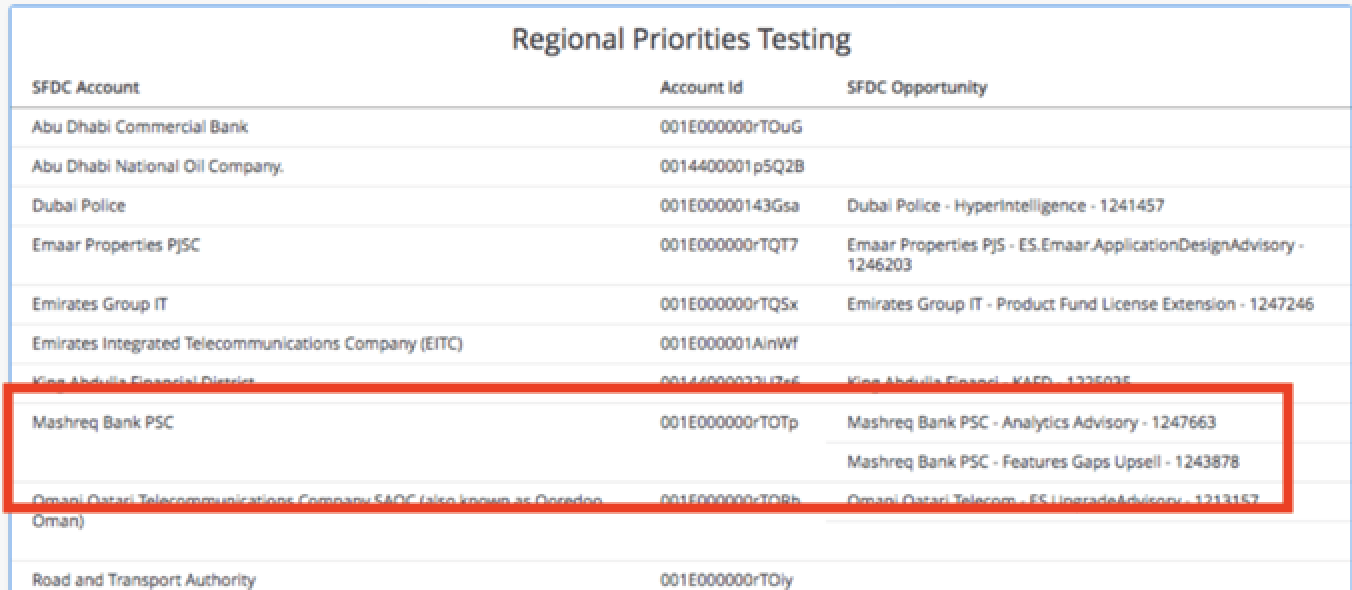
    • the Excel data as Regional Priorities Testing:
ka0PW0000001JaWYAU_0EM2R000000n0Tq.jpeg
    • Link [Regional Priorities Testing.SFDC Account] → [MEA Accounts Testing.Account Name]
    • Duplicate the attribute "Sales Dossier 2.0 – Accounts Test.Account Name" as "Sales Dossier 2.0 – Accounts Test.Account Name 1" and link [Regional Priorities Testing.SFDC Account] → [Sales Dossier 2.0 – Accounts Test.Account Name 1].
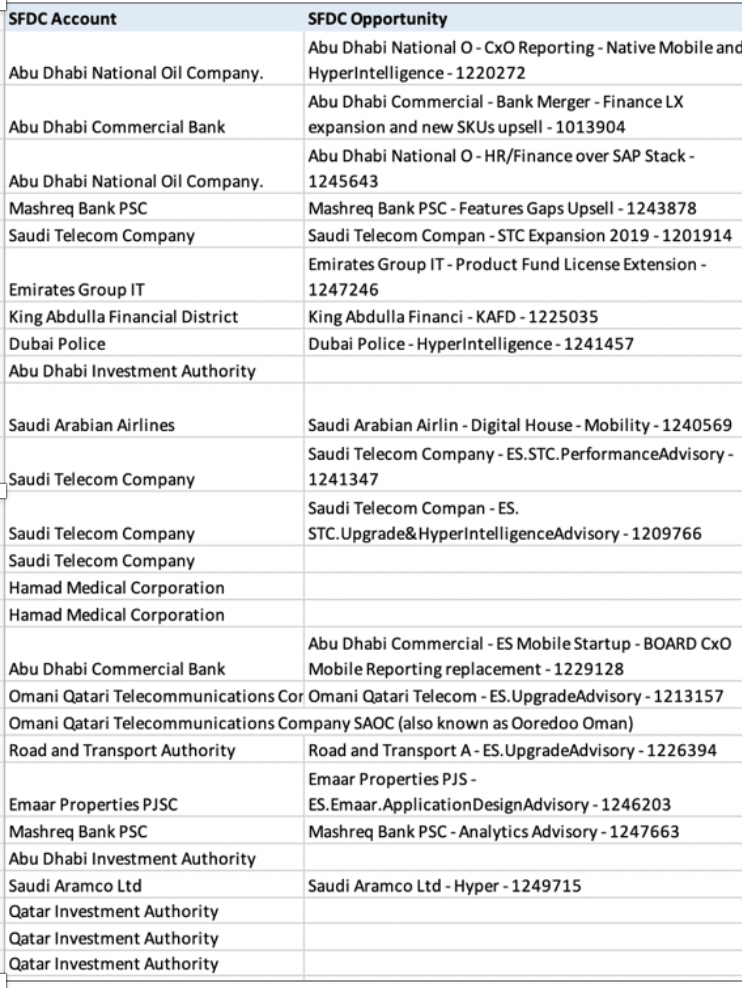
    • Add "Regional Priorities Testing.SFDC Account", "Sales Dossier 2.0 – Accounts Test.Account ID" and "Regional Priorities Testing.SFDC Opportunity" to the grid. Make sure "Sales Dossier 2.0 – Accounts Test.Account ID" is added last. The problematic grid will be shown as the following:
ka0PW0000001JaWYAU_0EM2R000000n0U9.jpeg

Action


This issue has been addressed in 10.11 or later releases. To get the issue fixed, the customer can upgrade to the new release and switch to Data Engine version m2019 or newer version, refer to  Change Data Engine Version.


Comment

0 comments

Details

Knowledge Article

Published:

May 1, 2019

Last Updated:

March 21, 2024