EducationSoftwareStrategy.com
StrategyCommunity

Knowledge Base

Product

Community

Knowledge Base

TopicsBrowse ArticlesDeveloper Zone

Product

Download SoftwareProduct DocumentationSecurity Hub

Education

Tutorial VideosSolution GalleryEducation courses

Community

GuidelinesGrandmastersEvents
x_social-icon_white.svglinkedin_social-icon_white.svg
Strategy logoCommunity

© Strategy Inc. All Rights Reserved.

LegalTerms of UsePrivacy Policy
  1. Home
  2. Topics

KB483288: Connection to ESRI resets in Web although the connection between the web server machine and the ArcGIS servers is available


Yanqing Liu

Cloud Support Expert I • MicroStrategy


Symptom


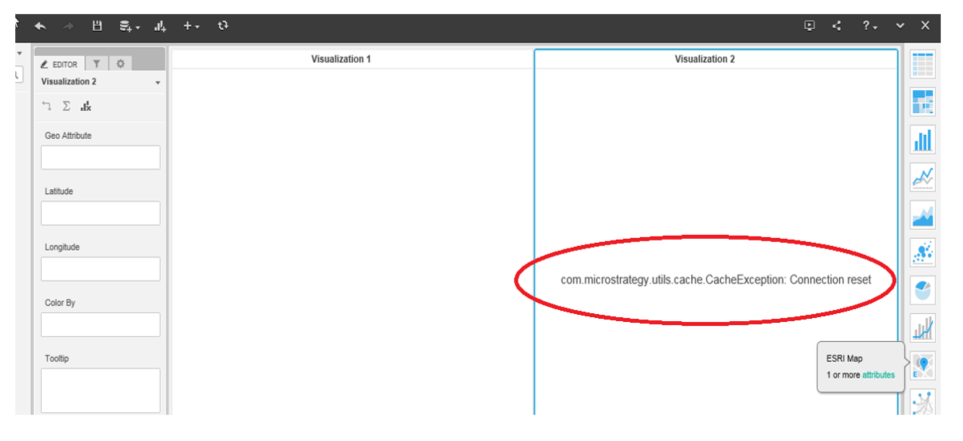
Even if you have followed article KB46526, and the connection between Strategy Web Server and the ArcGIS servers is available, you may get the following error when using ESRI in Strategy Web:
 
com.Strategy.utils.cache.cacheexception: Connection reset
ka04W000001IvslQAC_0EM2R000000h1IQ.jpeg

Cause


ArcGIS introduced some changes on April 16, 2019 and ArcGIS online services only accepts connections using TLS 1.2 (source).
You may get the above error if you are using JDK 1.7 or earlier for Strategy Web Server.

Action


You can use either of the following solutions to solve the problem:

  1. Upgrade JDK to v1.8 or later which supports TLS 1.2. (ESRI FAQ: How do I enable TLS 1.2 for ArcGIS Runtime SDK for Java?)
  2. Add clientToken="true" to the esriconfig.xml file, as suggested in article KB202342.
    Once clientToken is set to "true", the authentication process between Strategy and ESRI will be handled by the browser only. Since most modern web browsers support TLS 1.2, the change will also solve the problem.


Related:

  • Integration with ESRI Maps
  • ESRI Configuration File

Comment

0 comments

Details

Knowledge Article

Published:

May 9, 2019

Last Updated:

June 27, 2022