EducationSoftwareStrategy.com
StrategyCommunity

Knowledge Base

Product

Community

Knowledge Base

TopicsBrowse ArticlesDeveloper Zone

Product

Download SoftwareProduct DocumentationSecurity Hub

Education

Tutorial VideosSolution GalleryEducation courses

Community

GuidelinesGrandmastersEvents
x_social-icon_white.svglinkedin_social-icon_white.svg
Strategy logoCommunity

© Strategy Inc. All Rights Reserved.

LegalTerms of UsePrivacy Policy
  1. Home
  2. Topics

KB483320: Derived metric does not show any value on dossier after upgrading from 10.3 to 10.11


Community Admin

• Strategy


In MicroStrategy 10.11 and later, a Derived Aggregate From Base metric does not return data because double aggregation causes Data Engine to return null values.

Starting with the release of Strategy ONE (March 2024), dossiers are also known as dashboards.
Symptoms

  • Two or more datasets with a common (linked) attribute are used.
  • Derived Aggregate From Base Metric returns no data when placed on a Visualization with a Derived Attribute from a different dataset.
    • The metric can be a standalone derived metric that was added to the dataset or a derived metric that was defined in a subset report.
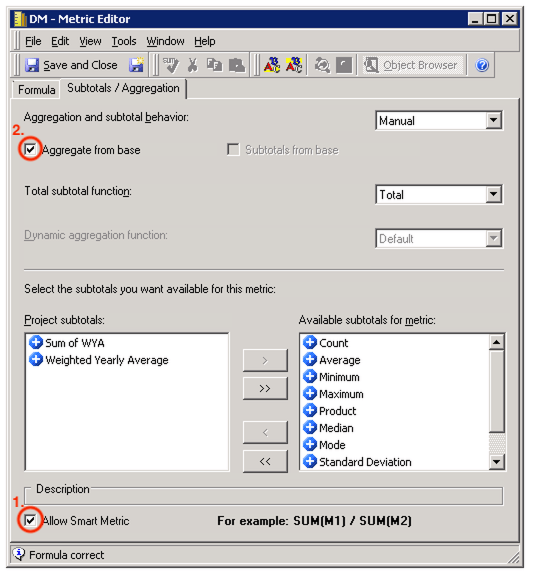
    • Double aggregation is involved.

Glossary

  • Derived Attribute
  • Subset Report
  • Aggregate From Base (AFB) metric

Steps to Reproduce

  • Open Strategy Developer.
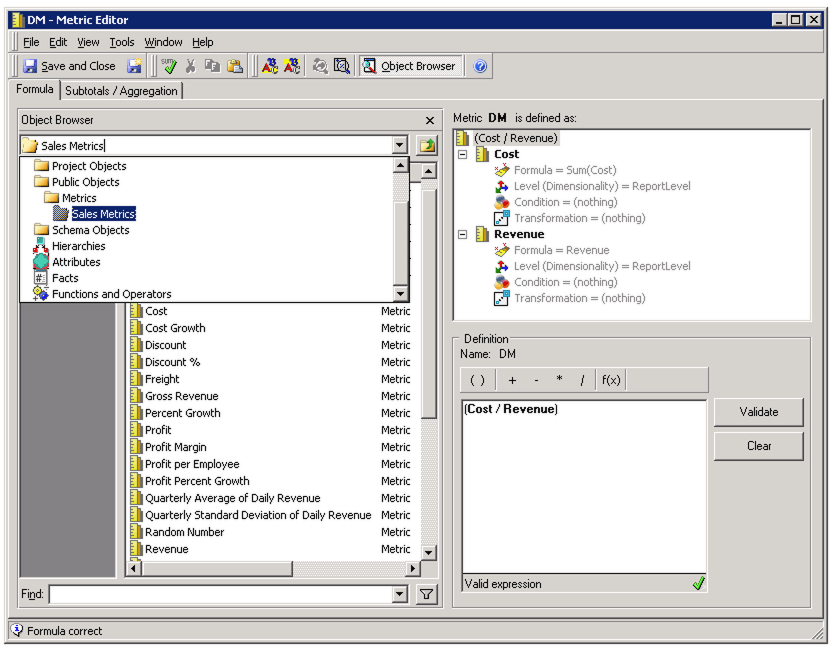
    • Create a standalone Derived metric DM: 
ka0PW0000001JYOYA2_0EM2R000000lgFX.jpeg
ka0PW0000001JYOYA2_0EM2R000000lgFh.jpeg
    • Create a new Intelligent Cube C01:
      • Add the Quarter, Country, and Region attributes.
      • Add DM.
      • Save the cube, and run it to publish.
    • Create a second Intelligent Cube C02:
      • Add the Year, Quarter, and Category attributes.
      • Save the cube, and run it to publish.
  • Open Strategy Web.
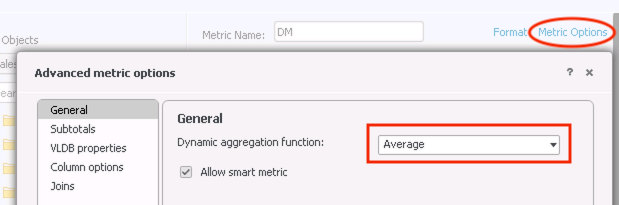
    • Edit DM and set the "Dynamic aggregation function" to "Average". 
ka0PW0000001JYOYA2_0EM2R000000lgGa.jpeg
    • Create a new dossier.
      • Add C01 and C02 as datasets.
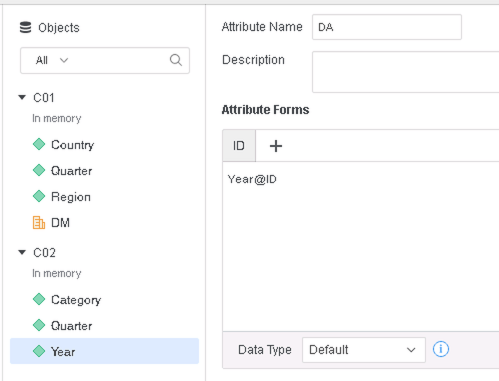
      • Create a Derived Attribute in C02: 
ka0PW0000001JYOYA2_0EM2R000000lgwv.jpeg
      • Drag DA from C02 and DM from C01 to a Grid visualization.


The Grid returns no values for DM: 
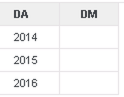
ka0PW0000001JYOYA2_0EM2R000000lgHO.jpeg

If user examines the Query Detail, in the earlier pass when selecting data from C01, DM was not selected.


select	[Quarter]@[QUARTER_ID],
	[Quarter]@[QUARTER_DESC],
	[Region]@[REGION_ID],
	[Region]@[REGION_NAME]
from	C01
with Table Join Tree: 	[F_MAIN_INDEX]
to	Ex1_tempcube0

Cause

  • When Data Engine has to perform double aggregation, it will return null values for an Aggregate From Base metric if some component is not in the metric source dataset.
    • In the example above, the Derived Attribute DA comes from a different dataset.

Solution

  • Upgrade to Strategy 2020 or above. We recommend the latest version.
  • Set Data Engine Version setting to 12 or above.
    • The project level setting Data Engine Version can only be enabled through Workstation. For more details on enabling the setting, see Change Data Engine Version.
    • After changing the Data Engine Version setting, you will need to republish your datasets to see the changes.


In the new fix, Data Engine changes its logic for calculating Aggregate From Base metrics, so that non-null values can be returned when blending data from different datasets.
The example above will now return data (The Number Format of DM has been changed to Percentage):
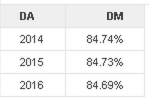
ka0PW0000001JYOYA2_0EM2R000000lgwg.jpeg

If user examines the Query Detail, in the earlier pass when selecting data from C01, DM was selected.


select	[Quarter]@[QUARTER_ID],
	[Quarter]@[QUARTER_DESC],
	[Region]@[REGION_ID],
	[Region]@[REGION_NAME],
	[[F_MAIN_INDEX].DM] as [DM]
from	C01
with Table Join Tree: 	[F_MAIN_INDEX]
to	Ex1_tempcube0

Strategy Internal Reference number for this technical note is KB483320 and DE134877.


Comment

0 comments

Details

Knowledge Article

Published:

May 24, 2019

Last Updated:

March 21, 2024