EducationSoftwareStrategy.com
StrategyCommunity

Knowledge Base

Product

Community

Knowledge Base

TopicsBrowse ArticlesDeveloper Zone

Product

Download SoftwareProduct DocumentationSecurity Hub

Education

Tutorial VideosSolution GalleryEducation courses

Community

GuidelinesGrandmastersEvents
x_social-icon_white.svglinkedin_social-icon_white.svg
Strategy logoCommunity

© Strategy Inc. All Rights Reserved.

LegalTerms of UsePrivacy Policy
  1. Home
  2. Topics

KB483322: Two identical tables for a full outer join twice when metric join type is set to Outer Join and SQL Global Optimization is set to level 4


Community Admin

• Strategy


In MicroStrategy 2019 and previous versions, the same two tables are joined twice during Report execution when the metric join type is "OUTER" and SQL Global Optimization is set to Level 4. This stems from old Data Engine logic that does not recognize that some SQL passes can be merged because of the order of the metrics on the Report.

Symptoms

  • The SQL for a Report shows that two identical tables do a full outer join twice.
    • The VLDB setting "SQL Global Optimization" is set to Level 4.
    • The join type for all metrics on the Report is set to "Outer".

Glossary

  • SQL Global Optimization
  • Metric Join Type

Steps to Reproduce

  • Open Strategy Developer. We use Strategy Tutorial objects to create our metrics, filter, and final Report.
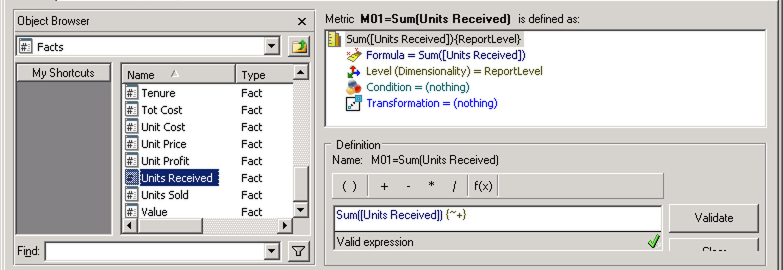
  • Create a metric M01=Sum(Units Received): 
ka04W000001Ix5RQAS_0EM2R000000lns3.jpeg
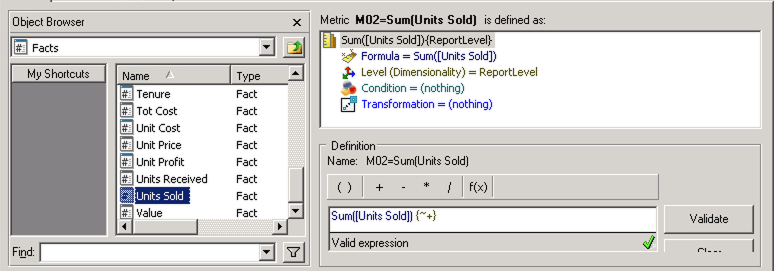
  • Create a metric M02=Sum(Units Sold): 
ka04W000001Ix5RQAS_0EM2R000000lns8.jpeg
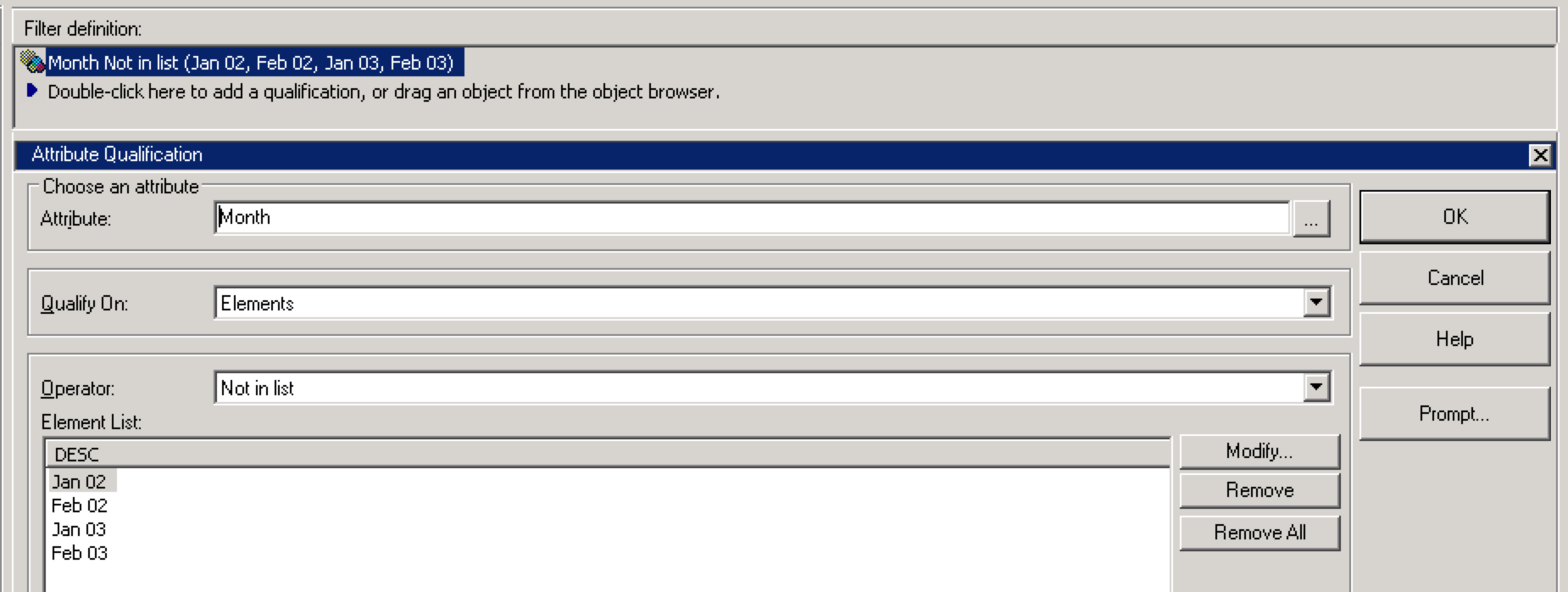
  • Create a filter F01=MonthNotInList:  
ka04W000001Ix5RQAS_0EM2R000000loz5.jpeg
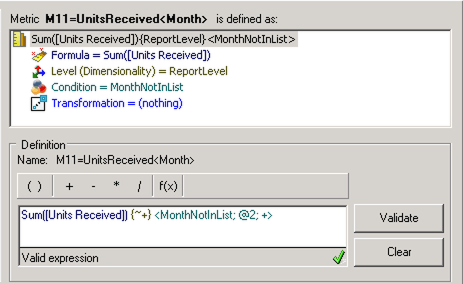
  • Create a metric M11=Sum(Units Received)<Month>: 
ka04W000001Ix5RQAS_0EM2R000000lnu4.jpeg
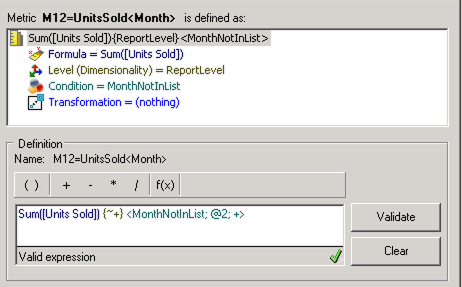
  • Create a metric M12=Sum(Units Sold)<Month>: 
ka04W000001Ix5RQAS_0EM2R000000lnuE.jpeg
  • Create a Report R01, and drag the attribute Item and the metrics M01, M02, M12, and M11 to the template, in that order.
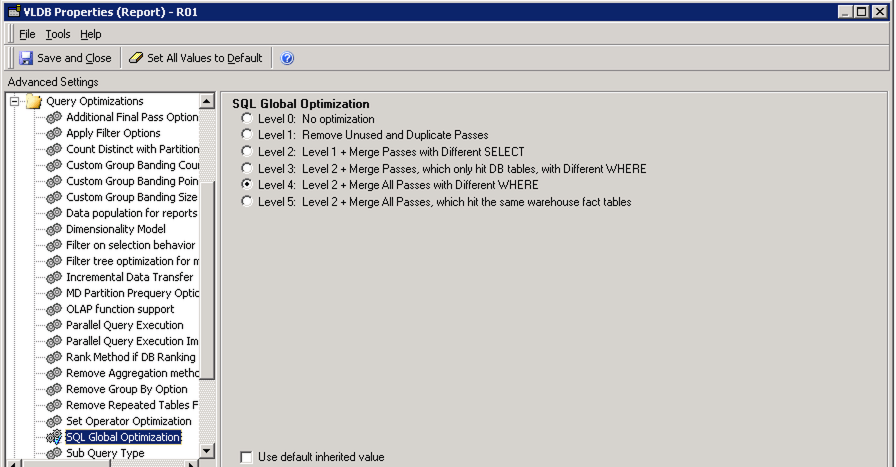
  • Click Data->VLDB Properties->Query Optimization->SQL Global Optimization, select "level 4": 
ka04W000001Ix5RQAS_0EM2R000000lnrA.jpeg
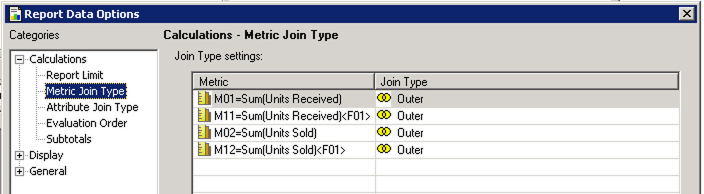
  • Click Data->Report Data Options->Metric Join Type, set join type to Outer for all of the metrics: 
ka04W000001Ix5RQAS_0EM2R000000lnr5.jpeg
  • Run the report, and examine the SQL.


Note how two tables perform a full outer join twice, just in a different order. First is Table 1 join Table 2, then Table 2 join Table 1:


...

select coalesce(pa11.ITEM_ID, pa12.ITEM_ID)  ITEM_ID,
pa11.WJXBFS1  WJXBFS1,
pa12.WJXBFS1  WJXBFS2
into #ZZMD02
from #ZZSP00 pa11
full outer join #ZZSP01 pa12
  on (pa11.ITEM_ID = pa12.ITEM_ID) 

select coalesce(pa11.ITEM_ID, pa12.ITEM_ID)  ITEM_ID,
pa11.WJXBFS2  WJXBFS1,
pa12.WJXBFS2  WJXBFS2
into #ZZMD03
from #ZZSP01 pa11
full outer join #ZZSP00 pa12
  on (pa11.ITEM_ID = pa12.ITEM_ID)
 
...


Cause


This is a known issue in Strategy 2019 and previous versions. Depending on the DBMS your warehouse is built on and other VLDB settings, you may be affected by this issue:

  • When SQL Global Optimization is set to Level 4, the order that the metrics are placed on the template affects how the SQL passes that retrieve data for each metric are merged.
    • In the example above, Data Engine logic does not recognize that the passes for M1 and M11 and the passes for M2 and M12 can be merged because the data comes from the same database table. Since they are not merged, this results in the same two intermediate tables being joined twice.

Solution

  • Upgrade to Strategy 2020 or above. We recommend the latest version.
  • Set Data Engine Version setting to 12 or above.
    • The project level setting Data Engine Version can only be enabled through Workstation. For more details on enabling the setting, see Change Data Engine Version.


In the new fix, Data Engine fixes its logic to change the way mergeable passes are compared so that a pass will be compared with every other pass rather than in a hard-coded order. This looks at all possible combinations of merges and prevents extra unnecessary joins from being done.
This fix serves to optimize performance when SQL Global Optimization is set to Level 4 and should not change data, only SQL. Again, this fix does not apply to all warehouses as some DBMS do not support the optimizations.
Strategy Internal Reference Number for the technical note is KB483322 and DE133372


Comment

0 comments

Details

Knowledge Article

Published:

May 24, 2019

Last Updated:

May 24, 2019