After creating a report containing level metrics with filter settings set to ignore filters, applying a report filter does not alter the information displayed on the report.
For example, this report has level metrics set to ignore filters. When a report filter is added and set to Year = 2015, there is still data displayed from 2014 and 2016.
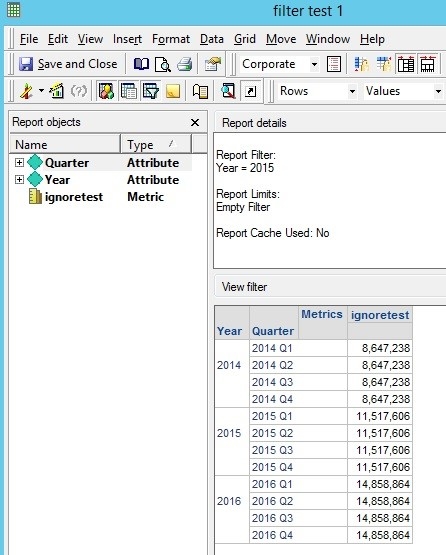
The SQL of the report also confirms that the filter is not applied:
create table ZZMD00 ( YEAR_ID SHORT, WJXBFS1 DOUBLE)insert into ZZMD00select a11.[YEAR_ID] AS YEAR_ID, sum(a11.[TOT_DOLLAR_SALES]) AS WJXBFS1from [YR_CATEGORY_SLS] a11group by a11.[YEAR_ID]select pa11.[YEAR_ID] AS YEAR_ID, a12.[QUARTER_ID] AS QUARTER_ID, a12.[QUARTER_DESC] AS QUARTER_DESC0, pa11.[WJXBFS1] AS WJXBFS1from [ZZMD00] pa11, [LU_QUARTER] a12where pa11.[YEAR_ID] = a12.[YEAR_ID]
This is expected behavior from a report containing metrics with filter settings set to ignore filters.
By default, filters are only applied to metric and metric passes. If the metrics ignore the filter in their settings, the filter is never applied to the metric and thus not applied to the report.
If this behavior is undesired, there are two ways to workaround the default behavior and apply the filter.
You will need to alter two properties: Additional final pass option and Apply filter options.
Set the additional final pass property to force an additional pass of SQL. Then set the apply filter options property to apply filters to all passes, including the final pass. These two modifications will cause the filter to be reapplied in the final pass of SQL after the metrics are joined together.
This workaround requires the report to have warehouse tables in the final pass as a lookup or a relationship table for the attributes on the report. Without a warehouse table, the filter will not be reapplied in the final pass.
When this workaround is applied, the SQL of the report will display the filter on the selected report filter. For example, the below SQL displays the filter on the year in the final pass.
create table ZZMD00 ( YEAR_ID SHORT, WJXBFS1 DOUBLE)insert into ZZMD00select a11.[YEAR_ID] AS YEAR_ID, sum(a11.[TOT_DOLLAR_SALES]) AS WJXBFS1from [YR_CATEGORY_SLS] a11group by a11.[YEAR_ID]select pa11.[YEAR_ID] AS YEAR_ID, a12.[QUARTER_ID] AS QUARTER_ID, a12.[QUARTER_DESC] AS QUARTER_DESC0, pa11.[WJXBFS1] AS WJXBFS1from [ZZMD00] pa11, [LU_QUARTER] a12where pa11.[YEAR_ID] = a12.[YEAR_ID] and pa11.[YEAR_ID] in (2015)
Since the filter is not applying because of the metric settings, you can add a metric with standard filter dimensionality settings to the report objects window. This metric will apply the filter as expected.
Set this metric to outer join while the original metrics are set to inner join for their metric join type. To use this workaround, you need a fact table that contains all necessary combinations and metric outer joins should not be needed for other reasons on the report.
