EducationSoftwareStrategy.com
StrategyCommunity

Knowledge Base

Product

Community

Knowledge Base

TopicsBrowse ArticlesDeveloper Zone

Product

Download SoftwareProduct DocumentationSecurity Hub

Education

Tutorial VideosSolution GalleryEducation courses

Community

GuidelinesGrandmastersEvents
x_social-icon_white.svglinkedin_social-icon_white.svg
Strategy logoCommunity

© Strategy Inc. All Rights Reserved.

LegalTerms of UsePrivacy Policy
  1. Home
  2. Topics

KB483527: How to Configure Google API Data Import Connectors in MicroStrategy Desktop or Workstation


Community Admin

• Strategy


MicroStrategy Desktop and Workstation include the ability to add external data from Google, such as Google Analytics, Google Drive, and Google BigQuery.

Configure the Google App

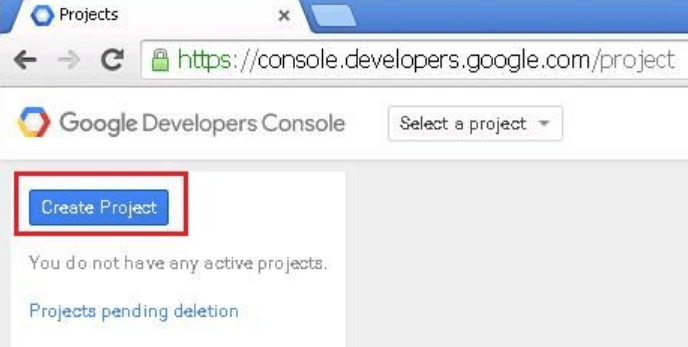
  • Log into Google Developers using your Google account.
  • Click Create Project. If you already have a project, choose it and go to step four.
ka04W000001IwyjQAC_0EM2R000000lXkv.jpeg
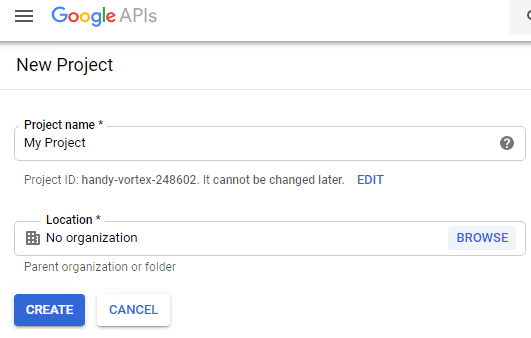
  • Name the project and click Create.
ka04W000001IwyjQAC_0EM2R000000lXl5.jpeg
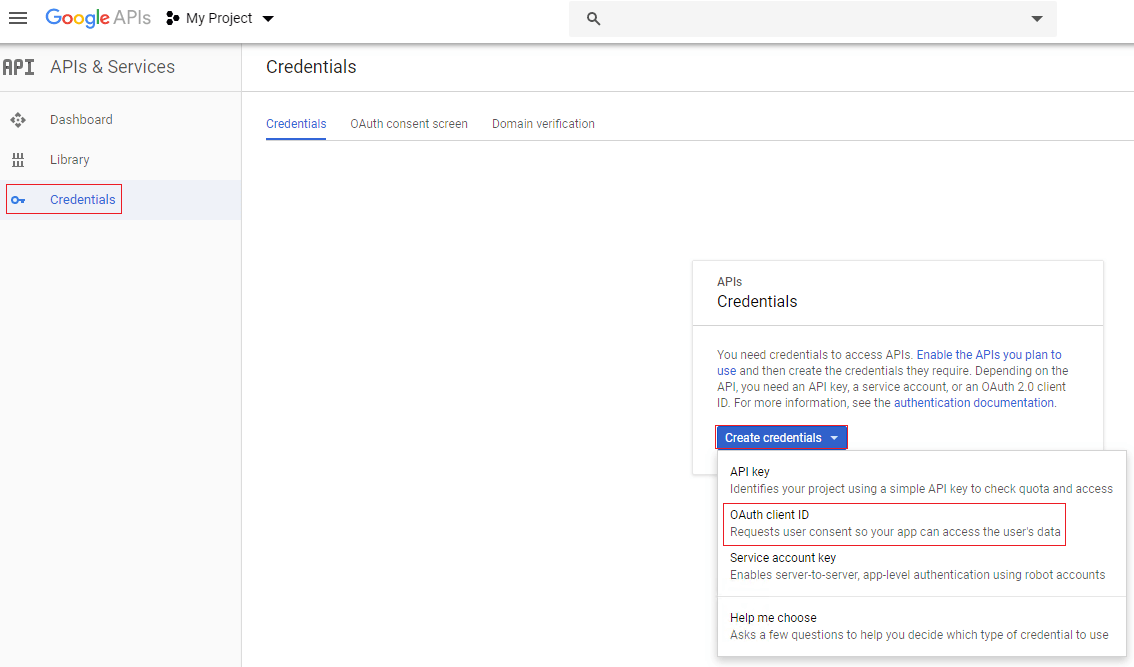
  • On the Credentials pop-up, click Create credentials and choose OAuth client ID.
ka04W000001IwyjQAC_0EM2R000000lXm3.jpeg
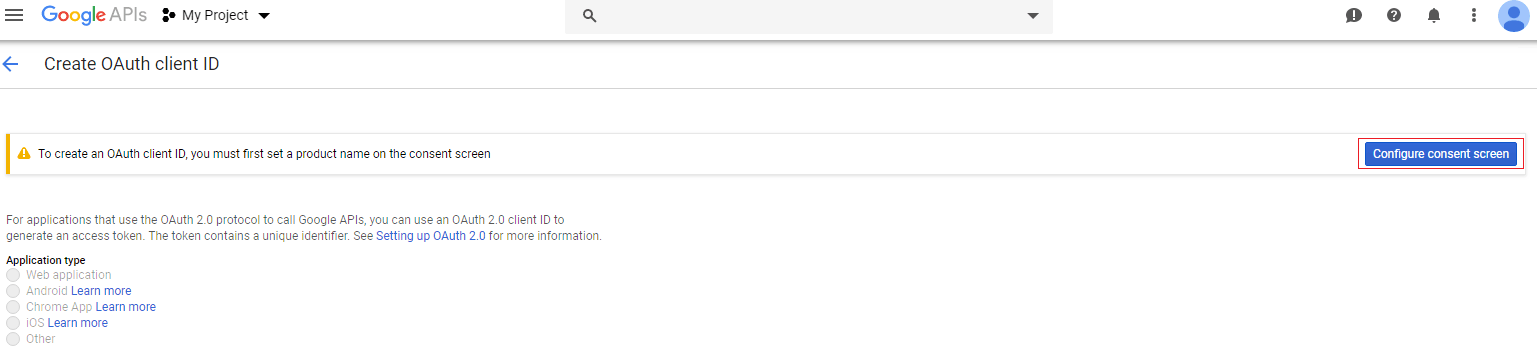
  • If you don't have the OAuth consent screen settings enabled, a warning page appears as shown below.
ka04W000001IwyjQAC_0EM2R000000lXnG.jpeg
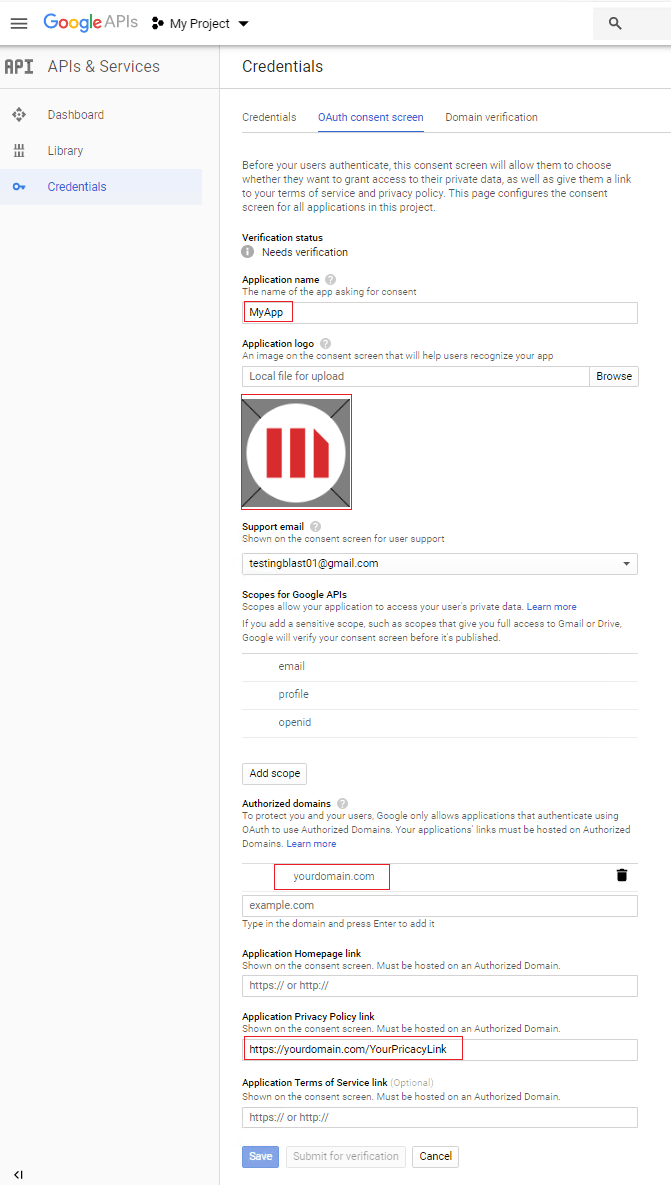
  • If you receive this warning page, make sure to set the OAuth consent screen settings before using the OAuth client ID credential.
ka04W000001IwyjQAC_0EM2R000000lXnk.jpeg
  • Go back to the Credentials pop-up.
  • Click Create credentials and choose OAuth client ID.
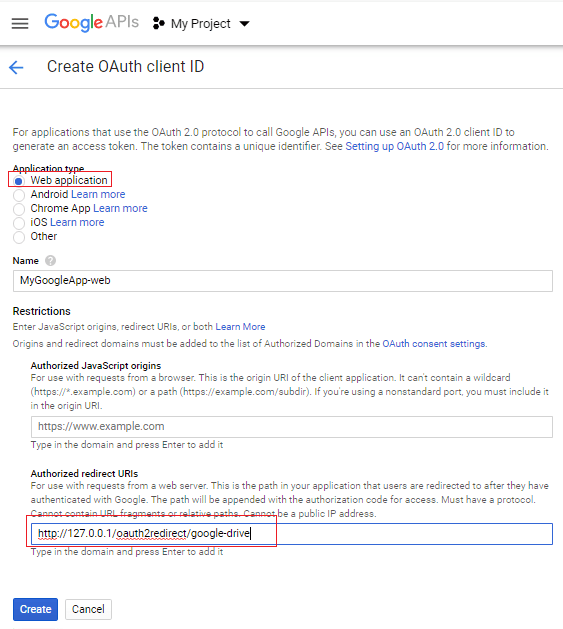
  • Strategy supports two kinds of application types for Workstation and Desktop: Web application and Other. If you select Web application, go to step 12 to configure different Authorized redirect URIs when you use different Google sources. If you select Other, go there is no need to configure Authorized redirect URIs.
  • In Application type, choose Other (recommended) and click Create.
ka04W000001IwyjQAC_0EM2R000000lYEl.jpeg
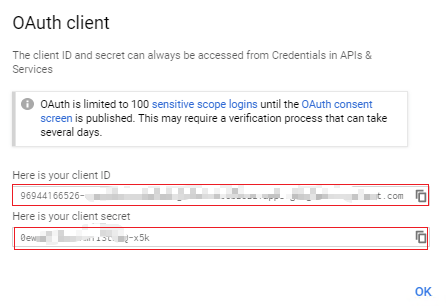
  • Copy the client ID and client secret, so you can use it later and click OK. Go to step 16.
ka04W000001IwyjQAC_0EM2R000000lYEv.jpeg
  • In Application type, choose Web application.
  • In Authorized redirect URIs enter one of the following and click Create:
    • For Google Drive: http://127.0.0.1/oauth2redirect/google-drive
    • For Google Analytics: http://127.0.0.1/oauth2redirect/google-analytics
    • For Google Big Query: http://127.0.0.1/oauth2redirect/google-bigquery
ka04W000001IwyjQAC_0EM2R000000lYFU.jpeg
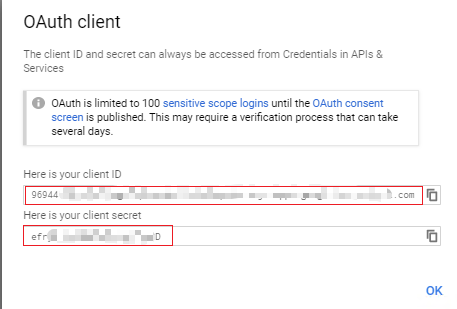
  • Copy the client ID and client secret, so you can use it later and click OK.
ka04W000001IwyjQAC_0EM2R000000lYHf.jpeg
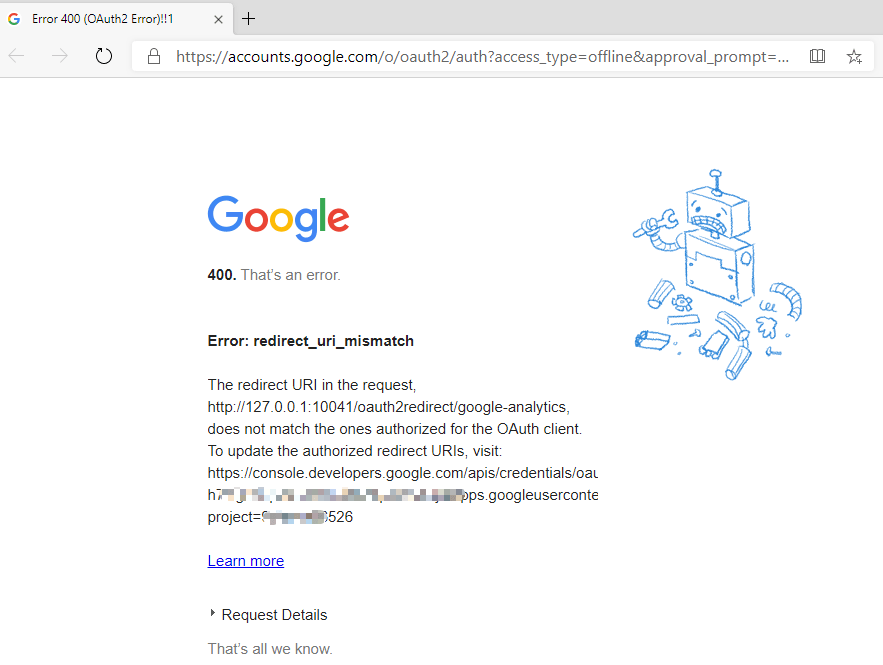
  • If a redirect_ui_mismatch error occurs, the URI you entered in Authorized redirect URIs is not correct. Go back and enter the correct URI. Otherwise, go to the next step.
ka04W000001IwyjQAC_0EM2R000000lYHz.jpeg
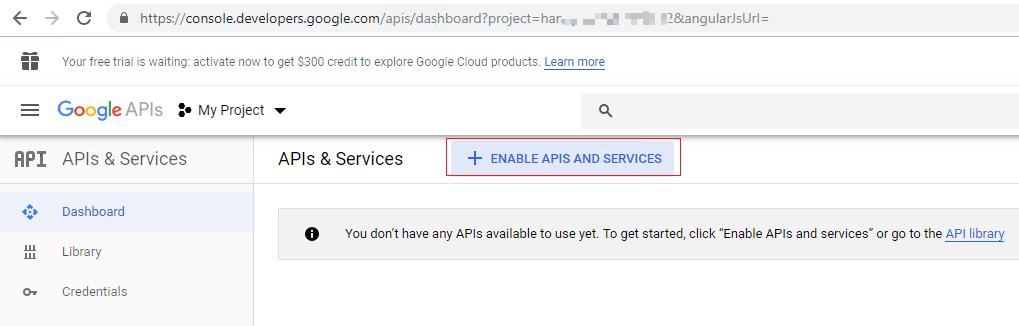
  • Select APIs & Services and click ENABLE APIS AND SERVICES. Next, choose the API for importing data.
ka04W000001IwyjQAC_0EM2R000000lYI9.jpeg
  • Follow the prompts to enable Google Drive API, Google Analytics Reporting API, and/or API Library as necessary.
    If you do not enable the correct APIs, the error No external session was found for the given external source occurs. Go back and enable the correct API.

Set Google OAuth Parameters for Desktop or Workstation

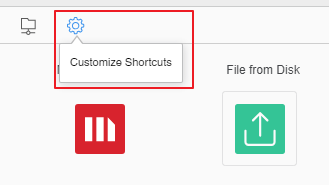
  • On the Data Import dialog, click Customize Shortcuts.
ka04W000001IwyjQAC_0EM2R000000lYIJ.jpeg
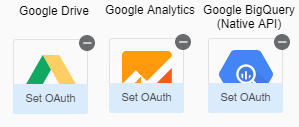
  • Hover over Google Drive, Google Analytics, or Google BigQuery (Native API), and click Set Oauth.
ka04W000001IwyjQAC_0EM2R000000lYJ7.jpeg
  • Enter the Client ID and Client ID that you saved earlier.
ka04W000001IwyjQAC_0EM2R000000lYJC.jpeg
  • Click OK.
  • Click Save.

Use Google API Sources in Desktop or Workstation

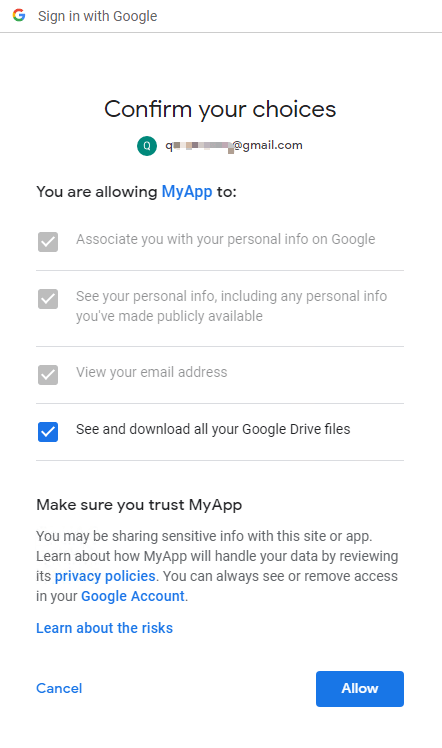
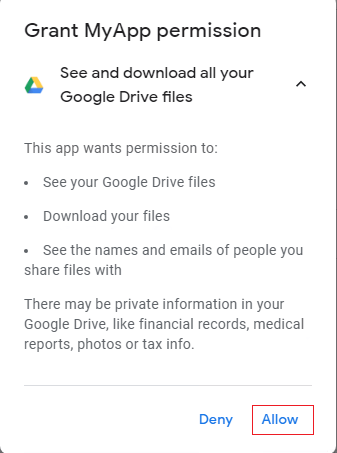
Starting with Strategy version 2020, there is a browser pop-up when Google OAuth sources sign in and out. You must allow access your Google data so it can be imported into Desktop or Workstation. The procedure below details this process with Google Drive.
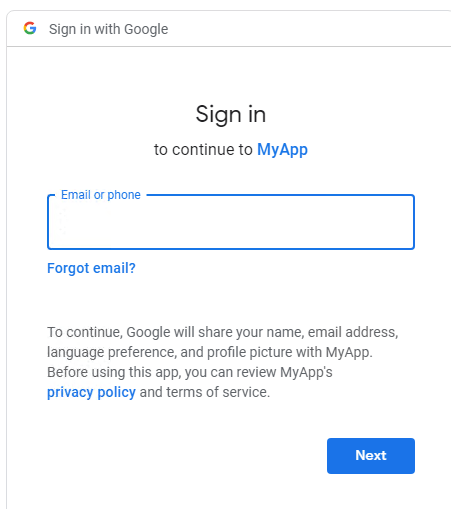
  • On the Data Import window, click on the Google Drive icon and enter your Google credentials in the browser pop-up.
ka04W000001IwyjQAC_0EM2R000000lYJl.jpeg
  • Within five minutes, you must allow the app to access your Google Drive files.
ka04W000001IwyjQAC_0EM2R000000lYJq.jpeg
ka04W000001IwyjQAC_0EM2R000000lYJv.jpeg
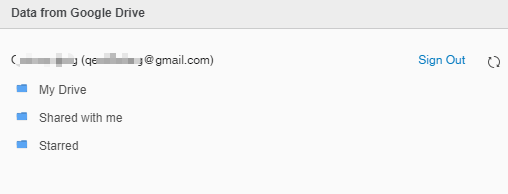
  • Go back to Desktop or Workstation to import your data.
ka04W000001IwyjQAC_0EM2R000000lYK0.jpeg

Comment

0 comments

Details

Knowledge Article

Published:

August 5, 2019

Last Updated:

September 22, 2022