This knowledge base article describes an issue that may occur when trying to connect using a Strategy JDBC driver for MongoDB on Windows with Strategy 2019. The impact is limited to Windows Intelligence Server, Desktop, and Workstation.
You may also encounter a NullPointerException error when your connection string is not correct.
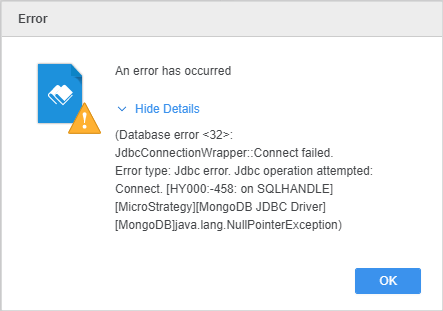
This is happening because the path of SchemaDefinition does not exist. Notice that the representations of paths by different operating systems are not the same. For Mac, the JDBC connection string is generated by default when using the DSN-less option and the path of the SchemaDefinition contains a colon.
If you copy the following connection string to Windows, and enter a drive location that contains a colon, such as C:\ , the character before the colon causes issues with the system driver.
"SchemaDefinition=MSTR_JDBC_JAR_FOLDER/xxx.xxx.xxx.xxx:27017db;"
A solution is to give a valid SchemaDefinition as shown below.
SchemaDefinition: "SchemaDefinition=C:\Schema\hostname.config;"
Or another solution is to remove SchemaDefinition from the connection string, then it will use the default value of SchemaDefinition as listed below:
The default value of SchemaDefinition:
userprofile\ApplicationData\Local\Progress\DataDirect\MongoDB_Schema\hostname.config
userprofile\AppData\Local\Progress\DataDirect\MongoDB_Schema\hostname.config
C:\Users\Default\AppData\Local\Progress\DataDirect\MongoDB_Schema\hostname.config
˜/progress/datadirect/mongodb_schema/hostname.config
See the Connection Property Descriptions topic in the Progress DataDirect for JDBC for MongoDB Driver online help for more information.
