Starting with the release of Strategy ONE (March 2024), dossiers are also known as dashboards.
Since this issue only be reproduced under complex condition, we will only demonstrate the concept of Aggregate from Base (AFB) metric, and smart metric. Users who has seen the behavior changed and the related upgrade impact reference ID, can compare this example to understand the change.
This case is built upon Tutorial project.
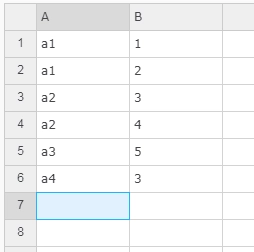
1. Create a New Dossier. Add External Data. Choose Clipboard and create a dataset with Attribute A, Metric B as below:
2. Create metrics
MaxB = Max(B){~+} and MinB = Min(B){~+}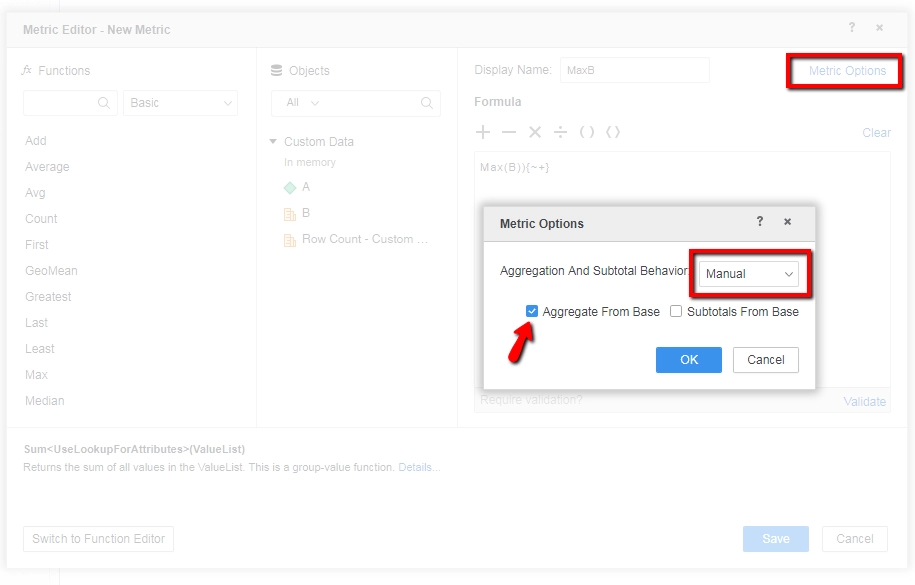
3. Create
AvgMaxB = Avg(Max(B)){~+} and AvgMinB = Avg(Min(B)){~+}Diff = AvgMaxB-AvgMinB
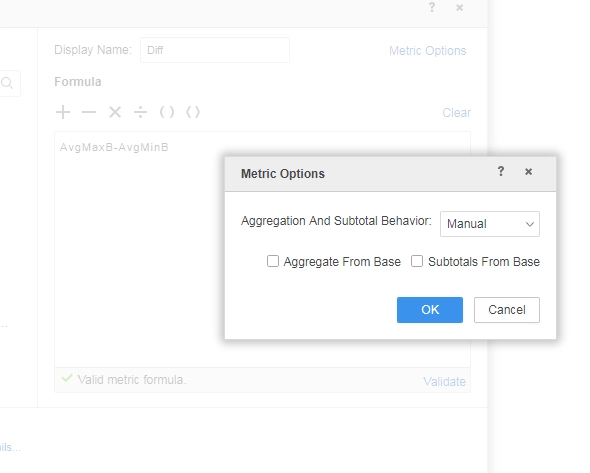
3. When the dataset and child attributes/metric, or data relations are complex, sometime metrics like
Diffwill show null
This is a known defect before Strategy 2019.
This issue happens when there are many passes of metric calculation for a deeply nested metric. Sometimes in the later passes, very complex AFB metrics are not treated as calculated metrics even when they have already been calculated in the previous passes. This results in the null value in the final result. In the above example, the Engine would have one path to calculate metric MaxB and another path to calculate metric AvgMaxB using the result of MaxB. Before the fix, the Engine sometimes lost the result of MaxB, and treats it as uncalculated when generating the result of AvgMaxB.
To resolve this defect, upgrade to Strategy 2019 or above.
After the fix, smart metrics will show the correct values.
Strategy reference numbers for this technical note are KB483550 and DE111407
