EducationSoftwareStrategy.com
StrategyCommunity

Knowledge Base

Product

Community

Knowledge Base

TopicsBrowse ArticlesDeveloper Zone

Product

Download SoftwareProduct DocumentationSecurity Hub

Education

Tutorial VideosSolution GalleryEducation courses

Community

GuidelinesGrandmastersEvents
x_social-icon_white.svglinkedin_social-icon_white.svg
Strategy logoCommunity

© Strategy Inc. All Rights Reserved.

LegalTerms of UsePrivacy Policy
  1. Home
  2. Topics

KB483561: Aggregate From Base metric defined on two unrelated metrics returns incorrect data in Connect Live mode


Community Admin

• Strategy


In MicroStrategy 11.0 and later with Data Engine Version set to 11, an Aggregate From Base metric composed of two metrics from unrelated tables will return incorrect data in Connect Live mode due to wrong logic when extending fact relations.

Symptoms

  • Aggregate From Base metric which is composed of two metrics from unrelated tables (with no common attribute) returns incorrect data in "Connect Live" mode.
    • Changing the Data Access mode of the dataset to "In-memory" returns correct data.
  • Data Engine Version is set to 11.
    • Data Engine Version 10 does not support fact level calculations between incompatible levels. Rather than incorrect data, the user will see an error message instead.

Glossary

  • Connect Live - mode of data access that retrieves results directly from the data source
  • Aggregate From Base (AFB) metric - uses the attributes on the dataset (the base) when dynamic aggregation is triggered
  • Dynamic aggregation - roll-up of metric values that occurs when an attribute is removed from a visualization or document

Steps to Reproduce

  • Open Strategy Web.
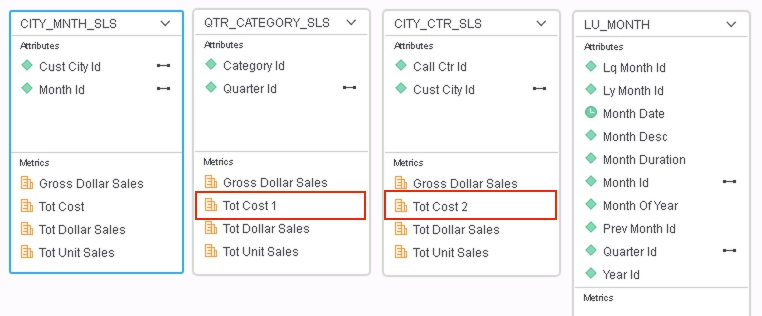
  • Create a new dataset with the following Strategy Tutorial tables: 
ka04W000001Ix4EQAS_0EM2R000000ljQT.jpeg
    • Rename Tot Cost in "QTR_CATEGORY_SLS" to Tot Cost 1 and Tot Cost in "CITY_CTR_SLS" to Tot Cost 2. This is to differentiate between the two metrics so they do not become merged once the cube is published.
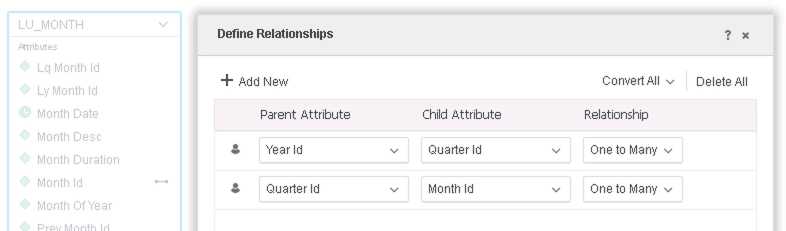
    • Define relationships for "LU_MONTH": 
ka04W000001Ix4EQAS_0EM2R000000ljTm.jpeg
    • Save the dataset in "Connect Live" mode.
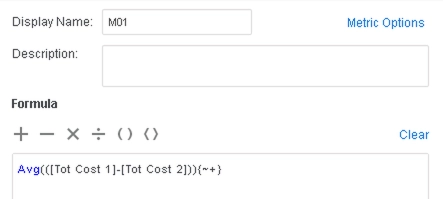
  • Create M01 with the following formula: 
ka04W000001Ix4EQAS_0EM2R000000ljQi.jpeg
    • Note that this metric uses "Tot Cost 1" and "Tot Cost 2", each comes from "QTR_CATEGORY_SLS" AND "CITY_CTR_SLS", and there is no common attribute between these 2 tables.
    • However, by joining through the other 2 tables, the Engine will be able to find a better path: QTR_CATEGORY_SLS - LU_MONTH - CITY_MNTH_SLS - CITY_CTR_SLS
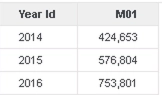
  • Drag Year_Id and M01 to a Grid Visualization. 


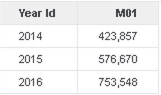
The values returned for M01 are inaccurate because it ignores the indirect relationships between tables:
ka04W000001Ix4EQAS_0EM2R000000ljSU.jpeg


Cause

  • The generated SQL attempts to cross join two fact tables that are not directly related, instead of using a join path through other tables, and this results in inaccurate data.

SQL before fix


select pa13.YEAR_ID  YEAR_ID,
avg((a11.TOT_COST - a12.TOT_COST))  WJXBFS1
from QTR_CATEGORY_SLS a11
cross join CITY_CTR_SLS a12
join T176SPLD7OP000 pa13
  on (a11.QUARTER_ID = pa13.QUARTER_ID)
group by pa13.YEAR_ID
...


Note: The actual SQL that is generated will vary depending on the DBMS your data is stored on.
 

Solution

  • Upgrade to Strategy 2020 or above. We recommend the latest version.
  • Set Data Engine Version setting to 12 or above.
    • The project level setting Data Engine Version can only be enabled through Workstation. For more details on enabling the setting, see Change Data Engine Version.


In the new fix, an intermediate table made from using other tables in the dataset with common attributes is used to join the two fact tables. This mimics the CSI that is generated for In-Memory datasets. As a result, more accurate data will be returned.
With the example above, there is no common attribute between "QTR_CATEGORY_SLS" AND "CITY_MNTH_SLS". However, they can be connected by common attributes in the "LU_MONTH" and "CITY_MNTH_SLS" tables. The new SQL shows how an intermediate table is created by joining these tables:
 

<?xml version='1.0'?>
<!DOCTYPE fontconfig SYSTEM 'fonts.dtd'>
<fontconfig>
  <match target="font">
     <edit mode="assign" name="antialias">
       <bool>true<bool>
     </edit>
  </match>
</fontconfig>
SQL after fix


create table T7RTQ22AEOP000 nologging as
select    distinct a12.CUST_CITY_ID  CUST_CITY_ID,
    a13.CALL_CTR_ID  CALL_CTR_ID,
    a11.QUARTER_ID  QUARTER_ID
from    LU_MONTH    a11
    join    CITY_MNTH_SLS    a12
      on     (a11.MONTH_ID = a12.MONTH_ID)
    join    CITY_CTR_SLS    a13
      on     (a12.CUST_CITY_ID = a13.CUST_CITY_ID) 
...
select    pa14.YEAR_ID  YEAR_ID,
    avg((a11.TOT_COST - a13.TOT_COST))  WJXBFS1
from    QTR_CATEGORY_SLS    a11
    join    T7RTQ22AEOP000    pa12
      on     (a11.QUARTER_ID = pa12.QUARTER_ID)
    join    CITY_CTR_SLS    a13
      on     (pa12.CALL_CTR_ID = a13.CALL_CTR_ID and 
    pa12.CUST_CITY_ID = a13.CUST_CITY_ID)
    join    TCM8D230MOP001    pa14
      on     (a11.QUARTER_ID = pa14.QUARTER_ID)
group by    pa14.YEAR_ID
...

<?xml version='1.0'?>
<!DOCTYPE fontconfig SYSTEM 'fonts.dtd'>
<fontconfig>
  <match target="font">
     <edit mode="assign" name="antialias">
       <bool>true<bool>
     </edit>
  </match>
</fontconfig>
SQL after fix


create table T7RTQ22AEOP000 nologging as
select    distinct a12.CUST_CITY_ID  CUST_CITY_ID,
    a13.CALL_CTR_ID  CALL_CTR_ID,
    a11.QUARTER_ID  QUARTER_ID
from    LU_MONTH    a11
    join    CITY_MNTH_SLS    a12
      on     (a11.MONTH_ID = a12.MONTH_ID)
    join    CITY_CTR_SLS    a13
      on     (a12.CUST_CITY_ID = a13.CUST_CITY_ID) 
...
select    pa14.YEAR_ID  YEAR_ID,
    avg((a11.TOT_COST - a13.TOT_COST))  WJXBFS1
from    QTR_CATEGORY_SLS    a11
    join    T7RTQ22AEOP000    pa12
      on     (a11.QUARTER_ID = pa12.QUARTER_ID)
    join    CITY_CTR_SLS    a13
      on     (pa12.CALL_CTR_ID = a13.CALL_CTR_ID and 
    pa12.CUST_CITY_ID = a13.CUST_CITY_ID)
    join    TCM8D230MOP001    pa14
      on     (a11.QUARTER_ID = pa14.QUARTER_ID)
group by    pa14.YEAR_ID
...

The correct data is now returned:

ka04W000001Ix4EQAS_0EM2R000000ljRR.jpeg

Strategy Internal Reference Number for this technical note is KB483561 and DE105518.


Comment

0 comments

Details

Knowledge Article

Published:

August 21, 2019

Last Updated:

August 21, 2019