Content
SYMPTOM:
Failed to connect to data source. Error message: KerberosLogin failed. Unable to connect.
Error type: Kerberos error. ERROR: Failed gss_accept_sec_context(): Unspecified GSS failure. Minor code may provide more information KRB MSG: Key table entry not found
System Error (ENOENT): --- No such file or directory.

CAUSE:
The Teradata Client software (specifically TeraGSS) is inadvertently setting that environment variable TeradataKeyTab=/etc/teradata.keytab. The code that sets the environment variable was introduced from Teradata 14.0. They already have a plan to fix this issue.
ACTION:
There’re two workarounds for this issue, you can choose any of them as per your convenience.
If your krb5.keytab was created in /etc/krb5.keytab, then you should create a symlink from /etc/teradata.keytab to /etc/krb5.keytab by using below command:
ln -s /etc/krb5.keytab /etc/teradata.keytab
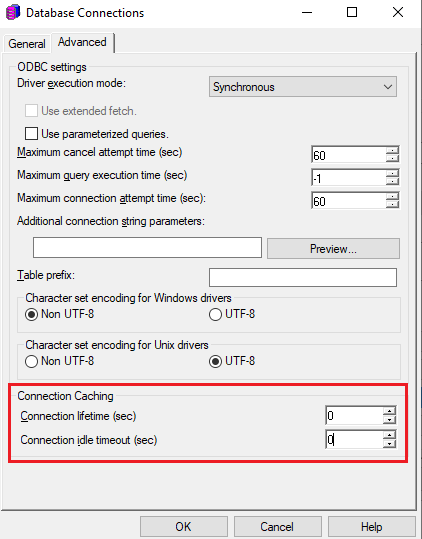
Right click on your DB role or DB Instance from Administration > Configuration Managers > Databases Instances in Developer, then modify the Database Connection, choose Advanced, and set the connection lifetime and idle timeout as 0.