Starting with the release of Strategy ONE (March 2024), dossiers are also known as dashboards.
When opening a dossier as a non-admin and sharing it via the menu Share > Get a link, the following error message appears:
“The task cannot be completed due to a malformed request. Please try again”.
https | https |
The issue is related to the personal view event. A personal view event is a configuration object in Strategy that is used to share dossiers, reports, and documents in Strategy Web. When an object is shared, the personal view event is triggered.
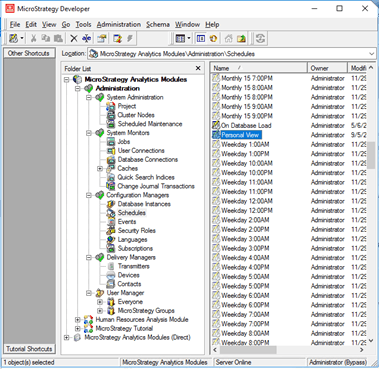
The personal view event is linked to a schedule that has the same name:
A subscription to the shared dossier, report, or document is also added to the subscription list.

As such, the message may appear as a result of the following scenarios:
Since this error can be a result of three scenarios, it's recommended to try the three following solutions:
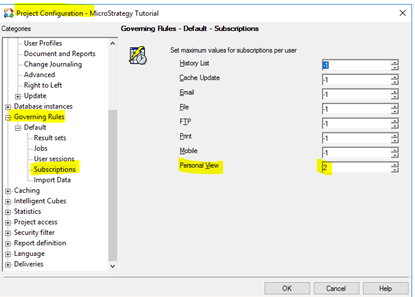
The personal view schedule may have been deleted for maintenance reasons, or it may not have been migrated from another project during project duplication. In this scenario, users cannot share objects because the personal view schedule is missing.
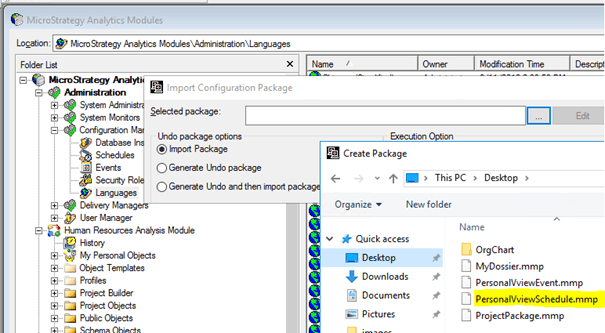
To share objects, you must retrieve the missing personal view schedule and its corresponding personal view event from the out-of-the-box installation. For example, you can use the Tutorial Project metadata. After, use Object Manager to create a configuration package, generating an .mpp file.
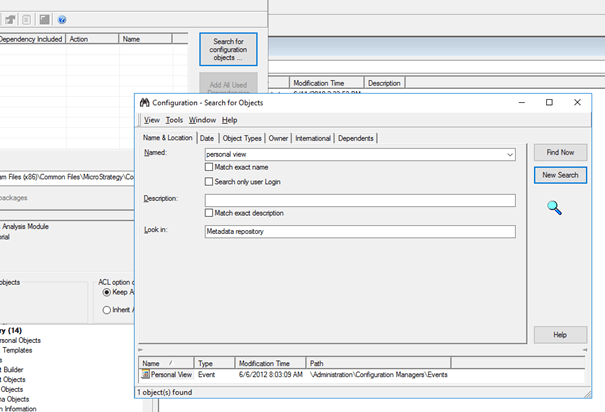
After, use Object Manager to import the package file into the target environment where the configuration objects are missing.
If you cannot find the configuration objects, please contact Technical Support so an engineer can help you finding a solution.