EducationSoftwareStrategy.com
StrategyCommunity

Knowledge Base

Product

Community

Knowledge Base

TopicsBrowse ArticlesDeveloper Zone

Product

Download SoftwareProduct DocumentationSecurity Hub

Education

Tutorial VideosSolution GalleryEducation courses

Community

GuidelinesGrandmastersEvents
x_social-icon_white.svglinkedin_social-icon_white.svg
Strategy logoCommunity

© Strategy Inc. All Rights Reserved.

LegalTerms of UsePrivacy Policy
  1. Home
  2. Topics

KB483644: Intelligence Server creates temporary tables with wrong data types when "Include Distinct Elements" setting is enabled


Community Admin

• Strategy


In MicroStrategy 2020 and previous versions, the Intelligence Server creates temporary tables with wrong data types when the "Include Distinct Elements" setting is enabled, resulting in failed executions due to inconsistent datatypes.

Symptoms

  • The metric is defined using the Max or Min function, and the function parameter "Include Distinct Elements" setting is enabled.
  • User sees the error like "inconsistent datatypes: expected NUMBER got DATE." or report executes but datatype for the metric is wrong.
  • The issue only reproduce when the SQL statement includes creation of a temporary table

Steps to Reproduce

  • Open Strategy Web. We use Strategy Tutorial tables and objects in this example.
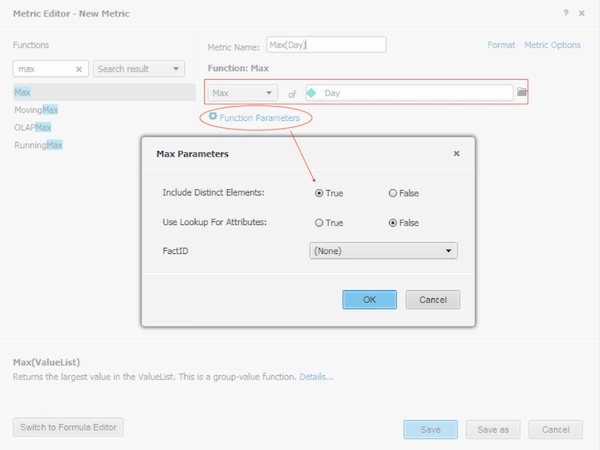
  • Create a new metric Max(Day), and under Function Parameters, set "Include Distinct Elements" to True:
ka04W000001Ix48QAC_0EM2R000000m6en.jpeg
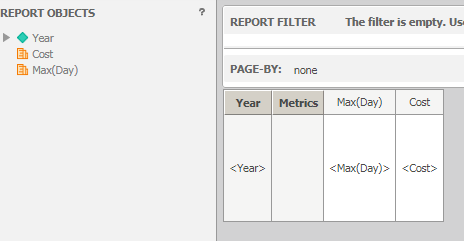
  • Create a report, and add the Year attribute and Cost and Max(Day) metrics:
ka04W000001Ix48QAC_0EM2R000000m6aS.png
  • Execute the report. If the report creates a temporary when calculate the Max(Day) metric, depending on the data source and data type, use may see:

a. Execution failed due to mismatched datatypes.

Error: QueryEngine encountered error: Execute Query failed.
Error type: Odbc error. Odbc operation attempted: SQLExecDirect. [HY000:932: on SQLHANDLE] [Strategy][ODBC Oracle Wire Protocol driver][Oracle]ORA-00932: inconsistent datatypes: expected NUMBER got DATE.
b. Report able to execute but data is wrong because column datatype is incorrect, for example:
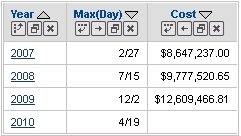
ka04W000001Ix48QAC_0EM2R000000mL8X.jpeg

If user check the SQL statement, a mismatch of data type can be found:


create table TZELQ22AAMD000 (
	YEAR_ID	DECIMAL(38, 0), 
	WJXBFS1	DOUBLE)

insert into TZELQ22AAMD000 
select	a11.YEAR_ID  YEAR_ID,
	max(distinct a11.DAY_DATE)  WJXBFS1
from	`LU_DAY`	a11
group by	a11.YEAR_ID

In this case, WJXBFS1 should be a datetime type instead of Double.

Cause


This is a known issue in Strategy 2020 and previous versions. Enabling the "Include Distinct Elements" setting causes Data Engine to incorrectly select the wrong data type for the metric column when creating a temporary table.
Solution

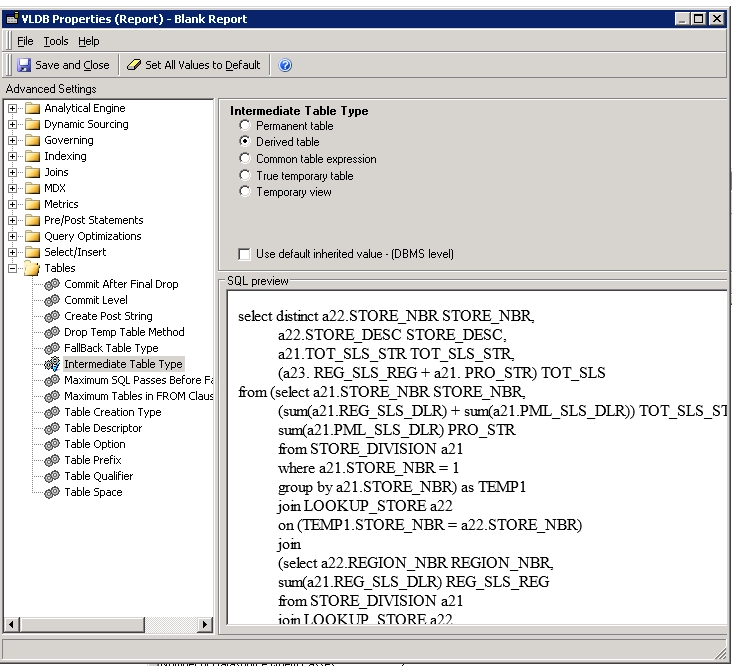
  • Change the Report VLDB setting "Intermediate Table Type" to "Derived Table"
    • Since this issue only reproduces when there are temporary tables created with data type mismatch, using "Derived Table" may be a workaround for simple objects.
    • In Developer, edit the report, select "Data" from Menu, "VLDB Properties...", Expend Table and choose "Intermediate Table Type", select "Derived Table".
ka04W000001Ix48QAC_0EM2R000000mL9a.jpeg
  • Upgrade to Strategy 2020 or above and set Data Engine Version setting to 12 or above. We recommend the latest version.
    • The project level setting Data Engine Version can only be enabled through Workstation. For more details on enabling the setting, see Change Data Engine Version.
    • After changing the Data Engine Version setting, you will need to republish your datasets to see the changes.


In the new fix, the correct data type is selected after removing unnecessary logic within Data Engine.
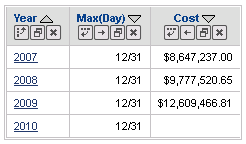
The report now can be executed successfully and correctly.
ka04W000001Ix48QAC_0EM2R000000mL9p.jpeg

The SQL shows that the column is correctly selected as the correct data type:


create table TWIUELBZCMD000 (
    YEAR_ID    DECIMAL(38, 0), 
    WJXBFS1    DATETIME)

insert into TWIUELBZCMD000 
select    a11.YEAR_ID  YEAR_ID,
    max(distinct a11.DAY_DATE)  WJXBFS1
from    `LU_DAY`    a11
group by    a11.YEAR_ID

...


Strategy Internal Reference Number for this technical note is KB483644 and DE110975.


Comment

0 comments

Details

Knowledge Article

Published:

September 23, 2019

Last Updated:

September 23, 2019