Starting with the release of Strategy ONE (March 2024), dossiers are also known as dashboards.
1. This example uses Strategy Tutorial WH that is shipped with Strategy products.
2. In Strategy Web, click Add External Data -> Databases -> Select Tables, pick the following two tables:
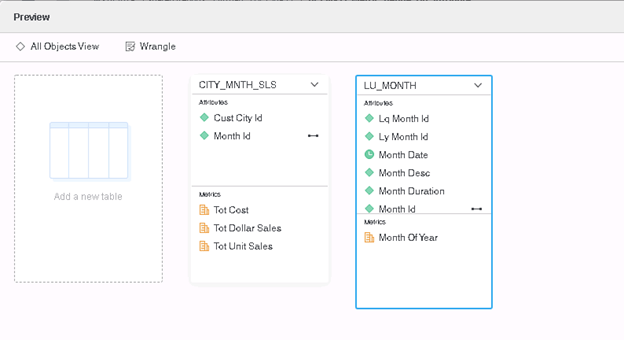
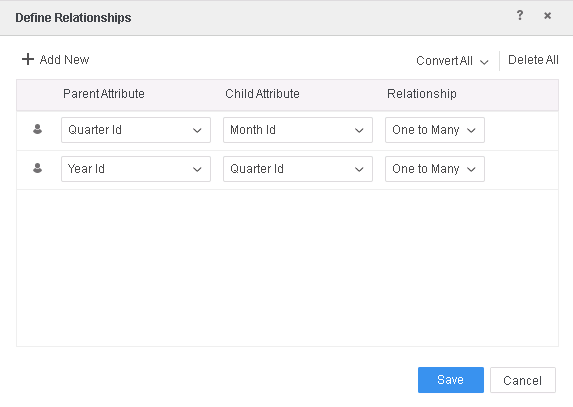
3. Define the following relationship on table LU_MONTH
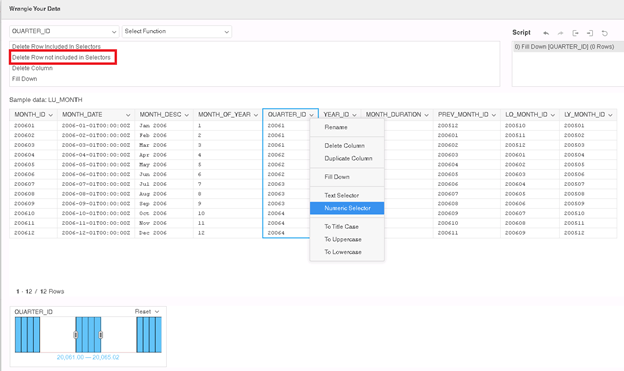
4. Select table LU_MONTH, click ‘Wrangle’. Click on Column QUARTER_ID, choose Numeric Selector and select data between 20061 and 20065, and click ‘Delete Row not include in Selector’ to apply the data wrangle.
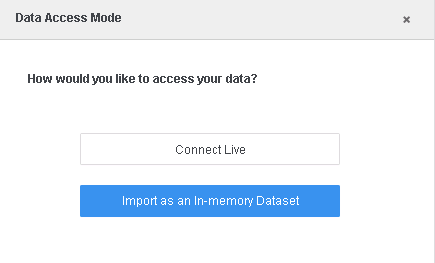
5. Click Finish and choose Import as an In-memory Dataset, save as MTDI01
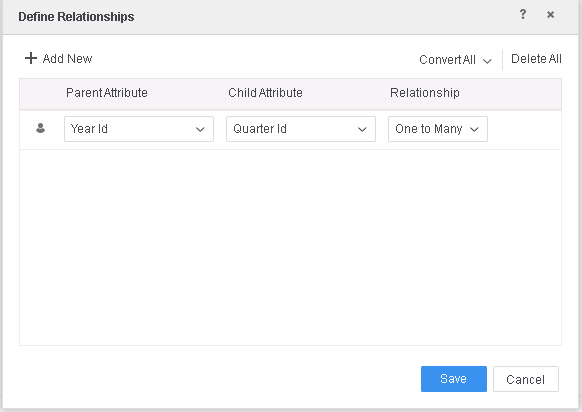
6. Create Dossier with MTDI01, click on Add Data -> New Data, select Databases and pick table LU_QUARTER, define relationship as
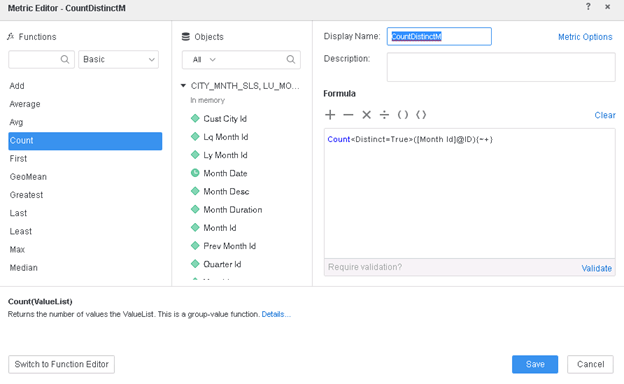
7. Create Metric on attribute Month Id in dataset MTDI01
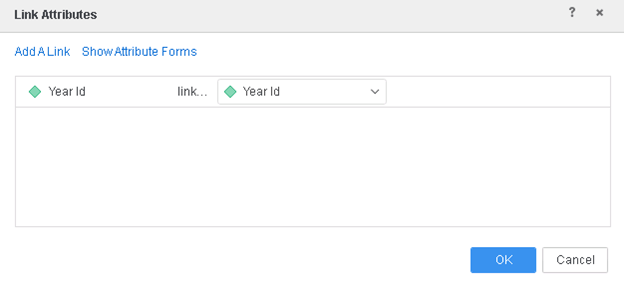
8. Link Attribute Year Id and Quarter Id separately in the two datasets
9. Add into template: Attribute Quarter Desc, Metric CountDistinctM
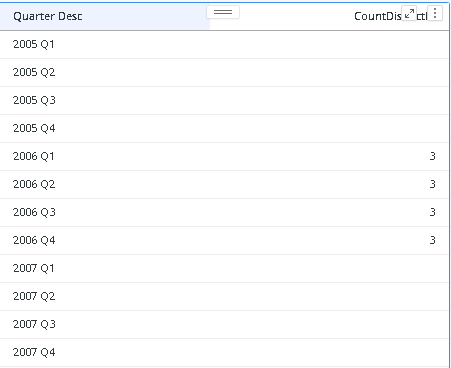
10. View Query Details, notice full outer join on Attribute Quarter Desc is used, hence all the NULL value for Quarter Desc in 2005 and 2007 show up.
select    [Year Id]@[YEAR_ID],
    [Quarter Id]@[QUARTER_ID],
    [Month Id]@[MONTH_ID]
from    CITY_MNTH_SLS, LU_MONTH
with Table Join Tree:     [REL_QUARTER_ID_MONTH_ID]
     Join [REL_YEAR_ID_QUARTER_ID] with output level Tuple([Month Id]@[MONTH_ID], [Quarter Id]@[QUARTER_ID], [Year Id]@[YEAR_ID])
to    Ex1_tempcube0

select    ([Quarter Id]@[QUARTER_ID]) as ([Quarter Id]@[QUARTER_ID]),
    ([Year Id]@[YEAR_ID]) as ([Year Id]@[YEAR_ID]),
    [Quarter Desc]@[QUARTER_DESC]
from    LU_QUARTER
with Table Join Tree:     [F_LU_QUARTER]
to    Ex1_tempcube1

select    *
from    Left Outer Join(
                    Ex1_tempcube0,
                    Ex1_tempcube1
                   ) on Quarter Id, Year Id
to    Ex1_tempcube2
...
...
select    [Quarter Desc]@[QUARTER_DESC]
from    Document
to    Ex1_tempcube3

select	*
from	Full Outer Join(
	                Ex1_tempcube2,
	                Ex1_tempcube3
	               ) on Quarter Desc
to	Ex1_tempcube4

select    [Quarter Desc]@[QUARTER_DESC],
    count(distinct [Month Id]@[MONTH_ID])@{[Quarter Desc]} as [CountDistinctM]
from    Ex1_tempcube4
This is a known limitation before Strategy 2020.
Metric defined on Attribute is treated as Attribute only, so full outer join is used which will impact the performance heavily.
This issue has been addressed in Strategy 2020.
If you are upgrading to Strategy 2020 or above, to pick up the fix, enable project level setting "Data Engine Version" to 12. This property can only be enabled through Workstation. For more details on enabling the setting, refer to Change Data Engine Version .
When the Data Engine version is set to 12, Engine will not do full outer join for metric defined on attribute. The data and Query Detail for the dossier in the example will be as below.
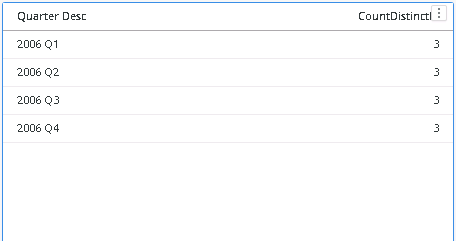
select	[Year Id]@[YEAR_ID],
	[Quarter Id]@[QUARTER_ID],
	[Month Id]@[MONTH_ID]
from	CITY_MNTH_SLS, LU_MONTH
with Table Join Tree: 	[REL_QUARTER_ID_MONTH_ID]
	 Join [REL_YEAR_ID_QUARTER_ID] with output level Tuple([Month Id]@[MONTH_ID], [Quarter Id]@[QUARTER_ID], [Year Id]@[YEAR_ID])
to	Ex7_tempcube0

select	([Quarter Id]@[QUARTER_ID]) as ([Quarter Id]@[QUARTER_ID]),
	([Year Id]@[YEAR_ID]) as ([Year Id]@[YEAR_ID]),
	[Quarter Desc]@[QUARTER_DESC]
from	LU_QUARTER
with Table Join Tree: 	[F_LU_QUARTER5538A2FE47DED0D0F762638BE15410E8]
to	Ex7_tempcube1

select	*
from	Left Outer Join(
	                Ex7_tempcube0,
	                Ex7_tempcube1
	               ) on Quarter Id, Year Id
to	Ex7_tempcube2

select    [Quarter Desc]@[QUARTER_DESC],
    count(distinct [Month Id]@[MONTH_ID])@{[Quarter Desc]} as [CountDistinctM]
from    Ex7_tempcube2