Starting with the release of Strategy ONE (March 2024), dossiers are also known as dashboards.
Steps To Reproduce:
1. This example uses Strategy Tutorial WH that is shipped with Strategy products.
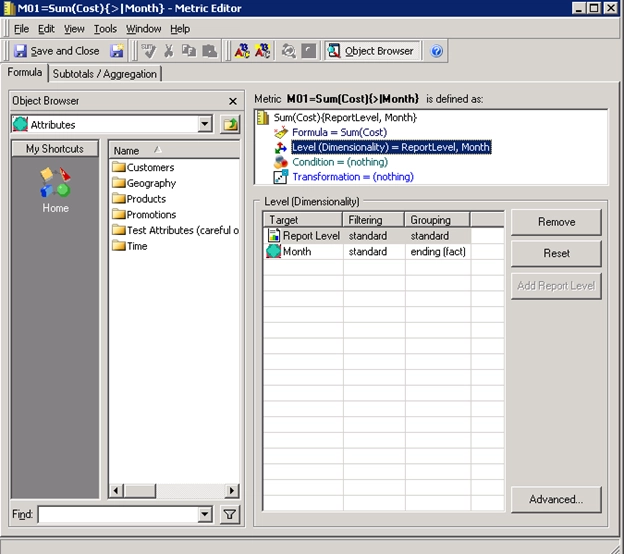
2. In Strategy Developer, create metric M01=Sum(Cost){>|Month}. ">|Month" means this metric is at the Month Level and its Grouping is ending(fact).
3. Create Intelligence Cube C01 with attribute Month, Category, Subcategory and metric Cost, M01=Sum(Cost){>|Month}
4. Create Intelligence Cube C02 with attribute Year, Month and metric Profit.
5. In Strategy Web, create dossier with C01 and C02 as the datasets
6. Add into the template: Attribute Year, Metric M01=Sum(Cost){>|Month}
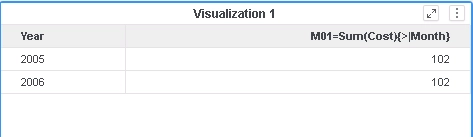
7. View Query Details, notice the output level, in this case {[Subcategory],[Year]}, is missing in the inner aggregate function, in this case, First(), when calculating metric in the final pass.
select	[Month]@[MONTH_ID],
	[Subcategory]@[SUBCAT_ID],
	First<SortBy= ([[Month]] Desc)>([[F_MAIN_INDEX].M01=Sum(Cost){>|Month}])@{[Subcategory],[Year]} as [M01=Sum(Cost){>|Month}]
from	C03=Month,Cat,Subcat,Cost,M01
with Table Join Tree: 	[F_MAIN_INDEX]
to	Ex1_tempcube0

select	[Month]@[MONTH_ID],
	[Month]@[MONTH_DESC],
	[Year]@[YEAR_ID]
from	C02=Year,Month,Profit
with Table Join Tree: 	[F_MAIN_INDEX]

select    *
from    Left Outer Join(
                    Ex1_tempcube0,
                    RELATION1-<Year, Month>
                   ) on Month
to    Ex1_tempcube1

select	[Year]@[YEAR_ID],
	sum(First<SortBy= ([[Month]] Desc)>([M01=Sum(Cost){>|Month}]))@{[Year]}
from	Ex1_tempcube1
This is a known regression issue starting from Strategy 10.11/10.4.7.
We have the optimization done in DE81833 to do the subset before extension for Intelligence Cube in order to improve performance, which cause double aggregation for non-distributive metrics.
This issue has been addressed in Strategy 2020 and Strategy 2019 Update 4 when the Allow joins across datasets based on unrelated common attributes setting on dossier is ON.
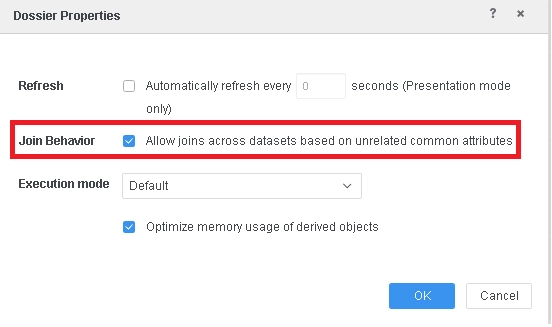
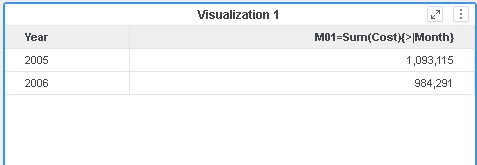
Engine will not do subset before extension for non-distributive metric against Intelligence Cube. The data and Query detail for the dossier in the example will be as below.
select	[Category]@[CATEGORY_ID],
	[Month]@[MONTH_ID],
	[Subcategory]@[SUBCAT_ID],
	[[F_MAIN_INDEX].M01=Sum(Cost){>|Month}] as [M01=Sum(Cost){>|Month}]
from	C03=Month,Cat,Subcat,Cost,M01
with Table Join Tree: 	[F_MAIN_INDEX]
to	Ex1_tempcube0

select	[Year]@[YEAR_ID],
	[Month]@[MONTH_ID]
from	C02=Year,Month,Profit
with Table Join Tree: 	[F_MAIN_INDEX]
to	RELATION1-<Year, Month>

select	*
from	Left Outer Join(
	                Ex1_tempcube0,
	                RELATION1-<Year, Month>
	               ) on Month
to	Ex1_tempcube1

select	[Year]@[YEAR_ID],
	sum(First<SortBy= ([[Month]] Desc)>([M01=Sum(Cost){>|Month}])@{[Subcategory],[Year]})@{[Year]}
from	Ex1_tempcube1
Regression starting from Strategy 10.11/10.4.7 caused by optimization done in DE81833
Strategy Internal Reference Number for this technical note is KB483764 and DE147559
