EducationSoftwareStrategy.com
StrategyCommunity

Knowledge Base

Product

Community

Knowledge Base

TopicsBrowse ArticlesDeveloper Zone

Product

Download SoftwareProduct DocumentationSecurity Hub

Education

Tutorial VideosSolution GalleryEducation courses

Community

GuidelinesGrandmastersEvents
x_social-icon_white.svglinkedin_social-icon_white.svg
Strategy logoCommunity

© Strategy Inc. All Rights Reserved.

LegalTerms of UsePrivacy Policy
  1. Home
  2. Topics

PostgreSQL show truncated or garbled characters when connecting through database instance created on MicroStrategy Developer, further manipulation hit error on web “It contains two or more catalog instances with the same namespace”.


Junjie Shi

Quality Engineer, Senior • MicroStrategy


The article describes how to avoid PostgreSQL show truncated or garbled characters by setting suitable “Character set encoding for Unix drivers” and "Character set encoding for Windows drivers" for the database connection against PostgreSQL on MicroStrategy Developer.

Description
The article describes how to set suitable “Character set encoding for Unix drivers" and "Character set encoding for Windows drivers" for the database connection against PostgreSQL on Strategy Developer. When set to incorrect character set, PostgreSQL show truncated or garbled characters, further manipulation may hit error on web “It contains two or more catalog instances with the same namespace”.
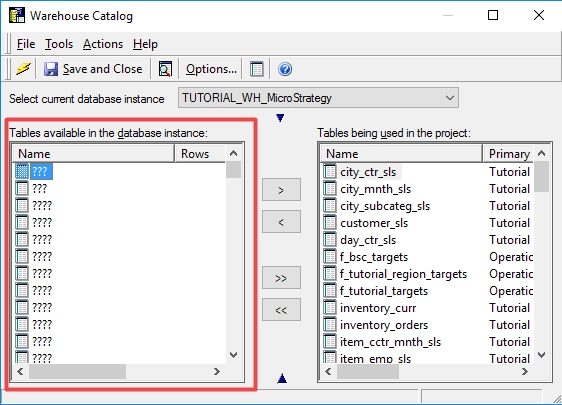
  • Developer warehouse Catalog show garbled characters
ka02R000000bsBCQAY_0EM2R000000mtNe.png
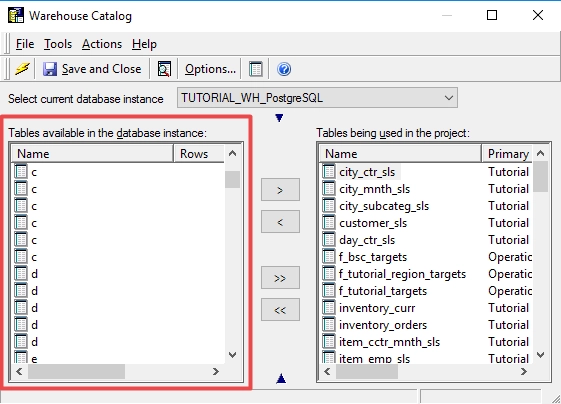
  • Developer warehouse Catalog show truncated characters
ka02R000000bsBCQAY_0EM2R000000mtNf.png
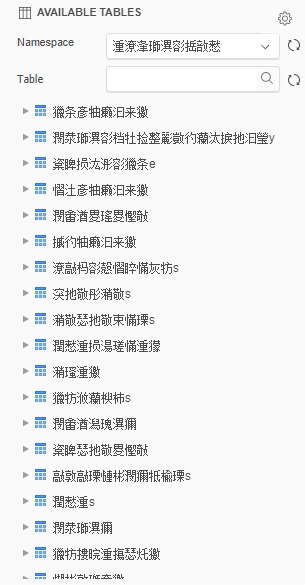
  • Web show garbled characters for namespace and table
ka02R000000bsBCQAY_0EM2R000000mtNg.png
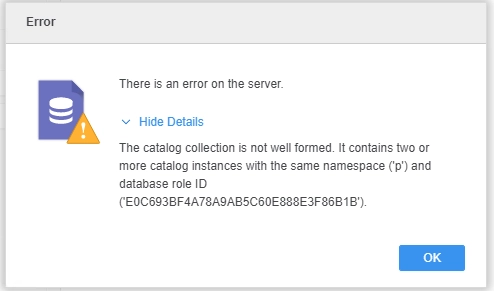
  • Web return truncated characters for table and further manipulation hit error:

The catalog collection is not well formed. It contains two or more catalog instances with the same namespace ('p') and database role ID ('E0C693BF4A78A9AB5C60E888E3F86B1B').
ka02R000000bsBCQAY_0EM2R000000mtNh.png

Why is this happening?
Strategy ships two PostgreSQL ODBC drivers. However, they are using different character set on Unix. User should set corresponding character set on Database connection: “UTF-8” for “Strategy ODBC Driver for PostgreSQL Wire Protocol” while “Non UTF-8” for “PostgreSQL Unicode(x64)” on Unix. Otherwise, the data could appear garbled or truncated. For windows DB instance, Non UTF-8 should be used for both of the two drivers.
Solution For Unix Drivers
1. Identify the driver type in “odbc.ini”


  • The file is in Strategy root folder where you install the Intelligence Server.
  • Navigate to the DSN by name, check the driver type in property Description.
  • Identify whether the driver type is “Strategy ODBC Driver for PostgreSQL Wire Protocol” or “PostgreSQL Unicode(x64)”
ka02R000000bsBCQAY_0EM2R000000mtNi.png
ka02R000000bsBCQAY_0EM2R000000mtNj.png

2. Set “Character set encoding for Unix drivers” for the database connection
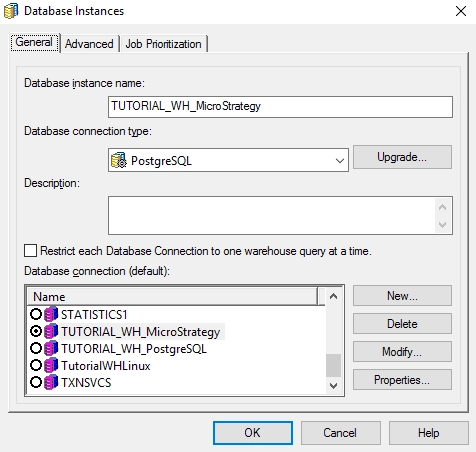
  • On developer, navigate to “Project Source\Administration\Database Instances”, create new or edit an existing Database Instance.
  • Make Sure the Database connection type is PostgreSQL, New or Modify an existing Database connection
ka02R000000bsBCQAY_0EM2R000000mtNk.png
  • Switch to Advanced tab, set suitable value for “Character set encoding for Unix drivers”:

If the ODBC data sources is from “Strategy ODBC Driver for PostgreSQL Wire Protocol”, set the value to UTF-8
If the ODBC data sources is from “PostgreSQL Unicode(x64)”, set the value to Non UTF-8
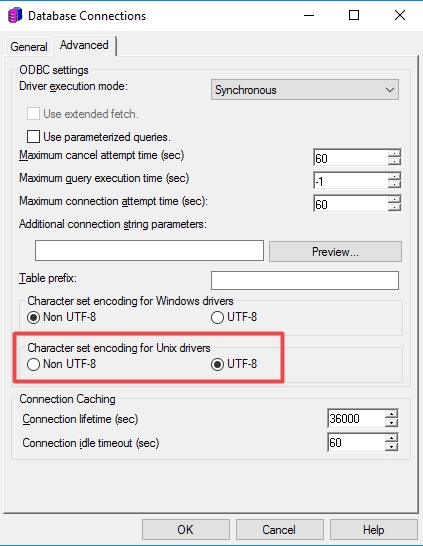
ka02R000000bsBCQAY_0EM2R000000mtNl.png


  • Save the changes

Solution For Windows Drivers
Users may also experience the same problem when they have a Windows DB instance for PostgreSQL. To solve the problem, simply set the 'Character set encoding for Windows driver'  as Non UTF-8 for both of the two ODBC drivers. The steps are the same as the above.


Comment

0 comments

Details

Knowledge Article

Published:

November 25, 2019

Last Updated:

May 6, 2020