Starting with the release of Strategy ONE (March 2024), dossiers are also known as dashboards.
SYMPTOM:
When a user tries to connect to a warehouse from Strategy with passthrough Kerberos authentication enabled, but the user’s Kerberos ticket was not found.
CAUSE:
This error message occurs as expected if a user tries to connect to a warehouse from Strategy with passthrough Kerberos authentication enabled, but the user’s Kerberos ticket was not found.
Since the release of Strategy 2019 Update 3 and Strategy 2020 RC, we enhanced the Kerberos authentication workflow to avoid security leak.
The security leak may include but not limited to the below situation:
A user created a dossier in the local machine which uses passthrough Kerberos to connect to the warehouse, then the user uploads the dossier to Strategy Intelligence Server. Other users who have the privilege to execute the dossier may view the data even though the user may don’t have the read privilege from the warehouse side, as long as the shared Kerberos works and has enough privilege from the warehouse side.
There are many ways may cause the situation:
For example, the user login Intelligence Server through Web or Developer by using standard authentication instead of integrated authentication, thus, the user’s Kerberos ticket won’t be passed to Intelligence Server. According to our previous workflow, if the user’s Kerberos ticket can’t be found, we’ll try to use the Intelligence Server’s Kerberos ticket if the ticket exists.
ACTION:
· For the Database Instance created from the Web with Kerberos authentication enabled, only passthrough Kerberos is allowed.
· For the Database Instance created from the Developer with Kerberos authentication enabled, you can choose to use shared Kerberos or passthrough Kerberos:
Right-click project and choose project configuration, go to Database instance > Authentication > Warehouse, choose Kerberos in the drop-down list of the Metadata authentication type.
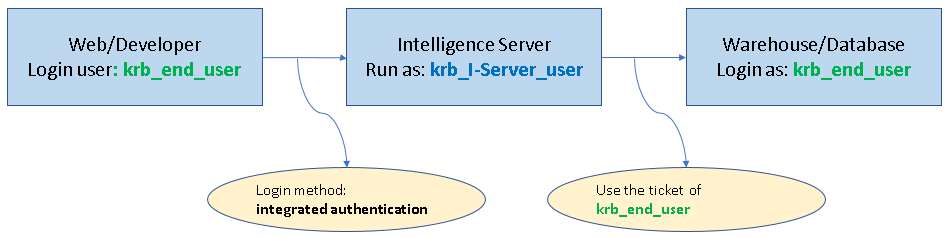
o The checked Database Instance with Kerberos authentication enabled will use passthrough Kerberos, the end-user should login Intelligence Server by using integrated authentication, thus the end user’s ticket will pass to the warehouse through Intelligence Server.
o The unchecked Database Instance with Kerberos authentication enabled will use shared Kerberos.

Terminology Explain:
Shared Kerberos:

Passthrough Kerberos:
Related Reference:
KB272948: How to configure Kerberos (Integrated) authentication against Microsoft SQL Server/Hive/Impala for MicroStrategy Secure Enterprise 10.2 and later on Unix/Linux operating systems
KB19580: How to setup Kerberos (Integrated) authentication for the MicroStrategy Intelligence Server 9.x - 2019 on Microsoft Windows operating systems.
KB320454: How to configure Kerberos pass-through with Teradata for MicroStrategy Intelligence Server 10.6 or higher running on Linux Operating Systems
KB45540: How to setup Single Sign-on access to Teradata (using Kerberos) for MicroStrategy Intelligence Server 9.x and newer on Windows
