When the default charset of Sybase ASE database is iso_1, but Japanese characters are stored in Shift-JIS, user need to follow below steps to get them displayed in Strategy Web correctly.
1. Disable the database character set conversion. Otherwise the error like "conversion can not be done" will show.
How to:
Make sure having the exact same value as below capture.
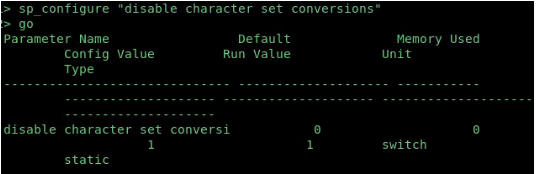
The run value must be 1. If it is not. Please run
sp_configure " disable character set conversions",1
then restart Sybase server. Otherwise this setting would not take effect.
2. Check the DSN which is used to fetch Japanese table, make sure they have the following lines:
IANAAppCodePage=17
Charset=Shift-JIS (not sjis)
Here is an example DSN:
[sybase]
Driver=/iserver-install/BIN/Linux/lib/MYaseXX.so
Description=Strategy ODBC Driver for Sybase ASE Wire Protocol
AlternateServers=
ApplicationName=
ApplicationUsingThreads=1
ArraySize=50
AuthenticationMethod=0
BulkBinaryThreshold=32768
BulkCharacterThreshold=-1
BulkLoadBatchSize=1024
BulkLoadFieldDelimiter=
BulkLoadRecordDelimiter=
Charset=Shift-JIS
ConnectionReset=0
ConnectionRetryCount=0
ConnectionRetryDelay=3
ConnectionReset=0
CursorCacheSize=1
Database=master
DefaultLongDataBuffLen=1024
EnableDescribeParam=1
EnableQuotedIdentifiers=0
EncryptionMethod=0
FailoverGranularity=0
FailoverMode=0
FailoverPreconnect=0
GSSClient=native
HostNameInCertificate=
InitializationString=
Language=
LoadBalancing=0
LoadBalanceTimeout=0
LoginTimeout=15
LogonID=uid
MaxPoolSize=100
MinPoolSize=0
NetworkAddress= NetworkAddress
OptimizePrepare=1
PacketSize=0
Pooling=0
QueryTimeout=0
RaiseErrorPositionBehavior=0
ReportCodePageConversionErrors=0
SelectMethod=0
ServicePrincipalName=
TruncateTimeTypeFractions=0
TrustStore=
TrustStorePassword=
ValidateServerCertificate=0
WorkStationID=
IANAAppCodePage=17
3. Make sure the DBIntance has the UTF8 for Unix.

With all above done in sequence we should be able to get Japanese displayed correctly.
