EducationSoftwareStrategy.com
StrategyCommunity

Knowledge Base

Product

Community

Knowledge Base

TopicsBrowse ArticlesDeveloper Zone

Product

Download SoftwareProduct DocumentationSecurity Hub

Education

Tutorial VideosSolution GalleryEducation courses

Community

GuidelinesGrandmastersEvents
x_social-icon_white.svglinkedin_social-icon_white.svg
Strategy logoCommunity

© Strategy Inc. All Rights Reserved.

LegalTerms of UsePrivacy Policy
  1. Home
  2. Topics

KB484226: 메트릭 함수에서 SQL을 바로 사용하기


Sang-Yeop Lee

Sales Engineer • MicroStrategy


이 아티클을 통해 메트릭 함수에서 SQL 을 바로 사용하는 방법을 알아봅니다.

DB 의 두 테이블이 같은 이름의 칼럼을 갖고 있지만 다른 차원의 데이터들을 갖고 있을 경우, 각기 다른 메트릭을 동적으로 선택하는 것이 바람직 할 때가 있습니다. 실제로 많이 사용되는 예시로 Sum() 함수와 Count() 함수를 함께 사용하는 경우가 있습니다. 한 사용자가 디테일 레벨의 테이블의 특정 칼럼에는 Count() 함수를 사용하고, 이 팩트들의 누적 된 값이 있는 총계 테이블의 같은 이름의 칼럼에는 Sum()을 사용하고자 할 때를 예시로 생각해 보겠습니다.
 
이 작업은 ApplySimple() 와 ApplyAgg() 함수를 팩트와 메트릭 정의에 활요함으로서 이루어질 수 있습니다. 다음의 예시 화면은 Strategy Tutorial 프로젝트 안에서, 단순히 ORDER_DETAIL 과 ORDER_FACT 테이블을 사용해서 만들어졌습니다.
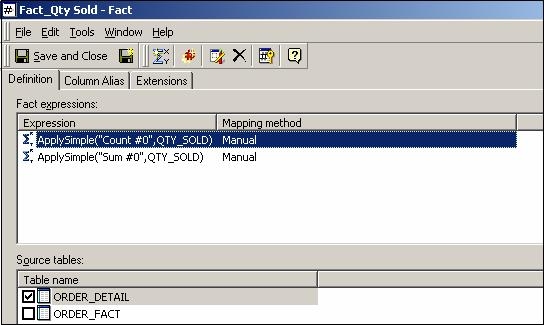
 

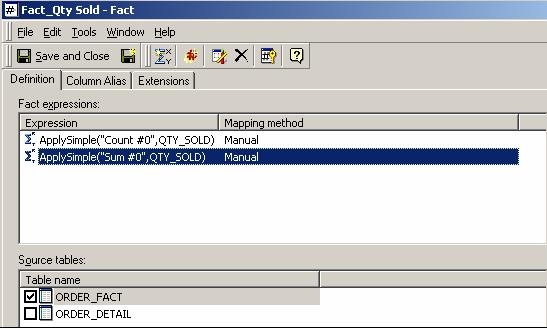
  • ApplySimple()를 사용한 두개의 표현식을 다음과 같이 만드세요:
     
    • ORDER_DETAIL 테이블에서
      1. Fact_Qty Sold: ApplySimple("Count #0", QTY_SOLD)
ka02R000000bsBHQAY_0EM2R000000fPPV.jpeg
    • ORDER_FACT 테이블에서
      • Fact_Qty Sold: ApplySimple("Sum #0", QTY_SOLD) )
ka02R000000bsBHQAY_0EM2R000000fPPa.jpeg
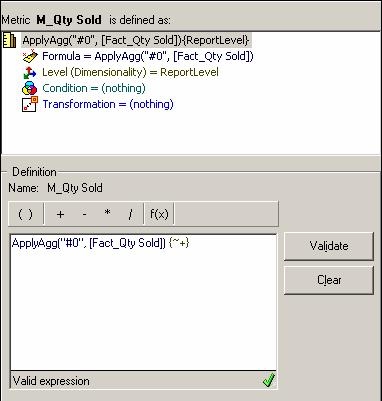
  • ApplyAgg() 함수를 Fact_Qty Sold에 사용해 새로운 메트릭을 만드세요:
     
    • M_Qty Sold:ApplyAgg("#0", Fact_Qty Sold) )

ka02R000000bsBHQAY_0EM2R000000fPPf.jpeg
  • Strategy SQL 엔진이 내제된 표현식을 반영해 적절한 테이블에 대해 SQL 문을 생성합니다:
     

    Web and Mobile client read the default auth mode (auth.modes.default) defined in configOverride.xml
    Following 2 scenarios' behavior change are by design
    1.Multiple modes including OIDC mode are enabled. In releases prior to Strategy 2021 Update 8, OIDC is used as the default auth mode when it is enabled. Starting from Strategy 2021 Update 8, the default auth mode is configured by administrator.
    2.Multiple modes including SAML mode are enabled, SAML is the default authentication mode. In release prior to Strategy 2021 Update 8, user needs to click “Log in with Identity” button to redirect to SAML page for login. Starting from Strategy 2021 Update 8, user will be redirect to SAML page directly if SAML is the default authentication mode.Supported Authentication ModeAuthentication Mode ValueStandard1Guest8LDAP16Trusted64Integrated128SAML1048576OIDC4194304SQL리포트 화면

    Web and Mobile client read the default auth mode (auth.modes.default) defined in configOverride.xml
    Following 2 scenarios' behavior change are by design
    1.Multiple modes including OIDC mode are enabled. In releases prior to Strategy 2021 Update 8, OIDC is used as the default auth mode when it is enabled. Starting from Strategy 2021 Update 8, the default auth mode is configured by administrator.
    2.Multiple modes including SAML mode are enabled, SAML is the default authentication mode. In release prior to Strategy 2021 Update 8, user needs to click “Log in with Identity” button to redirect to SAML page for login. Starting from Strategy 2021 Update 8, user will be redirect to SAML page directly if SAML is the default authentication mode.Supported Authentication ModeAuthentication Mode ValueStandard1Guest8LDAP16Trusted64Integrated128SAML1048576OIDC4194304SQL리포트 화면

    select a11.ORDER_ID ORDER_ID,
    a11.SHIP_DATE SHIP_DATE,
    Sum a11.QTY_SOLD WJXBFS1
    from ORDER_FACT a11
    group by a11.ORDER_ID,
    a11.SHIP_DATE


    select a11.ORDER_ID ORDER_ID,
    a11.PROMOTION_ID PROMOTION_ID,
    a12.PROMO_SALE PROMO_SALE,
    Count a11.QTY_SOLD WJXBFS1
    from ORDER_DETAIL a11,
    LU_PROMOTION a12
    where a11.PROMOTION_ID = a12.PROMO_SALE_ID
    group by a11.ORDER_ID,
    a11.PROMOTION_ID,
    a12.PROMO_SALE


Comment

0 comments

Details

Knowledge Article

Published:

April 29, 2020

Last Updated:

April 29, 2020