EducationSoftwareStrategy.com
StrategyCommunity

Knowledge Base

Product

Community

Knowledge Base

TopicsBrowse ArticlesDeveloper Zone

Product

Download SoftwareProduct DocumentationSecurity Hub

Education

Tutorial VideosSolution GalleryEducation courses

Community

GuidelinesGrandmastersEvents
x_social-icon_white.svglinkedin_social-icon_white.svg
Strategy logoCommunity

© Strategy Inc. All Rights Reserved.

LegalTerms of UsePrivacy Policy
  1. Home
  2. Topics

KB484332: Apply specific personal prompt answers provided in Narrowcast Services (NCS) and Distribution services (DS) subscriptions during Automated validation in Integrity Manager


Yuan Guo

Quality Engineer, Senior • MicroStrategy


This article shows how to collect personal prompt answers from subscriptions in Narrowcast server (NCS) or Distribution Services and apply them when validating reports, documents, and dossiers in Integrity Manager 11.2.2 and above.

Starting with the release of Strategy ONE (March 2024), dossiers are also known as dashboards.

Description

You can collect personal prompt answers from subscriptions in Narrowcast server (NCS) or Distribution Services and apply them when validating reports, documents, and dossiers in Integrity Manager 11.2.2 and above.

Pre-Install

Install Python 3.7.6 and SQL Server ODBC driver. Run the following command to install pyodbc for Python to communicate with the NCS/DS database server. The connection information is read from config.json.


pip install -r requirements.txt

When upgrading to Strategy 2020 Update 2, the requirements.txt file is saved in the PromptAnswerExtractor subfolder by default. This folder is located in <Common Path>/utilities_scripts/PromptUtilities.The value of <Common Path> is specified by the registry key located at Computer\HKEY_LOCAL_MACHINE\SOFTWARE\WOW6432Node\MicroStrategy\DSS Suite.

Stage 1: Extract personal prompt answers from NCS or DS by running a prepared Python script

  • Navigate to the PromptAnswerExtractor subfolder, located in <Common Path>/utilities_scripts/PromptUtilities. This folder is created automatically when upgrading Strategy to 2020 Update 2. It is located in the default path specified by the registry key value, Computer\HKEY_LOCAL_MACHINE\SOFTWARE\WOW6432Node\MicroStrategy\DSS Suite.
  • Modify the value of the "target" key in the config.json file to determine which subscription source you retrieving the personal prompt answers from (NCS or DS). Refer to the file shown below for details. If you choose NCS, provide the related connection information required in the first two sections for "SubscriptionBookRepo" and "ObjectRepo”. Otherwise, the third section, "DSRepo" is used to connect to DS subscription data when the target value is set as "DS".
    
    {
    	    "SubscriptionBookRepo": {
    	        "DBHost": "",
    	        "DBName": "",
    	        "Username": "",
    	        "DBPort": 1433,
    	        "Driver": "SQL Server",
    	        "Prefix": ""
    	    },
    	    "ObjectRepo": {
    	        "DBHost": "",
    	        "DBName": "",
    	        "Username": "",
    	        "Driver": "SQL Server",
    	        "Prefix": ""
    	    },
    	    "DSRepo": {
    	        "DBHost": "",
    	        "DBName": "",
    	        "Username": "",
    	        "Driver": "SQL Server",
    	        "Prefix": ""
    	    },
    	    "target": "NCS"
    	}
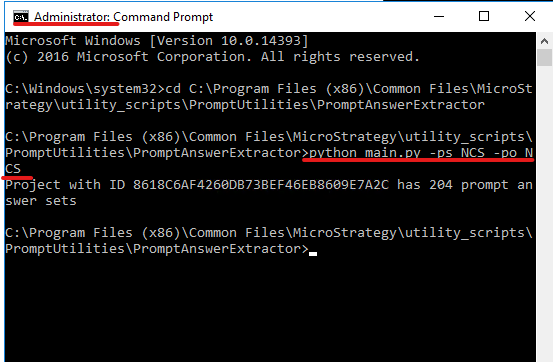
    

  • Open a command prompt in Windows as an administrator and change the working directory to the PromptAnswerExtractor path.
  • Run the prepared Python script, main.py, using the command, python main.py -ps <password> -po <password>. This collects the personal prompt answers from NCS, which are automatically saved in a newly created answers.json file within the output subfolder. There are different specific parameters to be clarified, if you want to collect prompt answers from DS. Use -h for help.
ka0PW0000001JfkYAE_0EM2R000000fvX2.jpeg

Stage 2: Enable IM to start with the answers.json file by adding the "MSTR_PROMPT_FILE" environment variable

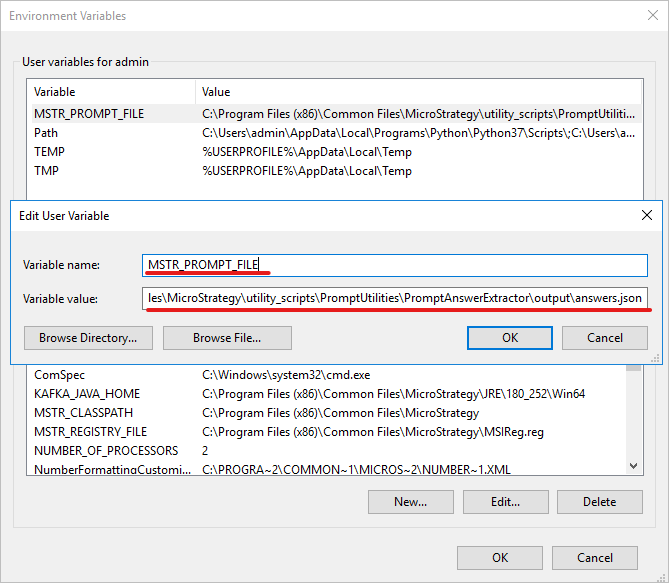
We have not made any changes to the original GUI and workflow of Integrity Manager. When you want to apply personal prompt answers from NCS or DS in the Integrity Manager test, add a new environment variable named "MSTR_PROMPT_FILE" and set the answers.json file as its value, including the full path. Then restart Integrity Manager. The prompt answers in the json file are read and used during the test.
ka0PW0000001JfkYAE_0EM2R000000fvXW.jpeg

You can rename and relocate the prompt answer file if necessary, but don't forget to update the value of the "MSTR_PROMPT_FILE" after doing so. Otherwise, Integrity Manager returns an error when it can't find the answer file. Do not rename the "MSTR_PROMPT_FILE" variable. If you rename the variable, Integrity Manager deals with the prompt answer in the previous way, instead of starting with the answer file.

Stage 3: Run a test in Integrity Manager and check the prompt answer source in the result details

As mentioned in Stage 2, Integrity Manager starts with the answer file, as long as you set an "MSTR_PROMPT_FILE" environment variable. Remove the variable if you want to disable this function later. In this situation, Integrity Manager follows the original logic, using the prompt answer strategy based on the priority list, when it can't read the "MSTR_PROMPT_FILE" environment variable or find the object ID in the answers .json file.
Warning: Once the environment variable is modified, Integrity Manager must be restarted for the changes to take effect.
Configure the test as you did previously, then click Apply to begin the test. After the test is finished, check the Detail panel regarding the object's prompt answer source. For objects with personal prompt answers from NCS or DS, the source is the answers.json file generated by the Python script in the previous stage. At the same time, the answer content is listed below.
Warning: For a baseline versus baseline test to validate the content, make sure the environment path is always correctly set and the same answer.json is applied when generating the two baselines or refreshing any items in them.

ka0PW0000001JfkYAE_0EM2R000000fvYZ.jpeg

Comment

0 comments

Details

Knowledge Article

Published:

June 11, 2020

Last Updated:

March 21, 2024