Starting with the release of Strategy ONE (March 2024), dossiers are also known as dashboards.
When execute a dossier or a report with parameterized queries enabled, the user may encounter below error message:
Error: QueryEngine encountered error: OdbcPreparedStatement::GetParameterDataTypes() failed.
Error type: Odbc error. Odbc operation attempted: SQLDescribeParam. [IM001:0: on SQLHANDLE] [Microsoft][ODBC Driver Manager] Driver does not support this function.
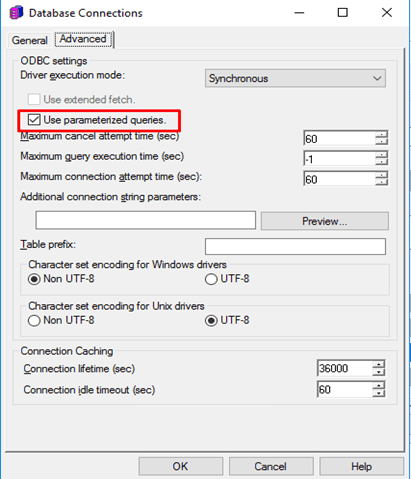
Edit your DB instance from Developer path Administrator->Configuration Managers->Database Instances, or the DB role from Web data import page Add External Data->Oracle->Any Select Import Options. Then check if the Use parameterized queries box is selected.
For DB instance on Developer:
For DB role on Web:
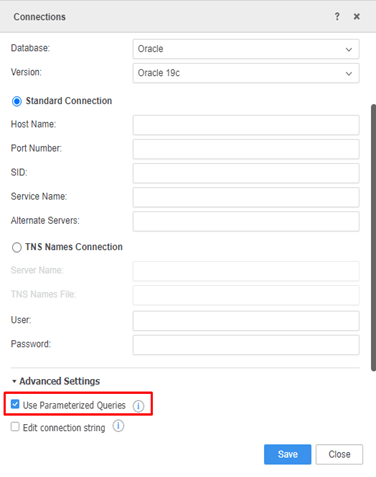
If the Use parameterized Queries is checked, then the DB instance or the DB role is ready for use parameterized queries to execute report/dossier SQL.
Need to check on one parameter from Windows created Oracle ODBC DSN:
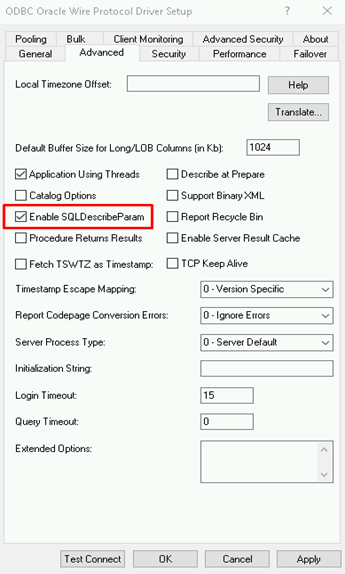
For Oracle Linux ODBC DSN and Oracle ODBC DSN-less connection string, need to add below parameter:
EnableDescribeParam = 1
Currently situation is being reviewed by Strategy Technology team for a potential enhancement on an upcoming Strategy release.
