Starting with the release of Strategy ONE (March 2024), dossiers are also known as dashboards.
Background
Applications Architect might have been getting different results when Report are used as dataset Cube as dataset. Cube-as-Dataset has more capability and better data behavior as compared to Report-as-Dataset. Report-as-Dataset can only generate single pass Cube Subsetting Instruction (aka CSI) which limits the functional and cannot leverage features that are only supported by multi-pass CSI such as Metric Qualification, Level Metrics, Non-Aggregation etc.
Content
Objects that are affected:
CSI differences:
There are additional information for “Table Accessed” and “with Table Join Tree” in the Cube-as-Dataset CSI.
Before the fix: Report-as-Dataset CSI
select [Category]@[CATEGORY_ID_2],
[Category]@[CATEGORY_DESC],
[Year]@[YEAR_ID_2],
sum([Profit])@{[Category],[Year]},
sum([Revenue])@{[Category],[Year]}
from R01
After the fix: Same as Cube-as-Dataset CSI
Tables Accessed:
Table2 [L_CATEGORY]: Category, LOOKUP_TABLE
Table3 [F_YEAR_COUNTRY_CATEGORY]: Year, Country, Category, Revenue, Profit, FACT_TABLE
select [Category]@[CATEGORY_ID_2],
[Category]@[CATEGORY_DESC],
[Year]@[YEAR_ID_2],
sum([[F_YEAR_COUNTRY_CATEGORY].Profit])@{[Category],[Year]} as [Profit],
sum([[F_YEAR_COUNTRY_CATEGORY].Revenue])@{[Category],[Year]} as [Revenue]
from R01
with Table Join Tree: [F_YEAR_COUNTRY_CATEGORY]
Steps to Reproduce:
This procedure is using Strategy Tutorial WH that is shipped with Strategy products.
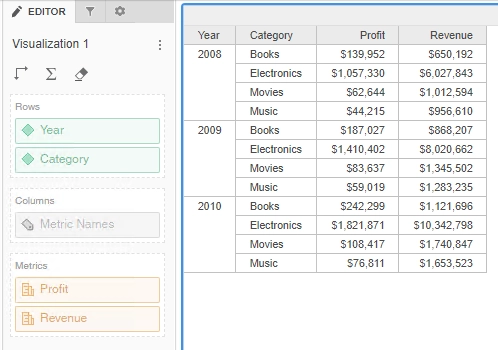
************ Individual Step Start ************
Number of Rows Returned: 12
Time Spent: 0.068 sec(s)
Query Execution Start Time: 1/19/2021 5:53:15 PM
Query Execution End Time: 1/19/2021 5:53:15 PM
select [Category]@[CATEGORY_ID_2],
[Category]@[CATEGORY_DESC],
[Year]@[YEAR_ID_2],
sum([Profit])@{[Category],[Year]},
sum([Revenue])@{[Category],[Year]}
from R01
************ Individual Step End ************
************ Individual Step Start ************
Number of Rows Returned: 12
Time Spent: 0.190 sec(s)
Query Execution Start Time: 1/20/2021 11:54:36 AM
Query Execution End Time: 1/20/2021 11:54:36 AM
Tables Accessed:
Table2 [L_CATEGORY]: Category, LOOKUP_TABLE
Table3 [F_YEAR_COUNTRY_CATEGORY]: Year, Country, Category, Revenue, Profit, FACT_TABLE
select [Category]@[CATEGORY_ID_2],
[Category]@[CATEGORY_DESC],
[Year]@[YEAR_ID_2],
sum([[F_YEAR_COUNTRY_CATEGORY].Profit])@{[Category],[Year]} as [Profit],
sum([[F_YEAR_COUNTRY_CATEGORY].Revenue])@{[Category],[Year]} as [Revenue]
from R01
with Table Join Tree: [F_YEAR_COUNTRY_CATEGORY]
************ Individual Step End ************
Difference when there is Security Filter:
Exceptions:
When the Report contains the following features which are not supported in Intelligent Cubes, it’s exempt from this feature:
Cause:
This is a known issue in Strategy.
Solution:
This issue has been addressed in Strategy 2021.
To pick up the fix, upgrade to Strategy 2021 or above and enable project level setting "Data Engine Version" to 2021 or above. For more details on enabling the setting, refer to Change Data Engine Version.
Strategy internal reference number for this technical note is F25102.
