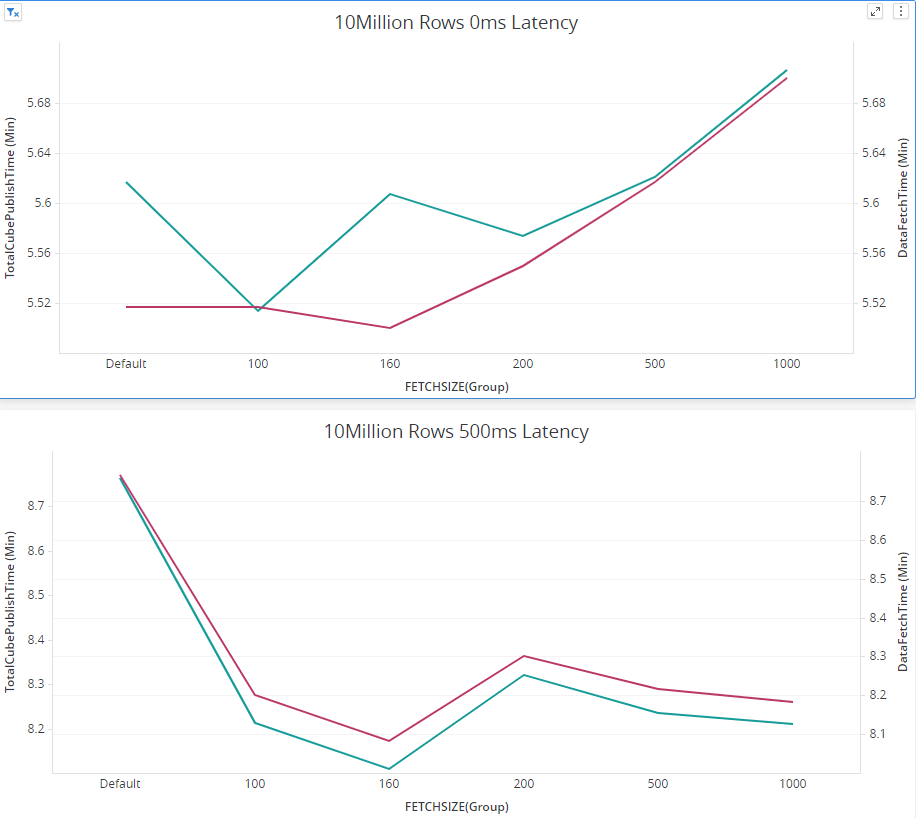
Snowflake JDBC Driver has a parameter FETCHSIZE with is by default set to 50 and defines how much data is transferred in one go, which can be specified in the connection string:
jdbc;driver={net.snowflake.client.jdbc.snowflakedriver};url={jdbc:snowflake://<your_host>/?warehouse=<your_warehouse>&db=<your_db>&schema=<your_schema>};fetchsize=xxx;
We found increasing it to a relatively bigger value could probably make a positive performance impact. Setting fetchsize is supposed to reduce number of round-trips between the database and the application (Strategy IntelligenceServer), which would theoretically reduce the data fetch time. But, while processing a bigger size of rowset, more memory would be consumed. There is tradeoff here.
First, there is no “one size fits all” value for this setting. The best way to find the optimal size for fetchsize is to benchmark the workload you’re trying to optimize with different values of fetchsize, evaluate results, and pick the optimal value. In the vast majority of cases, people pick a fetch size of 100 or 1000 and that turns out to be a reasonably optimal setting.
There are some aspects we need to consider while choosing the optimal value.
Snowflake Side Settings:
CLIENT_MEMORY_LIMIT: Parameter that specifies the maximum amount of memory the JDBC driver or ODBC driver should use for the result set from queries (in MB).
Official Documentation: https://docs.snowflake.com/en/sql-reference/parameters.html#client-memory-limit
CLIENT_RESULT_CHUNK_SIZE: Parameter that specifies the maximum size of each set (or chunk) of query results to download (in MB). The JDBC driver downloads query results in chunks.
Official Documentation: https://docs.snowflake.com/en/sql-reference/parameters.html#client-result-chunk-size
CLIENT_PREFETCH_THREADS: Parameter that specifies the number of threads used by the client to pre-fetch large result sets. The driver will attempt to honor the parameter value, but defines the minimum and maximum values (depending on your system’s resources) to improve performance.
Official Documentation: https://docs.snowflake.com/en/sql-reference/parameters.html#client-prefetch-threads
Make sure “2 * CLIENT_PREFETCH_THREADS * CLIENT_RESULT_CHUNK_SIZE < CLIENT_MEMORY_LIMIT” on Snowflake Side.
IntelligenceServer Side Settings:
While changing fetchsize to a bigger value, errors like would occur.
JdbcSQLException occur. Error Message: JDBC driver internal error: Max retry reached for the download of #chunk27 (Total chunks: 120) retry=10, error=net.snowflake.client.jdbc.SnowflakeSQLException: JDBC driver internal error: Exception: Failure allocating buffer..
at net.snowflake.client.jdbc.SnowflakeChunkDownloader$2.downloadAndParseChunk(SnowflakeChunkDownloader.java:983)…
It is due to the JVM heapsize limit is hit. The default is 1200MB. The way to enlarge the JVM heapsize is described in this article: https://community.Strategy.com/s/article/How-to-set-the-maximum-Java-Heap-Size-value-for-JDBC-source-connectivity-in-Strategy-Developer-and-Web-10-11?language=en_US
Some internal Test results: