Starting with the release of Strategy ONE (March 2024), dossiers are also known as dashboards.
Description
In some cases, it has very long Table Join Path to apply filter which uses too much memory and leads to error “This job was cancelled by an administrator”. To reduce the memory usage and improve performance, we prioritize the table whose join path has the smallest join cost with Data Engine Version 2021.
Steps to Reproduce
This procedure is using Strategy Tutorial WH that is shipped with Strategy products.
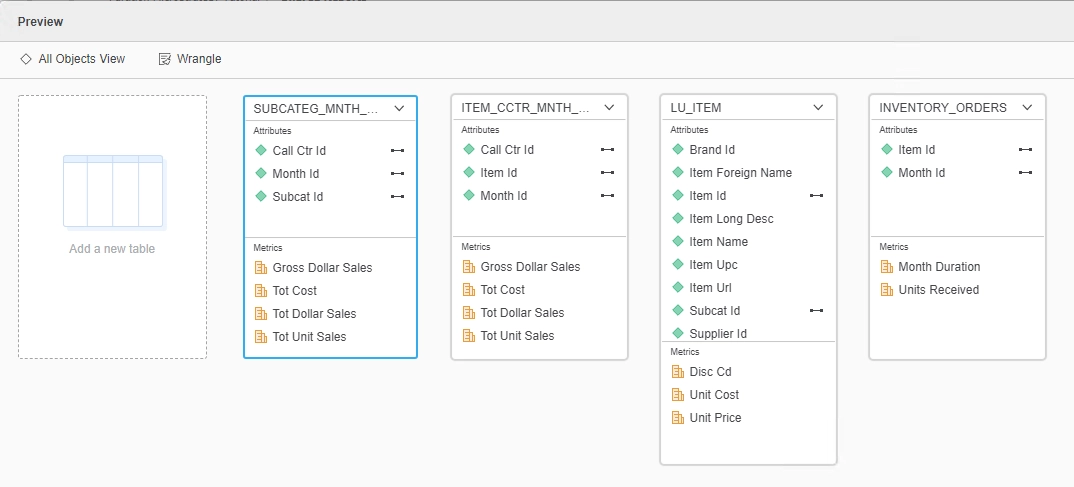
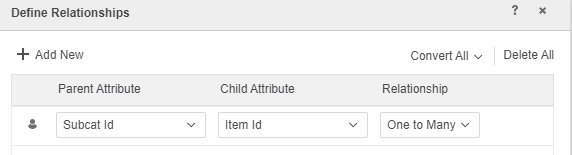
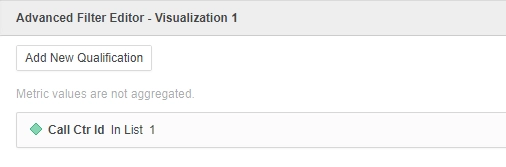
************ Individual Step Start ************
Number of Rows Returned: 360
Time Spent: 0.007 sec(s)
Query Execution Start Time: 3/9/2021 4:52:02 PM
Query Execution End Time: 3/9/2021 4:52:02 PM
Tables Accessed:
Table12 [REL_SUBCAT_ID_ITEM_ID]: Subcat Id, Item Id, RELATIONSHIP_TABLE, ONE_TO_MANY
Table13 [F_SUBCATEG_MNTH_CTR_SLS2FFDC70441004BD18CA5A0BF992C748C]: Call Ctr Id, Subcat Id, Month Id, Row Count - SUBCATEG_MNTH_CTR_SLS, Tot Dollar Sales, Tot Cost, Tot Unit Sales, Gross Dollar Sales, FACT_TABLE
Table16 [F_INVENTORY_ORDERS45842F822F2F434E91427F99765E7C81]: Month Id, Item Id, Month Duration, Row Count - INVENTORY_ORDERS, Units Received, FACT_TABLE
select [Item Id]@[ITEM_ID],
sum([[F_INVENTORY_ORDERS45842F822F2F434E91427F99765E7C81].Units Received])@{[Item Id]} as [Units Received]
from SUBCATEG_MNTH_CTR_SLS ITEM_CCTR_MNTH_SLS LU_ITEM I... (4 tables)
with Table Join Tree: [F_INVENTORY_ORDERS45842F822F2F434E91427F99765E7C81]
Join [REL_SUBCAT_ID_ITEM_ID] with output level Tuple([Item Id]@[ITEM_ID], [Subcat Id]@[SUBCAT_ID], [Month Id]@[MONTH_ID])
Join (Set of distinct Tuple([Subcat Id]@[SUBCAT_ID], [Month Id]@[MONTH_ID]) where Tuple([Subcat Id]@[SUBCAT_ID], [Month Id]@[MONTH_ID]) in [F_SUBCATEG_MNTH_CTR_SLS2FFDC70441004BD18CA5A0BF992C748C]<[Call Ctr Id]@[CALL_CTR_ID] in (1)>) with output level Tuple([Item Id]@[ITEM_ID], [Month Id]@[MONTH_ID])
************ Individual Step End ************
Cause
This is a known issue in Strategy.
Solution
This issue has been addressed in Strategy 2021.
To pick up the fix, upgrade to Strategy 2021 or above and enable project level setting "Data Engine Version" to 2021 or above. For more details on enabling the setting, refer to Change Data Engine Version
After the fix, it picks shorter Table Join Path to apply filter.
************ Individual Step Start ************
Number of Rows Returned: 360
Time Spent: 0.318 sec(s)
Query Execution Start Time: 3/10/2021 11:57:35 AM
Query Execution End Time: 3/10/2021 11:57:35 AM
Tables Accessed:
Table14 [F_ITEM_CCTR_MNTH_SLSF9B7ABED77FD49939A4B40F867AC8EB6]: Call Ctr Id, Month Id, Item Id, Row Count - ITEM_CCTR_MNTH_SLS, Tot Dollar Sales, Tot Cost, Tot Unit Sales, Gross Dollar Sales, FACT_TABLE
Table16 [F_INVENTORY_ORDERS45842F822F2F434E91427F99765E7C81]: Month Id, Item Id, Month Duration, Row Count - INVENTORY_ORDERS, Units Received, FACT_TABLE
select [Item Id]@[ITEM_ID],
sum([[F_INVENTORY_ORDERS45842F822F2F434E91427F99765E7C81].Units Received])@{[Item Id]} as [Units Received]
from SUBCATEG_MNTH_CTR_SLS ITEM_CCTR_MNTH_SLS LU_ITEM I... (4 tables)
with Table Join Tree: [F_INVENTORY_ORDERS45842F822F2F434E91427F99765E7C81]
Join (Set of distinct Tuple([Item Id]@[ITEM_ID], [Month Id]@[MONTH_ID]) where Tuple([Item Id]@[ITEM_ID], [Month Id]@[MONTH_ID]) in [F_ITEM_CCTR_MNTH_SLSF9B7ABED77FD49939A4B40F867AC8EB6]<[Call Ctr Id]@[CALL_CTR_ID] in (1)>) with output level Tuple([Item Id]@[ITEM_ID], [Month Id]@[MONTH_ID])
************ Individual Step End ************
Strategy internal reference number for this technical note is DE170977.
