EducationSoftwareStrategy.com
StrategyCommunity

Knowledge Base

Product

Community

Knowledge Base

TopicsBrowse ArticlesDeveloper Zone

Product

Download SoftwareProduct DocumentationSecurity Hub

Education

Tutorial VideosSolution GalleryEducation courses

Community

GuidelinesGrandmastersEvents
x_social-icon_white.svglinkedin_social-icon_white.svg
Strategy logoCommunity

© Strategy Inc. All Rights Reserved.

LegalTerms of UsePrivacy Policy
  1. Home
  2. Topics

KB485144: Open ID Connect (OIDC) Authentication


Sumit Bansal

Quality Engineer, Senior • Strategy


This article explains the OIDC authentication flow and configurations supported by MicroStrategy

Description

This article takes a deep dive into the OIDC authentication flow and configurations supported by Strategy. This can be helpful if you are using a custom identity provider and want to integrate it with MicroStrategy OIDC authentication.
OpenID Connect is an identity protocol and open standard that is built on OAuth 2.0 protocol. It enables applications such as Strategy, the relying party (RP), to rely on authentication that is performed by an OpenID Connect Provider (OP) to verify the identity of a user. Upon the successful authentication and generation of an access token, Strategy requests basic user information from the identity provider to create a user in the Strategy metadata.
 

MicroStratgy Supported Authentication Workflows

Strategy supports the Client Authorization Code + Client Secret key flow and the Client Authorization Code + PKCE (supports native applications) flow. If the same Strategy application needs to be accessed by both web clients (browsers) and native applications (Desktop and Mobile apps) it is possible to configure the application to use both workflows. Strategy does not support implicit flow, as it is not recommended by the OAuth 2.0 working group.
 

Strategy Flow Diagram

1. Client Authorization Code + PKCE (supports native applications) flow

ka0PW0000000uYTYAY_0EM4W00000385B2.jpeg

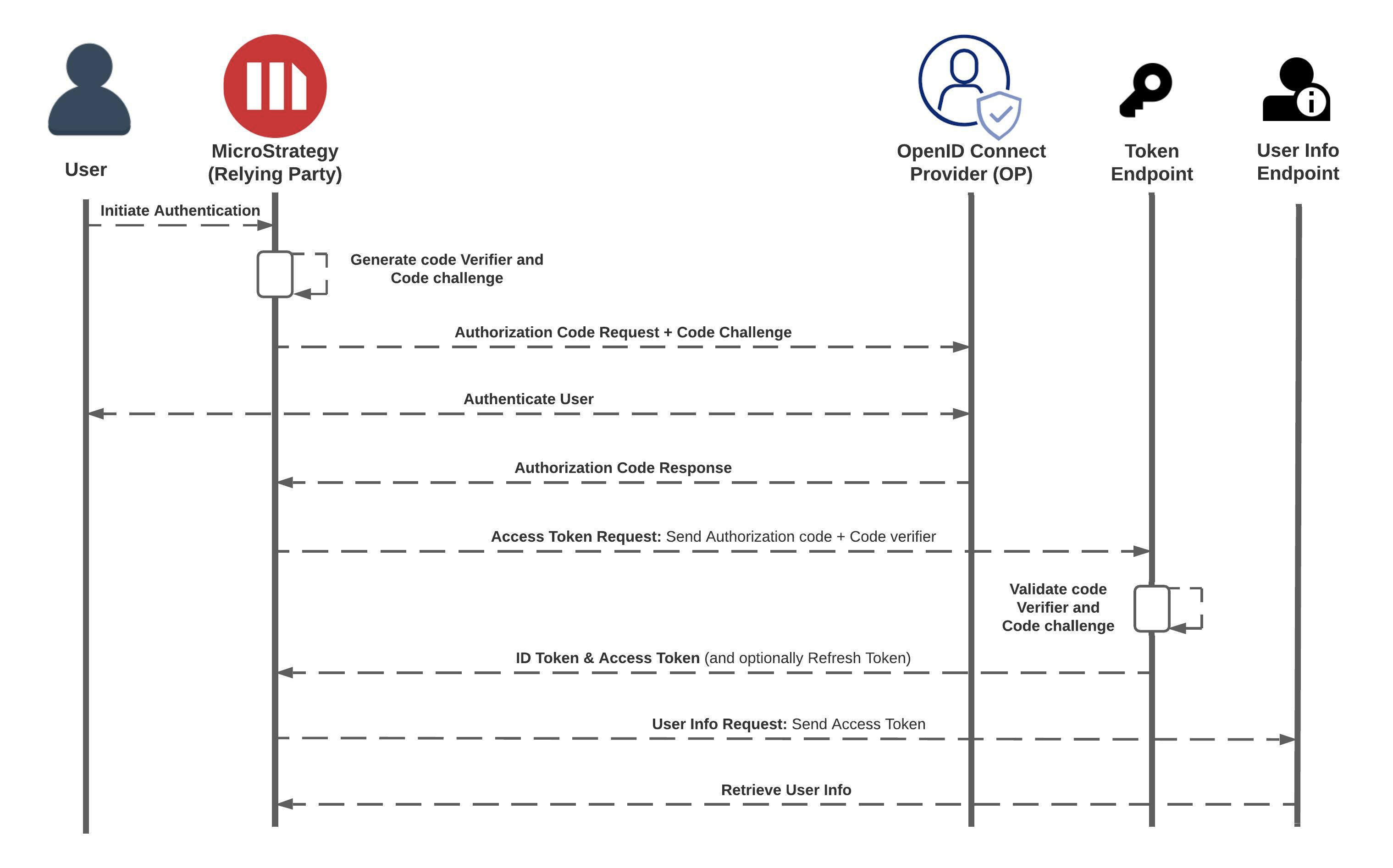
The Client Authorization Code + PKCE (supports native applications) flow is recommended as it supports all Strategy clients. In this flow, Strategy does not need the client secret key and generates a hashed code challenge instead.
  1. The user initiates OpenID Connect (OIDC) authentication.
  2. Strategy generates the hashed code challenge and code verifier.
  3. Strategy sends the authorization code request along with a code challenge to the identity provider.
  4. The identity provider validates the user. This can also include multi-factor authentication.
  5. Upon successful user authentication, the identity provider sends the authorization code to Strategy.
  6. Strategy requests the tokens by sending a request to the token endpoint with an authorization code and code verifier in the basic headers.
  7. The identity provider verifies the code verifier with the hashed code challenge.
  8. Upon successful code verification, Strategy gets the access token from the identity provider.
  9. Strategy posts the user information request with the access token.
  10. Strategy creates a user in the metadata, based on user information from the identity provider, and initiates the Intellgence server session.

2. Client Authorization Code + Client Secret key flow

ka0PW0000000uYTYAY_0EM4W00000385BH.jpeg

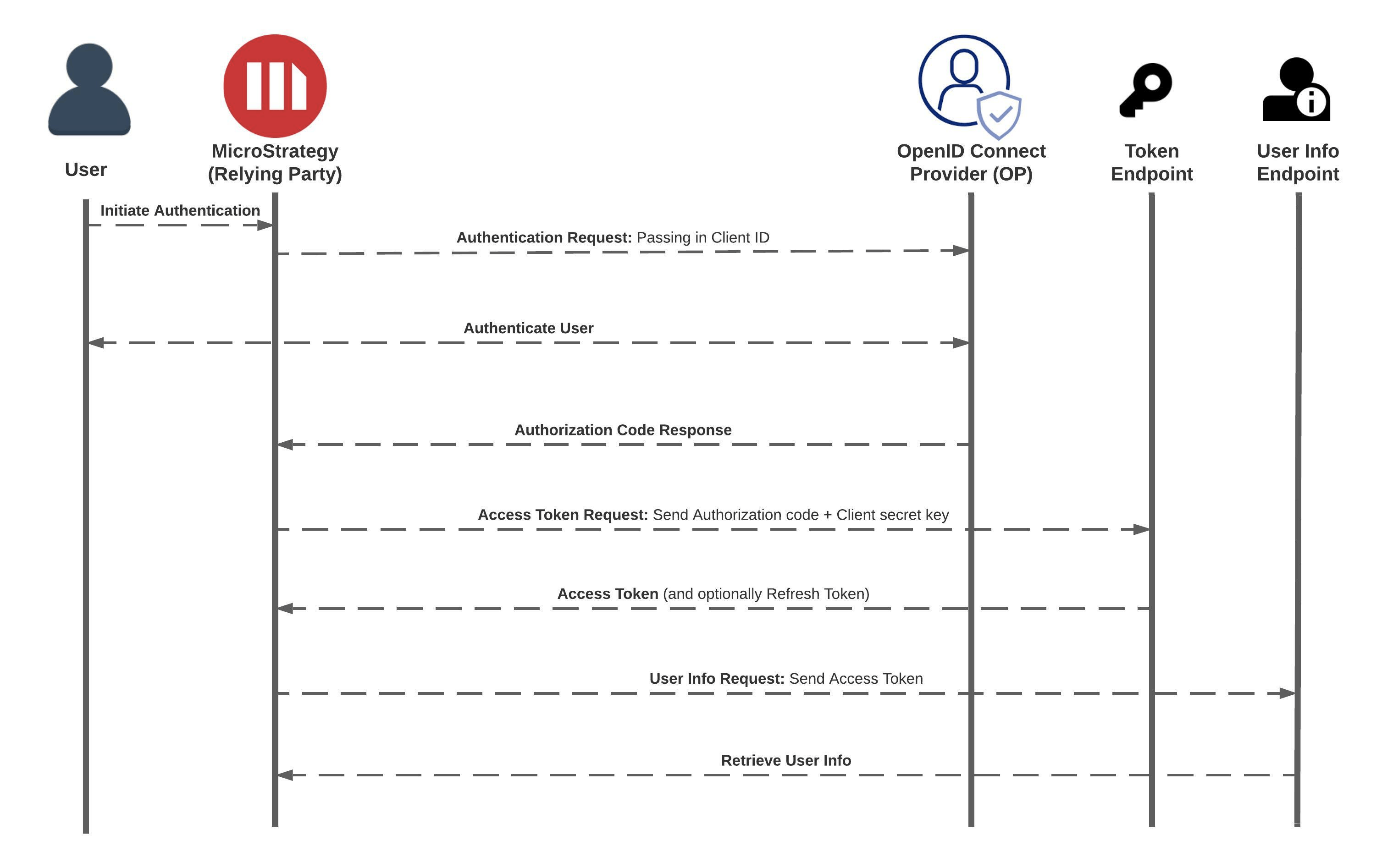
The Client Authorization Code + Client Secret key flow is supported by Web and Library Web only. It is not supported by native applications such as Workstation and mobile apps. In this flow, Strategy must have the client secret key to complete the authentication.

  1. The user initiates OpenID Connect (OIDC) authentication.
  2. Strategy makes a post request to the identity provider with the client ID.
  3. The identity provider validates the user. This can also include multi-factor authentication.
  4. Upon successful user authentication, the identity provider sends the authorization code to Strategy.
  5. Strategy requests the tokens by sending a request to the token endpoint with an authorization code and client secret key in the basic headers.
  6. The identity provider verifies the client secret key and generates the access tokens for Strategy.
  7. Strategy posts the user information request with the access token.
  8. Strategy creates a user in the metadata, based on user information from the identity provider, and initiates the Intelligence server session.

Additional Details

  1. The following scopes are recommended for OIDC authentication:
    • openid (required) Indicates that the application intends to use OIDC to verify the user's identity and returns the sub claim, which uniquely identifies the user.
    • profile (optional) Returns claims that represent basic profile information, such as
      name
      ,
      family_name
      ,
      given_name
      ,
      middle_name
      ,
      nickname
      ,
      preferred_username
      ,
      profile
      ,
      picture
      ,
      website
      ,
      gender
      ,
      birthdate
      ,
      zoneinfo
      ,
      locale
      , and
      updated_at.
  2. Strategy expects the access token to be signed in using the RS256 (RSA Signature with SHA-256) algorithm.
  3. Strategy makes the POST request with a client ID and client secret/code challenge in a basic authentication header (client_secret_basic) to get the tokens from the OpenID Connect Provider. There are other client authentication methods, such as client_secret_post and client_secret_jwt. However, Strategy does not use them. Make sure that the OpenID Connect Provider supports the client_secret_basic request.

Comment

0 comments

Details

Knowledge Article

Published:

August 30, 2021

Last Updated:

February 26, 2024