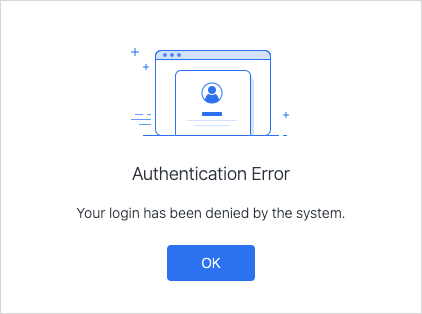
When you click Launch or Strategy Library (see below) from Strategy Web, you may experience the authentication error shown in the second image.
Starting in Strategy 2021 Update 3, stronger encryption capabilities for seamless login between Strategy Library and Strategy Web were introduced, so there are now two modes. The administrator should ensure that identical modes are used for both Strategy Library and Strategy Web to avoid errors.
This article covers troubleshooting two cases 1) if you backup/restore OOTB XML file (this is not recommended) 2) if you only upgrade one Web/Library server instead of both (it is recommended to update both).
Locate the Library Web log file,
StrategyLibrary-StrategyLibrary.log. The path may vary depending on the installation or deployment type. Check to see if the following line exists. This log indicates that the encryption/decryption in both servers is inconsistent.
"Unable to decrypt session state (Given final block not properly padded. Such issues can arise if a bad key is used during decryption.)"
{"@timestamp":"2021-09-26T07:54:30.451Z","@version":"1","message":"Unable to decrypt session state (Given final block not properly padded. Such issues can arise if a bad key is used during decryption.)","logger_name":"com.Strategy.utils.log.Slf4jHandler","thread_name":"https-openssl-nio-8443-exec-3","level":"ERROR","level_value":40000,"Slf4jH.class":"com.Strategy.utils.log.Slf4jHandler","Slf4jH.level":"SEVERE","Slf4jH.formatter":"com.Strategy.utils.log.ExtendedFormatter","level":"SEVERE","handlers":"Slf4jH","access_token":"1e1u1spa5c"}A
"support SeamlessLoginCompatibility"parameter has been added to both Strategy Library and Strategy Web in
sys_defaults.xml. The file path is
Strategy/xml/in Strategy Web and
StrategyLibrary/xml/in Strategy Library. This parameter can be set to be
"0"or
"1". The administrator should ensure this parameter value is identical for both Strategy Web and Strategy Library, so seamless login works as expected.
When you upgrade, if you backup the Strategy 2021 Update 2 (or prior) server’s
sys_defaults.xmlfile, restore it directly to Strategy 2021 Update 3, and install new Strategy 2021 Update 3 Library servers, the encryption/decryption modes are inconsistent between the Strategy Web and Library servers. This is because the older Strategy Web
sys_defaults.xmlfile does not contain the new
"support SeamlessLoginCompatibility"parameter that is in Library Web.
"supportSeamlessLoginCompatibility"parameter to
sys_default.xmland make sure it is set to the same value as in Strategy Library.
