EducationSoftwareStrategy.com
StrategyCommunity

Knowledge Base

Product

Community

Knowledge Base

TopicsBrowse ArticlesDeveloper Zone

Product

Download SoftwareProduct DocumentationSecurity Hub

Education

Tutorial VideosSolution GalleryEducation courses

Community

GuidelinesGrandmastersEvents
x_social-icon_white.svglinkedin_social-icon_white.svg
Strategy logoCommunity

© Strategy Inc. All Rights Reserved.

LegalTerms of UsePrivacy Policy
  1. Home
  2. Topics

KB485696: Add automatic fields to transactional grids in dossiers


Emmanuel Fernandez Hernandez

Product Manager • Strategy


This article details how to add automatic fields to transactional grids in dossiers.

Starting with the release of Strategy ONE (March 2024), dossiers are also known as dashboards.
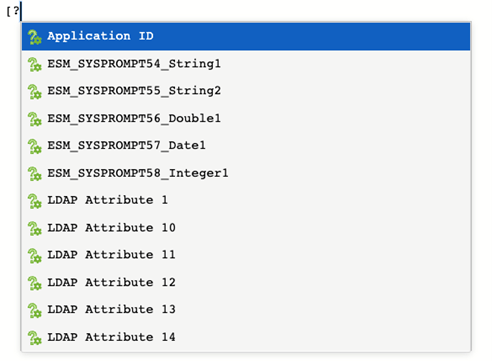
Strategy's transactional grids for dossiers offer the ability to add automatic fields through system prompts. These values are resolved at runtime and passed as part of the SQL configured in your transactions.
 

  • When configuring your transaction, switch to the SQL View.
ka0PW0000001JjMYAU_0EM4W000005nn6a.jpeg
  • For the field in which you want to add an automatic value, type [? to trigger a dialog with a list of available system prompts.
     
ka0PW0000001JjMYAU_0EM4W000005nn6f.jpeg
  • For instance, you can select the logged in user using [?User Login].
     
  • Click
ka0PW0000001JjMYAU_0EM4W000005nn6k.jpeg
  •  to continue configuring the input parameters for the transactional grid.

Comment

0 comments

Details

Knowledge Article

Published:

October 13, 2022

Last Updated:

March 21, 2024