EducationSoftwareStrategy.com
StrategyCommunity

Knowledge Base

Product

Community

Knowledge Base

TopicsBrowse ArticlesDeveloper Zone

Product

Download SoftwareProduct DocumentationSecurity Hub

Education

Tutorial VideosSolution GalleryEducation courses

Community

GuidelinesGrandmastersEvents
x_social-icon_white.svglinkedin_social-icon_white.svg
Strategy logoCommunity

© Strategy Inc. All Rights Reserved.

LegalTerms of UsePrivacy Policy
  1. Home
  2. Topics

KB485831: What are Smart Attributes


Puneet Nagri

Quality Engineer, Principal • MicroStrategy


Smart Attributes represent different intervals of time, allowing you to easily create complete time hierarchy without a need to create separate attributes for each dimension, maintaining hierarchy and relationships between them.

Starting with the release of Strategy ONE (March 2024), dossiers are also known as dashboards.

Prerequisites

  1. Data Engine version in project must be set to version 2021 or above.
  2. Data type of base attribute is timestamp/datetime.
  3. Write-back privilege to Warehouse database.
  4. Metadata upgraded to Strategy 2021 Update 8 or above.

Steps to Create Smart Attributes

  • Go to Smart Attribute blade on the Attributes Editor.
ka0PW0000001JlBYAU_0EM4W000006HW9g.jpeg
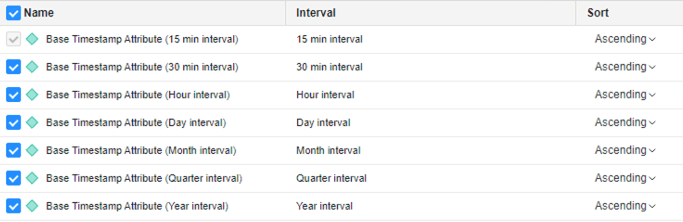
  • Select the check box for any smart attribute that needs to be created. (15-minute smart attribute is always required by default, if any smart attribute is checked)
ka0PW0000001JlBYAU_0EM4W000006HW8K.jpeg
  • You can rename the time attributes or apply default sorting for each smart attribute.
  • Save and Reload Schema.
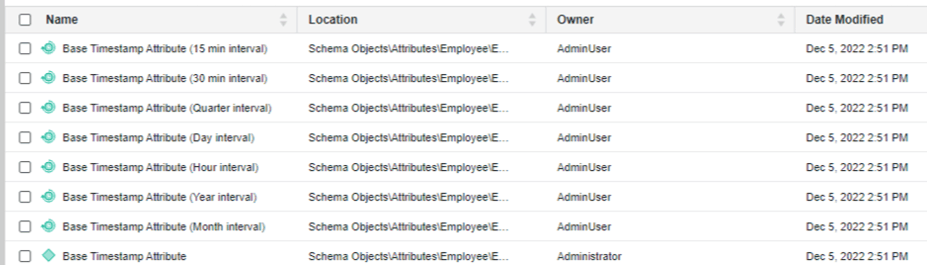
  • You can see the newly created smart attributes in object browser:
ka0PW0000001JlBYAU_0EM4W000006HWA0.jpeg


Steps to Consume Time Attributes

  • Strategy needs lookup tables to be created in Warehouse database.
  • Strategy has an Inhouse mechanism to create the lookup tables automatically, when a Cube/Report/Dossier is executed containing at least 1 smart attribute first time.
  • First execution of such Cube/Report/Dossier results in error below. 
ka0PW0000001JlBYAU_0EM4W000006HWp3.jpeg
  • A background job is automatically triggered which runs Calendar Builder Report
ka0PW0000001JlBYAU_0EM4W000006HWPe.jpeg
  • Above steps must be done with MSTR user having write-back access to warehouse. (admins can restrict this write back privilege for other users ) 
  • Once the above job is complete, a set of 10 lookup tables is created in the Warehouse database with name pattern like MSTR<random_name><Interval>. Example: MSTRHF0028MHQ1DCL00115M.

Relationship of Time Attributes with base Attribute

Smart Attributes are created as parent to the base attribute and the system hierarchy may look like below:

Multi-Form Smart Attributes

Day, Month, Quarter and Year Smart attributes are multiform. 

  • ID Form: This is a unique integer value that identifies an element. 
  • Start Form: This is the datetime form which has display value for the smart-time-attribute. 

It is best practice to always create filters on the ID Form for multi-form smart attributes.
 

FAQs for Time based Reporting

Q: If I have 2 warehouse databases and I have created smart-time-attribute for both warehouses, will MSTR create 2 sets of lookup tables.
A: Yes, lookup tables are created for each combination of CalendarID+CalendarVersionID+DbconnectionID+DbconnectionVersionID (by default a Gregorian system calendar is shipped in all MDs)
Q: Are lookup tables dropped, if the Calendar builder report to create lookup tables is run again.  
A: No, lookup tables are only created, each time the Calendar builder report is run. This report only runs again if any of these are changed: CalendarID,CalendarVersionID,DbconnectionID,DbconnectionVersionID. (unless the report is manually run)
Q: How to format smart-attribute
A: How to Customize formatting for Smart Attributes in a Dossier
Q: Can there be a performance impact due to Timezone. 
A: How performance is impacted with Time Based Reporting.


Comment

0 comments

Details

Knowledge Article

Published:

December 5, 2022

Last Updated:

March 21, 2024