EducationSoftwareStrategy.com
StrategyCommunity

Knowledge Base

Product

Community

Knowledge Base

TopicsBrowse ArticlesDeveloper Zone

Product

Download SoftwareProduct DocumentationSecurity Hub

Education

Tutorial VideosSolution GalleryEducation courses

Community

GuidelinesGrandmastersEvents
x_social-icon_white.svglinkedin_social-icon_white.svg
Strategy logoCommunity

© Strategy Inc. All Rights Reserved.

LegalTerms of UsePrivacy Policy
  1. Home
  2. Topics

KB486043: Configure Library Mobile to Use Applications


Menglu Xia

Product Owner, Principal • MicroStrategy


This article shows how to configure Library Mobile for applications.

Starting with the release of Strategy ONE (March 2024), dossiers are also known as dashboards.
Starting in Strategy 2021 Update 4 you can create applications in Workstation. Applications allow you to design and create unique viewing experiences for different groups of users. To take advantage of this functionality in Library Mobile, follow the steps below.
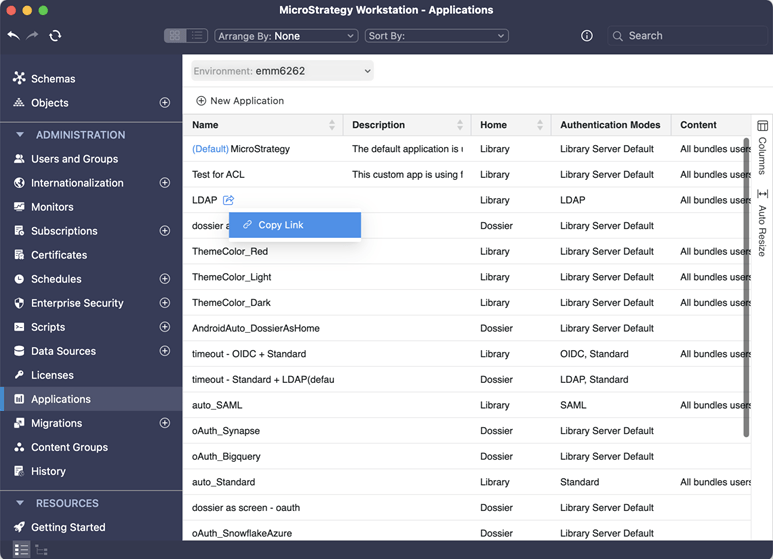
 

  • Manually apply the specific application's configuration.
     
    In Workstation, click Applications in the left pane and copy the link to the application you want to apply.
     
ka0PW0000001Jl7YAE_0EM4W00000883qT.jpeg
  • Pre-configure SDK embedding JSON for a specific application
     
    Predefine a specific Library server and application ID in Library Mobile SDK. See Preconfigure Library Mobile for iOS for details.
     
  • Leverage AppConfig's launch URL configuration
     
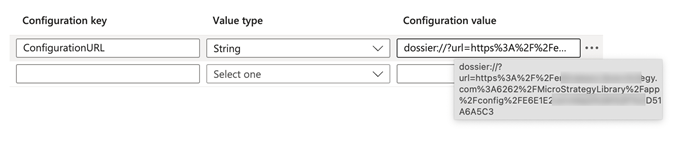
    In the AppConfig profile, use the ConfigurationURL key, in the format shown below:
     
    
    dossier://?url=https%3A%2F%2F<Server domain>%3A<Port>%2FStrategyLibrary%2Fapp%2Fconfig%2F<ApplicationID>

     
ka0PW0000001Jl7YAE_0EM4W00000883uB.jpeg

Comment

0 comments

Details

Knowledge Article

Published:

June 7, 2023

Last Updated:

March 21, 2024