EducationSoftwareStrategy.com
StrategyCommunity

Knowledge Base

Product

Community

Knowledge Base

TopicsBrowse ArticlesDeveloper Zone

Product

Download SoftwareProduct DocumentationSecurity Hub

Education

Tutorial VideosSolution GalleryEducation courses

Community

GuidelinesGrandmastersEvents
x_social-icon_white.svglinkedin_social-icon_white.svg
Strategy logoCommunity

© Strategy Inc. All Rights Reserved.

LegalTerms of UsePrivacy Policy
  1. Home
  2. Topics

KB486172: "Catalog 'xx' does not exist" error occurs when importing data from an Amazon Athena schema


Jinlei Cai

Quality Engineer, Senior • MicroStrategy


This article details a workaround for an error that occurs when importing data from an Amazon Athena schema.

Steps to Reproduce

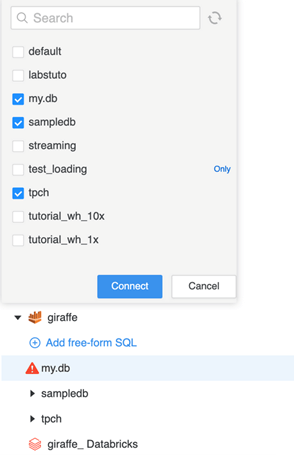
  • Import data from an Amazon Athena schema, such as xx.yy.
     
ka04W000000rZ1JQAU_0EM4W00000961oJ.jpeg
  • A "Catalog 'xx' does not exist." error occurs. 
     
ka04W000000rZ1JQAU_0EM4W00000961oT.jpeg

What is this happening?

Strategy uses the catalog SQL, 

show tables in #?SCHEMA_NAME?#,
 to list tables. To select tables from a schema such as xx.yy, use the following catalog SQL:

select table_name as TAB_NAME FROM information_schema.tables where table_schema='#?SCHEMA_NAME?#' 

Solution

The solution varies depending on whether you are using the new data import experience or the previous import.
 

  1. New Data Import Experience
  2. Previous Data Import

New Data Import Experience

  • Right-click on the data source's name and choose Edit Catalog Options.
     
ka04W000000rZ1JQAU_0EM4W00000961pg.jpeg
  • Click the existing Property Value for Retrieve tables.
     
ka04W000000rZ1JQAU_0EM4W00000961qF.jpeg
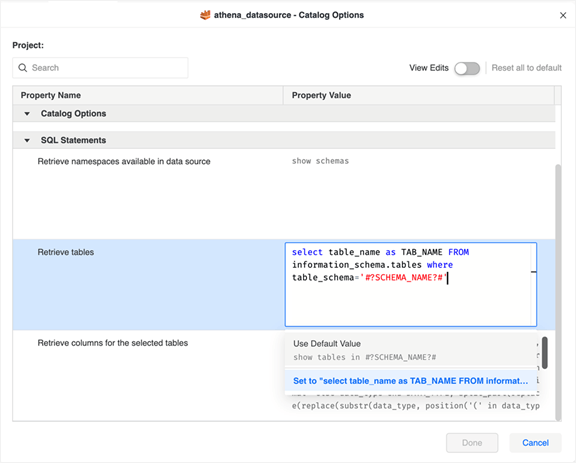
  • Copy and paste the following text into the text box and click Set to....
    
    select table_name as TAB_NAME FROM information_schema.tables where table_schema='#?SCHEMA_NAME?#'
ka04W000000rZ1JQAU_0EM4W00000961qP.jpeg
  • Click Done.

Previous Data Import

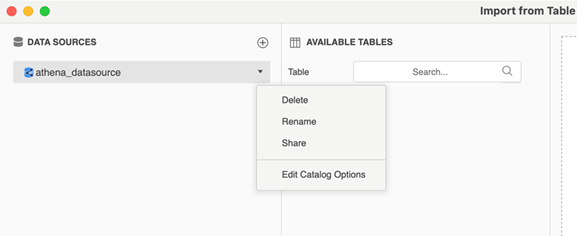
  • Click the drop down arrow next to the data source and choose Edit Catalog Options.
     
ka04W000000rZ1JQAU_0EM4W00000961qy.jpeg
  • Deselect Use default value for retrieving tables.
     
ka04W000000rZ1JQAU_0EM4W00000961sB.jpeg
  • Add the following text to the text box, replacing the default value.
    
    select table_name as TAB_NAME FROM information_schema.tables where table_schema='#?SCHEMA_NAME?#'
  • Click Apply and OK.

Reference:
How to show tables in schema like "xx.yy"


Comment

0 comments

Details

Knowledge Article

Published:

October 18, 2023

Last Updated:

October 18, 2023