EducationSoftwareStrategy.com
StrategyCommunity

Knowledge Base

Product

Community

Knowledge Base

TopicsBrowse ArticlesDeveloper Zone

Product

Download SoftwareProduct DocumentationSecurity Hub

Education

Tutorial VideosSolution GalleryEducation courses

Community

GuidelinesGrandmastersEvents
x_social-icon_white.svglinkedin_social-icon_white.svg
Strategy logoCommunity

© Strategy Inc. All Rights Reserved.

LegalTerms of UsePrivacy Policy
  1. Home
  2. Topics

KB486202: Refresh token authentication mode has been retired for ServiceNow due to an ODBC driver limitation


Ivy Lin

Quality Engineer, Senior • MicroStrategy


This article details how to resolve an issue where refresh token authentication mode does not work with ServiceNow after upgrading to MicroStrategy ONE Update 12.

Root Cause

Starting in Strategy ONE Update 12, Strategy ships ServiceNow ODBC connectors to connect ServiceNow as data source when importing data into Strategy Workstation and Web.
 
However, this version (1.7.4.1006) of the ODBC driver cannot access a ServiceNow instance using refresh token only. Therefore, Strategy removed refresh token authentication when creating a ServiceNow connection.
 

Symptom

Existing Connections

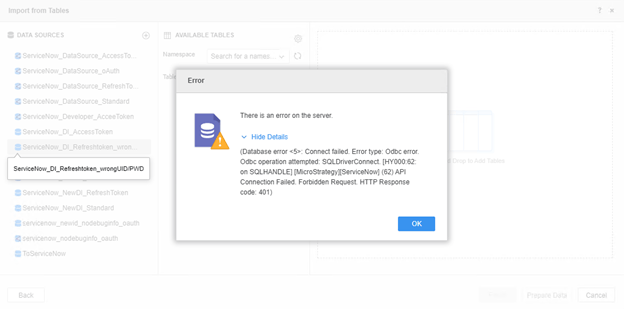
After upgrading to Strategy ONE Update 12, existing JDBC connections are automatically converted to ODBC. Errors or warnings appear if you are using refresh token authentication mode.
 

Strategy Web

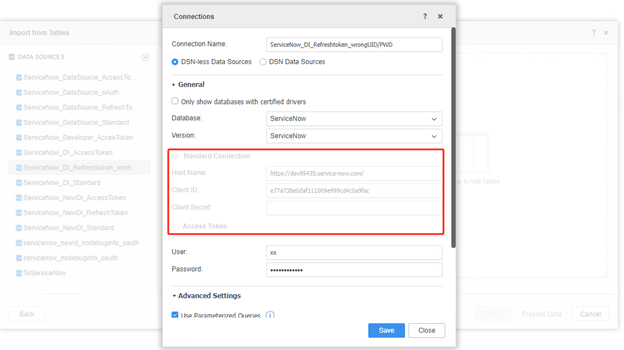
The authentication mode section is blocked out if your previous connections were using refresh token mode. The error shown below appears when you attempt to connect the instance.
 

ka0PW00000009rJYAQ_0EMPW000002UOYX.jpeg
ka0PW00000009rJYAQ_0EMPW000002UdSc.jpeg

Workstation Data Source Management

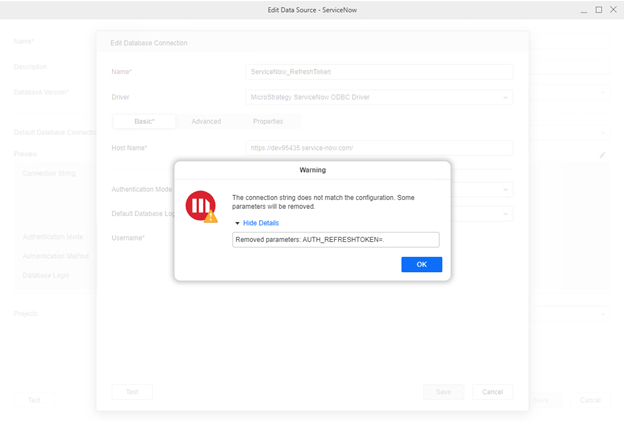
The Authentication Mode is mapped to Standard. The error shown below appears when you attempt to edit the connection.
 

ka0PW00000009rJYAQ_0EMPW000002Ufar.jpeg

Creating a New Connection

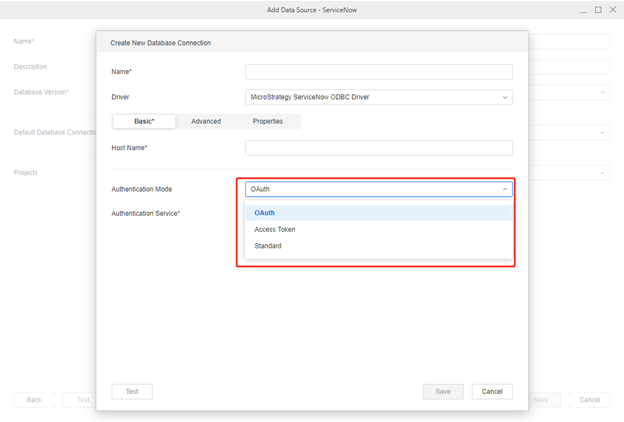
There is no refresh token authentication mode when you create a new connection to ServiceNow.
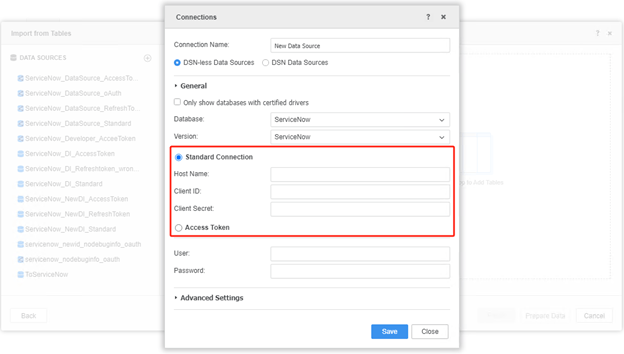
 

Strategy Web

ka0PW00000009rJYAQ_0EMPW000002UgFB.jpeg

Workstation Data Source Management

ka0PW00000009rJYAQ_0EMPW000002UgOr.jpeg

Solution

Recreate the connection with "Standard", "Access Token", "oAuth" authentication mode when you encounter the error.


Comment

0 comments

Details

Knowledge Article

Published:

December 13, 2023

Last Updated:

December 15, 2023