EducationSoftwareStrategy.com
StrategyCommunity

Knowledge Base

Product

Community

Knowledge Base

TopicsBrowse ArticlesDeveloper Zone

Product

Download SoftwareProduct DocumentationSecurity Hub

Education

Tutorial VideosSolution GalleryEducation courses

Community

GuidelinesGrandmastersEvents
x_social-icon_white.svglinkedin_social-icon_white.svg
Strategy logoCommunity

© Strategy Inc. All Rights Reserved.

LegalTerms of UsePrivacy Policy
  1. Home
  2. Topics

KB486245: Marketo Connection Error [MicroStrategy][Marketo] (20) Error while attempting to use REST API: Access denied Unknown Error Code


Yao Fu

Quality Engineer, Senior • MicroStrategy


In MicroStrategy ONE Update 12, existing Marketo JDBC drivers are automatically converted to ODBC drivers. If a user does not have the required Marketo permissions, an error may occur when the user runs a report or republishes the cube. To avoid this, you must grant the required permissions to the Marketo user.

Symptom


Starting in Strategy ONE Update 12, Strategy ships Marketo ODBC driver instead of the JDBC driver. Any existing Marketo JDBC connection will be converted to a ODBC connection automatically after upgrade. If you re-run a report or republish a cube, you may encounter an error:
[HY000:20: on SQLHANDLE] [Strategy][Marketo] (20) Error while attempting to use REST API: Access denied Unknown Error Code.

Cause


The error is caused by driver behavior changes from Marketo JDBC to ODBC.
The ODBC drivers needs to initialize the Columns for all the Stored Procedures upfront. Marketo ODBC driver has one Stored Procedure called

GetNamedAccountsByName()
which requires access to the endpoint:
v1/namedaccounts/describe.json
to initialize the Columns Metadata for it.
If the Marketo user doesn't have the required access, the ODBC driver will return the access denied error.

Solution


You need to grant the Marketo user the required access:
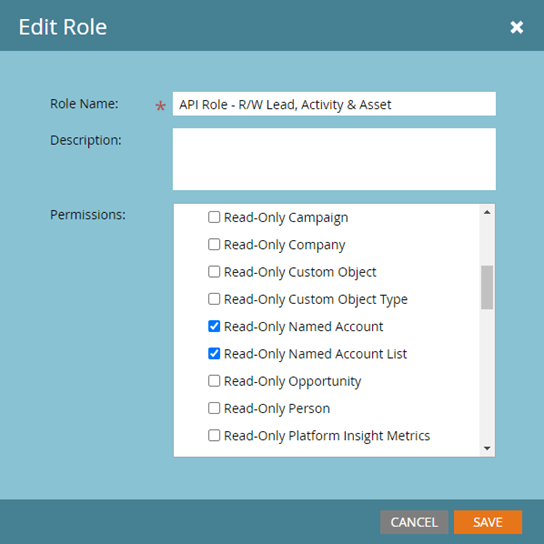
  • Go to Admin > Security > Users & Roles > Roles.
  • Edit the Role used for your Marketo user and grant the Read-Only Named Account and Read-Only Named Account List permissions.
ka0PW0000000Bt7YAE_0EMPW000002Z30I.jpeg

Comment

0 comments

Details

Knowledge Article

Published:

December 18, 2023

Last Updated:

December 18, 2023