Starting with the release of Strategy ONE (March 2024), dossiers are also known as dashboards.
When caching is enabled and multiple users run dossiers with multiple pages, Strategy Administrators may be surprised by the big number of Document Caches being created and/or hit. Document Caches can be observed in Developer in the following location:
Log in to Project Source > Log in to Project > Administration > System Monitors > Caches > Documents > Select project > Click OK.
Document caches can be observed in Workstation in the following location:
Log into Environment > Monitors > Caches > Contents tab
There may be e.g. several Document Caches for the same dossier and user created almost at the same time. A typical scenario when multiple users run a dossier at once is during a subscription execution of the involved dossier. As a result, the number of Document Caches being created and/or hit may be challenging to interpret.
The number of Document Caches created depends on multiple factors:
1) Number of pages in the dossier
Intelligence Server generates one cache for each dossier page (called Page Cache). In the Cache Monitor of Developer, Document Caches created for different pages show a different ID under the “Chapter” column. To expose this column, in the Cache Monitor for Document Caches, please right click on any blank space and select “View Options…”. A small window will pop up, allowing the user to expose the “Chapter” column by marking the corresponding checkbox, among other relevant information.
Note: Please be aware that the “Chapter” column displays the ID of the page containing the Document Cache, not the ID of the chapter. This means that several Document Caches of the same dossier page should show the same value under “Chapter”.
2) Number of users running the dossier (regardless of the dossier being part of a subscription or not)
The bigger the number of users, the more probable that multiple Document Caches are created. This can be better understood by reviewing the next points.
3) Different state of each dossier among users
Each dossier has a base state, which is essentially the dossier without manipulations like filtering, sorting, or drilling. Document Caches of the base state of each dossier page are generated. These are called base page caches.
After performing manipulations and when the dossier is closed or the user logs out or the user session times out, Document Caches are generated for the dossier pages in their current state. These are called shortcut page caches. Next time the user runs the dossier, it will be opened in the current state, and the corresponding Document Cache/s will be hit, depending on the Execution Mode (more details in a latter point).
In Library, if a user wants to create a Document Cache of the current page ad hoc during manipulations, the user can create a bookmark, and then a bookmark Document Cache (or bookmark page cache) is created. The “Bookmark” button can be found on the top left part of the dossier.

After manipulations, in Library it is possible to restore the dossier to its base state by clicking on the “Reset” button, next to the “Bookmark” button.

Note: Please be aware that the Cache Monitor of Developer cannot distinguish between particular manipulations (e.g. filtering vs sorting, or filtering different values, etc.), therefore information of the manipulation is not displayed. This means that Document Caches created by the same user for the same dossier page for different manipulations may be understood like the same cache from the information displayed in Developer. One of the reasons is that they are created for different manipulations.
4) Different Access Control Lists (ACLs) of the dossier object and its dependent objects
When there is a difference of permissions on the mentioned objects among users, each user generates his/her own Document Caches.
Note: As for the manipulations, the ACL information is not displayed in the Cache Monitor of Developer, so different ACLs is another reason of seeing similar information for several Document Caches.
5) Different manipulations on the dossier
If one user performs a particular manipulation (let us say filtering) on one dossier page and another user performs a different manipulation (let us say sorting) on the same page, 2 Document Caches of the dossier page are created.
When users perform multiple manipulations on a dossier, these manipulations are saved in the page cache key of the Document Cache. This Document Cache is only hit if another user performs the same manipulations, as in this case the page cache key is the same, otherwise an additional Document Cache is created.
Note: The note of the “Different state of each dossier among users” point applies also here.
6) Execution Mode
When running the dossier object, several execution modes are available. On the top left menu of the dossier in edit mode, under File -> Dossier Properties -> Execution mode, the following options are available:
- Default: All pages of the dossier are executed and loaded.
- Load chapters on demand: Only the pages of the current chapter are executed and loaded.
- Load pages on demand: Only the current page is executed and loaded.


Therefore, depending on the above option selected, a different number of Document Caches are created, as it applies to all dossier pages, to all chapter pages and to the current page, respectively.
7) Security Filters
As the main purpose of a security filter is to restrict access to data, the behavior by design is to create different Document Caches when security filters are applied on users running dossiers. Users who have security filters applied on should not access Document Caches created by users not having security filters applied on, therefore they need their own Document Caches.
Besides, if there are 2 Security Filters with the same filter definition applied on 2 different users, 2 Document Caches per dossier page are created (one per user) even if the filter definition is the same (let us say, “Region In list (Central)”), as Security Filter objects are different (and therefore their IDs).
In the Cache Monitor of Developer, Document Caches created where a security filter is involved contain a value in the “Security Filter ID” column. To expose this column, in the Cache Monitor for Document Caches, please right click on any blank space and select “View Options…”. A small window will pop up, allowing the user to expose the “Security Filter ID” column by marking the corresponding checkbox, among other relevant information.

8) Differences in the locale settings between users
Additional Document Caches will be created in this scenario, even though the data is the same for different users. Within Strategy, locale settings can be found at different levels:
- Web User Preferences: They can be accessed by logging in to Web, then clicking on the user name on the top right part of the screen > Preferences > User Preferences > Language.

- Metadata language at the project level: In Developer -> Log in to project source -> Log in to project -> Project Configuration -> Language -> Metadata

- Metadata and Data languages for all users in the project: In Developer -> Log in to project source -> Log in to project -> Project Configuration -> Language -> User Preferences

- Metadata and Data languages for particular users in the project: In Developer > Log in to project source > Log in to project > Project Configuration > Language > User Preferences > Modify…
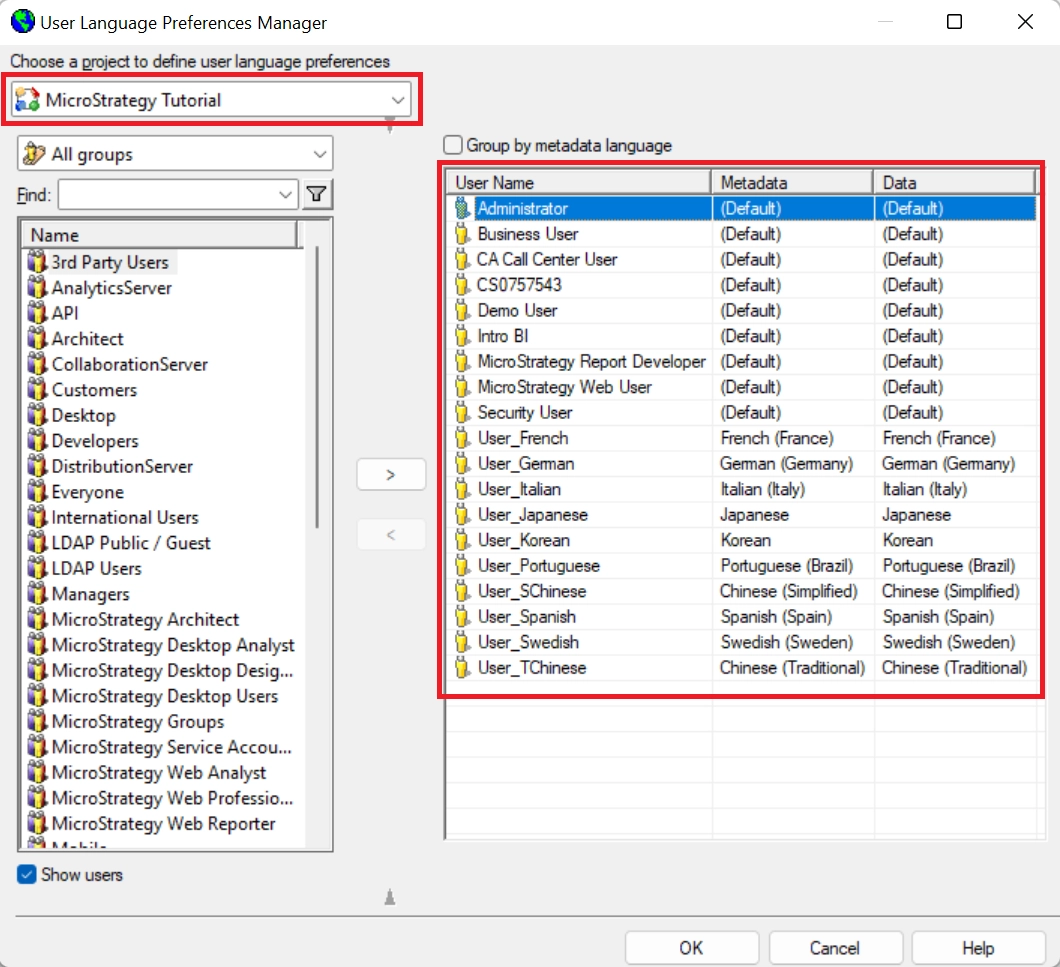
Note: As in previous points, information related to the locale settings does not appear in the Cache Monitor of Developer, therefore the same explanation applies here.
Apart from the points described above, more information about Page Caches can be found in the following link:
https://www2.microstrategy.com/producthelp/Current/SystemAdmin/WebHelp/Lang_1033/Content/page_cache.htm
There is no action to take, as this behavior is expected and by design.
