EducationSoftwareStrategy.com
StrategyCommunity

Knowledge Base

Product

Community

Knowledge Base

TopicsBrowse ArticlesDeveloper Zone

Product

Download SoftwareProduct DocumentationSecurity Hub

Education

Tutorial VideosSolution GalleryEducation courses

Community

GuidelinesGrandmastersEvents
x_social-icon_white.svglinkedin_social-icon_white.svg
Strategy logoCommunity

© Strategy Inc. All Rights Reserved.

LegalTerms of UsePrivacy Policy
  1. Home
  2. Topics

KB486425: Target Project Password does not work for Integrity Manager Silent Mode


Vincent Auyeung

Principal Support Engineer • MicroStrategy


One can perform an integrity manager test using command line. Integrity Manager's command line interface enables you to execute a test without having to load the graphical interface, or to schedule a test to run at specific times or dates. This is described further in the documentation below: https://www2.microstrategy.com/producthelp/Current/SystemAdmin/WebHelp/Lang_1033/Content/Executing_a_test_from_the_command_line.htm

Symptom:

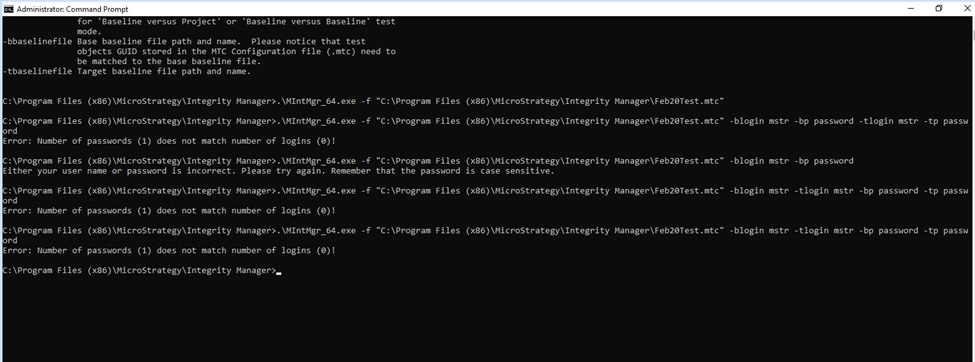
After creating and saving a test, Integrity Manager can be called along with various parameters described in the same documentation above. When including the target project username and password, the following error is received:
ka0PW0000001S3tYAE_0EMPW000004VR06.jpeg


Error: Number of passwords (1) does not match number of logins (0)


ACTION:

This issue has been logged as a defect. Please reach out to the Strategy Technical Support team for an update. 


Comment

0 comments

Details

Knowledge Article

Published:

April 4, 2024

Last Updated:

April 4, 2024