EducationSoftwareStrategy.com
StrategyCommunity

Knowledge Base

Product

Community

Knowledge Base

TopicsBrowse ArticlesDeveloper Zone

Product

Download SoftwareProduct DocumentationSecurity Hub

Education

Tutorial VideosSolution GalleryEducation courses

Community

GuidelinesGrandmastersEvents
x_social-icon_white.svglinkedin_social-icon_white.svg
Strategy logoCommunity

© Strategy Inc. All Rights Reserved.

LegalTerms of UsePrivacy Policy
  1. Home
  2. Topics

KB486466: Topology not showing correct service status for MicroStrategy Web using OIDC authentication in MicroStrategy ONE Update 10 - 12.


Katarzyna Olszewska

Senior Cloud Support Engineer III • MicroStrategy


This knowledge base article discusses an issue related to "Monitors" section in Worksation not reflecting proper service status for MicroStrategy Web while it is configured with OIDC.

Symptom:

Strategy Services Registration uses http(s)://domain:port/MicroStrategy/health endpoint to check the service status. This link is, however, protected by SSO. Since consul service has no means of authenticating so it can reach the endpoint, the application status cannot be retrieved properly. As a result, Strategy Web service shows as ‘Unavailable’ in Monitors section in Workstation.
In addition, while checking OIDC logs, the following entry can be found:


Failed to authorize filter invocation [GET /health] with attributes [IS_AUTHENTICATED_FULLY].


Workaround:


There are two ways to mitigate the issue – changing the endpoint used to evaluate application status to a one that is not protected by Single Sign-On, or disabling the protection on the application side:
First solution can be achieved by:
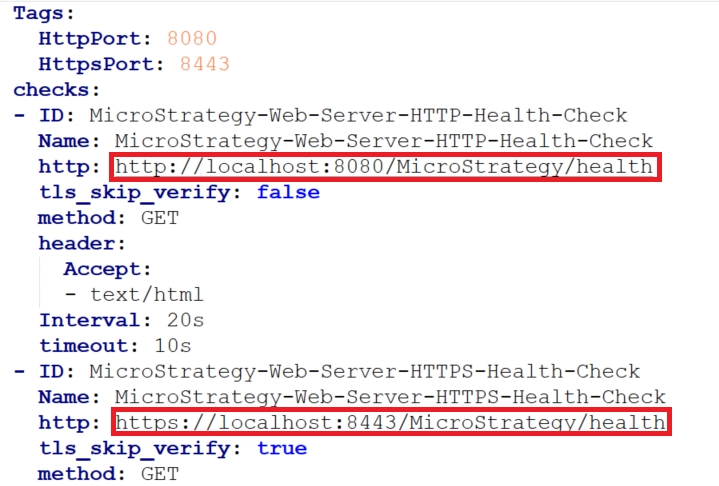
  • Navigating to Services Registration\yaml\mstr_services_config.yaml,
  • Finding sections dedicated Strategy Web (Strategy-Web-Server-HTTP-Health-Check and Strategy-Web-Server-HTTPS-Health-Check) Modifying the "http" property to point to a URL to a file in the images directory – e.g. http(s)://domain:port Strategy/images/0.gif. 
ka0PW0000001FY5YAM_0EMPW000004rnOT.jpeg
  • After making the changes, restarting the Services Registration is required. 

Another approach is to add the ‘health’ endpoint to an unprotected resources list:

  • Navigating to WEB-INF/classes/auth/SharedConfig.xml, and adding the line
    
    <security:http security="none" pattern="/health"/>
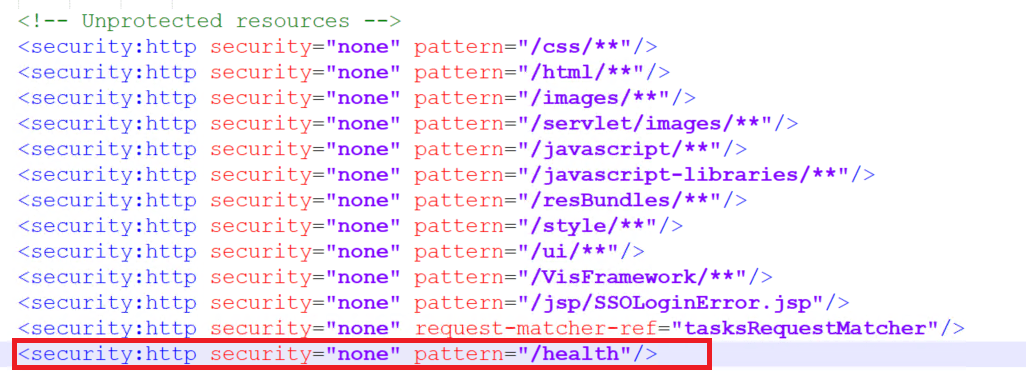
    in 'Unprotected resources' part.  
ka0PW0000001FY5YAM_0EMPW000004rkGw.jpeg
  • After making the changes, restarting the Tomcat server is required.   


Solution:


This issue has been addressed in Strategy ONE (March 2024) release. Updating the environment is required to take advantage of the fix. 


Comment

0 comments

Details

Knowledge Article

Published:

April 12, 2024

Last Updated:

April 12, 2024