A user cannot create a new subscription for history list in Strategy Workstation:
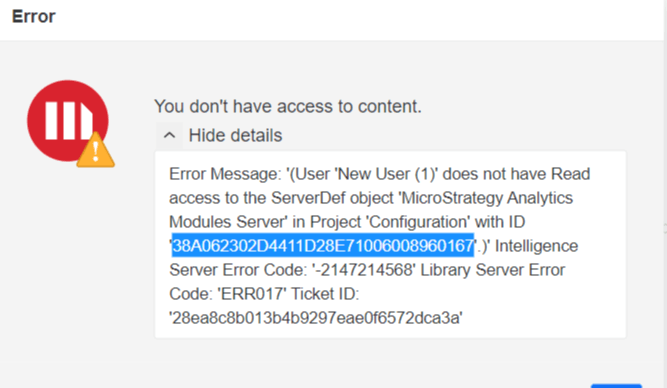
User 'xxxxx’ does not have Read access to the ServerDef object 'xxxxxx' in Project Configuration with ID 'xxxxxxx'.) Intelligence Server Error Code: -2147214568 Library Server Error Code: ERR017 Ticket ID: xxxxxxxx.'
1. Create a user and make sure the user has the privilege “Use Distribution Services" and "Web Subscribe to History List".
2. Go to Strategy Workstation and login as the new user.
3. Click the button to create a new subscription and in the Type list choose history list. The following error message will appear:
You don't have access to content.
User 'xxxxx’ does not have Read access to the ServerDef object 'xxxxxx' in Project Configuration with ID 'xxxxxxx'.) Intelligence Server Error Code: -2147214568 Library Server Error Code: ERR017 Ticket ID: xxxxxxxx.'
This issue occurs due to the fact that the users does not have Read permission to the Server definition object.
1. Go to Strategy Developer and configure the Intelligence Server by right clicking the project source.
2. Navigate to Server Definition > General > Properties
3. Click on "Modify" and go to the security section.
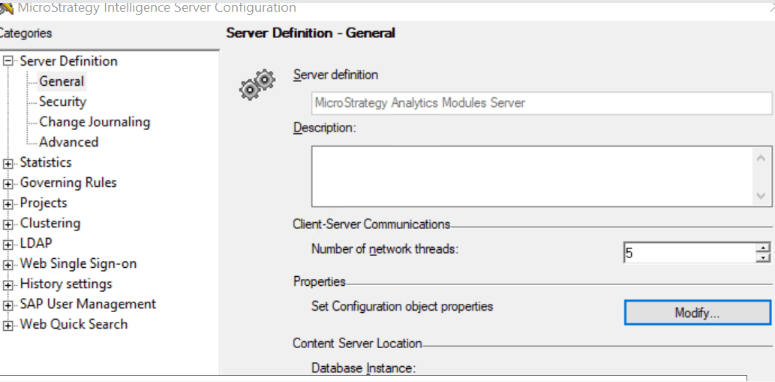
4. Change the permission for the Everyone group to Monitoring;
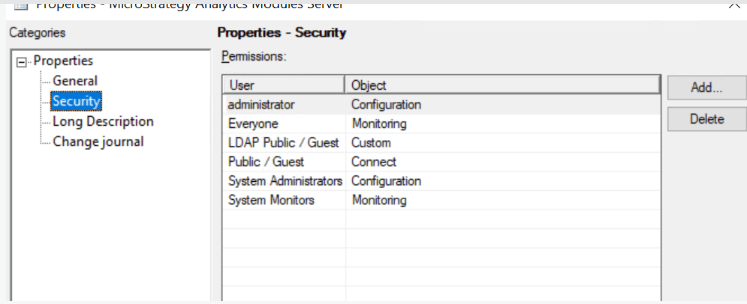
5. Log back in Strategy Workstation. The error should no longer appear.
