EducationSoftwareStrategy.com
StrategyCommunity

Knowledge Base

Product

Community

Knowledge Base

TopicsBrowse ArticlesDeveloper Zone

Product

Download SoftwareProduct DocumentationSecurity Hub

Education

Tutorial VideosSolution GalleryEducation courses

Community

GuidelinesGrandmastersEvents
x_social-icon_white.svglinkedin_social-icon_white.svg
Strategy logoCommunity

© Strategy Inc. All Rights Reserved.

LegalTerms of UsePrivacy Policy
  1. Home
  2. Topics

KB486754: Conditional display of a grid (workaround)


Robert Prochowicz

Manager, Sales Engineering • MicroStrategy


Conditional display is a great new feature that can show/hide objects like rectangle custom shapes by applying rules. With a workaround you can also show/hide grids based on custom logic.

When this kind of workaround would be helpful?

  • When you want to show a grid to some specific users and hide it from the rest
  • Imagine you have two transactional grids in your dashboard: one for INSERT is available for anyone, one for UPDATE is available only to a few power users. Alternatively, you may want the UPDATE grid to be visible to non-power users, but it should be inactive.

Until now the only solution would be to duplicate the dashboard, add those more advanced options to the copy and use ACL to set up access rights. Here is a recipe how to avoid duplication.
1. Create a derived metric that displays user login. Build a derived metric with Max(?[User Login]) as expression.  Also set the Options to have Aggregate/Subtotals from Base both unchecked. You need to save the dossier, close and reopen it to make the metric work.

ka0PW0000002O9VYAU_0EMPW000005DNQZ.jpeg

2. Create a second derived metric with IF condition that compares user login with a list of "accepted" logins. Use formula like:  IF (uid In ("rprochowicz", "zjanowski"), 0, 1)

ka0PW0000002O9VYAU_0EMPW000005DUqH.jpeg

3. Add a rectangle custom shape that lays on top of the grid that you want to hide. Align position and group both of them. Apply Conditional Display logic to the rectangle

ka0PW0000002O9VYAU_0EMPW000005DClM.jpeg

4. Make the rectangle the same color as your background to hide the underlying grid completely. Add some transparency so the grid will be visible, but inactive (for transactional grid use case)
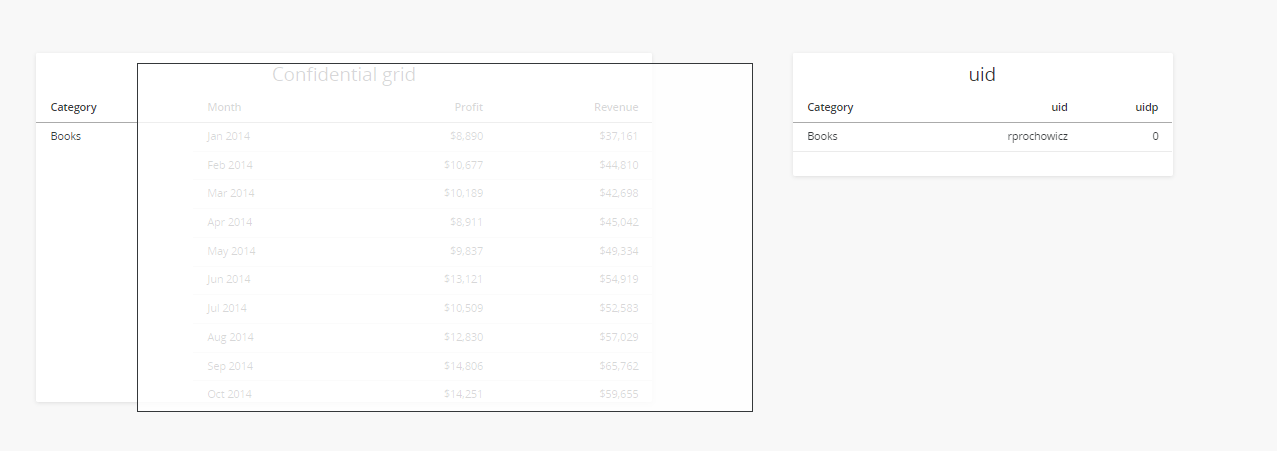
ka0PW0000002O9VYAU_0EMPW000005DPc3.jpeg

In my scenario, when users rprochowicz or zjanowski open the dashboard they will see the grid, because the rectangle shape will be hidden. All the other users will not see the grid, because the rectangle shape will cover it completely.


Comment

0 comments

Details

Knowledge Article

Published:

June 7, 2024

Last Updated:

June 7, 2024