EducationSoftwareStrategy.com
StrategyCommunity

Knowledge Base

Product

Community

Knowledge Base

TopicsBrowse ArticlesDeveloper Zone

Product

Download SoftwareProduct DocumentationSecurity Hub

Education

Tutorial VideosSolution GalleryEducation courses

Community

GuidelinesGrandmastersEvents
x_social-icon_white.svglinkedin_social-icon_white.svg
Strategy logoCommunity

© Strategy Inc. All Rights Reserved.

LegalTerms of UsePrivacy Policy
  1. Home
  2. Topics

KB486756: The error message, "'1' is not a valid value. Valid values for 'HLTarget' option are '[2]'" appears when users attempt to migrate their history list


Xiaoqin (Kim) Jin

Product Owner, Principal • MicroStrategy


This article explains how to resolve an error that occurs when users attempt to migrate their history list.

Symptom

Starting in Strategy ONE (June 2024), when using the response file to migrate the history list to database-only storage (HLTarget is set to 1) via Configuration Wizard silent mode, the following error appears:


'1' is not a valid value. Valid values for 'HLTarget' option are '[2]'

Response file template:
 
Note: The response.ini file is a configuration file that contains all the actions a user needs to perform.

ka0PW0000002URpYAM_0EMPW000006QqAr.jpeg

Error message:
 

ka0PW0000002URpYAM_0EMPW000006R2gc.jpeg


Cause

The Configuration wizard can be used to migrate the history list to a new storage location. Prior to Strategy ONE (June 2024) the available storage type options in the Configuration wizard were as follows:

  • When the current storage type was set to file, the options were database and hybrid
  • When the current storage type was set to database, the option was hybrid only

Starting in Strategy ONE (June 2024), the database option has been deprecated. The only available option is hybrid. Strategy recommends using hybrid storage for better performance. The options appear as follows:

  • GUI and interactive mode: Displays the hybrid option when selecting a history list storage type
  • Silent mode (executing response.ini directly): Only allows a value of
    2
    , which represents the hybrid storage type for the
    HLTarget
     in response.ini.

Action

For existing response.ini files that have been configured to migrate history list messages to database storage, update the file to migrate to hybrid storage.

  1. Assign
    HLTarget
    a value of
    2.
  2. Set
    HybridPath
     to a valid directory if it is not set. This is required for hybrid storage.

Configure

To migrate history list messages using silent mode, you must first generate a response.ini file using the Configuration wizard. This ensures that all applicable options are included in the response file with valid values.

  • Use the Configuration wizard to select the Upgrade option and click Next.
     
ka0PW0000002URpYAM_0EMPW000006R6nT.jpeg
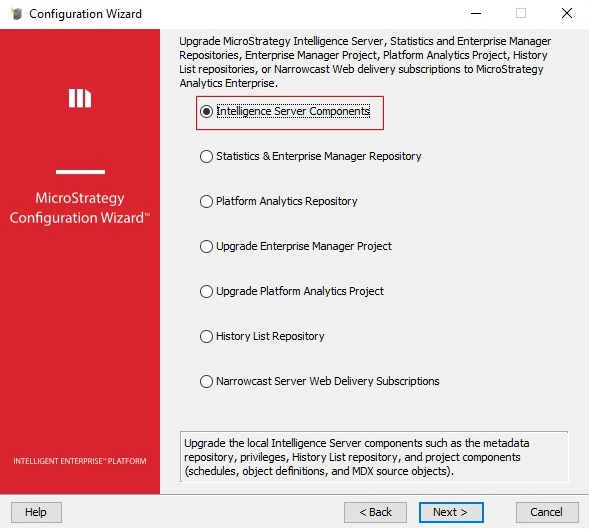
  • Select Intelligence Server Components and click Next.
     
ka0PW0000002URpYAM_0EMPW000006R8J0.jpeg
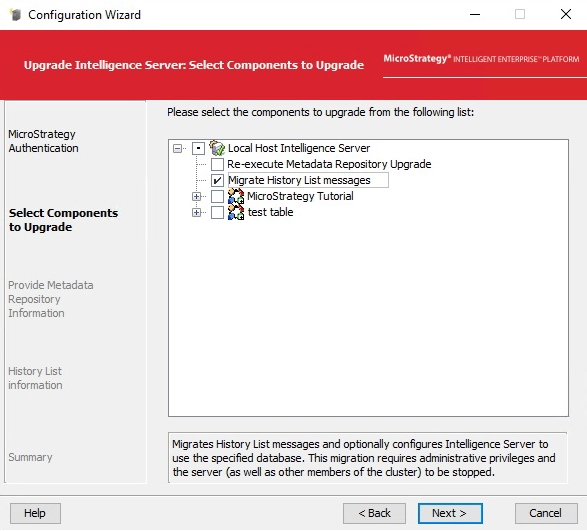
  • Select Migrate History List messages and click Next.
     
ka0PW0000002URpYAM_0EMPW000006RHB0.jpeg
  • Fill in the required fields and click Next.
     
ka0PW0000002URpYAM_0EMPW000006RHJ3.jpeg
  • Click Save to generate response.ini.
     
ka0PW0000002URpYAM_0EMPW000006TJwg.jpeg
  • Open response.ini in a text editor.
     
ka0PW0000002URpYAM_0EMPW000006RLUj.jpeg
  • The fields in the response file contain all of the actions to be done when upgrading the Intelligence server. Since you only selected the migrate history list option, only the fields that apply to migrating the history list are filled in. You can modify the fields as necessary.
    • MigrateHL
      A flag used to mark if the Migrate History List messages option is selected.
    • HLPath
      The history list message storage file location when using file-only storage.
    • HybridPath
      The folder location where the history list repository is currently stored, if currently using file-based storage.
    • HLDSNName
      The data source name for the database to migrate the history list repository to. This is required when migrating to hybrid storage.
    • HLUserName
      The user that has access to the data source.
    • HLUserPwd
      The user's password.

Comment

0 comments

Details

Knowledge Article

Published:

May 14, 2024

Last Updated:

June 21, 2024