Customers face the problem of static 'auto texts' in Dashboard when the parameter 'Enable Document Output caching In XML/Flash/HTML5' is enabled. Particularly, the {&DOCUMENTMESSAGEID} autotext, used to link Dashboards by passing selections from one Dashboard to another, retains a constant value upon each execution. This issue primarily manifests itself in the Web client and sporadically in the Library client.
'Enable Document Output caching In XML/Flash/HTML5' setting in WorkStation'.

'Enable Document Output caching In XML/Flash/HTML5' setting in Developer.
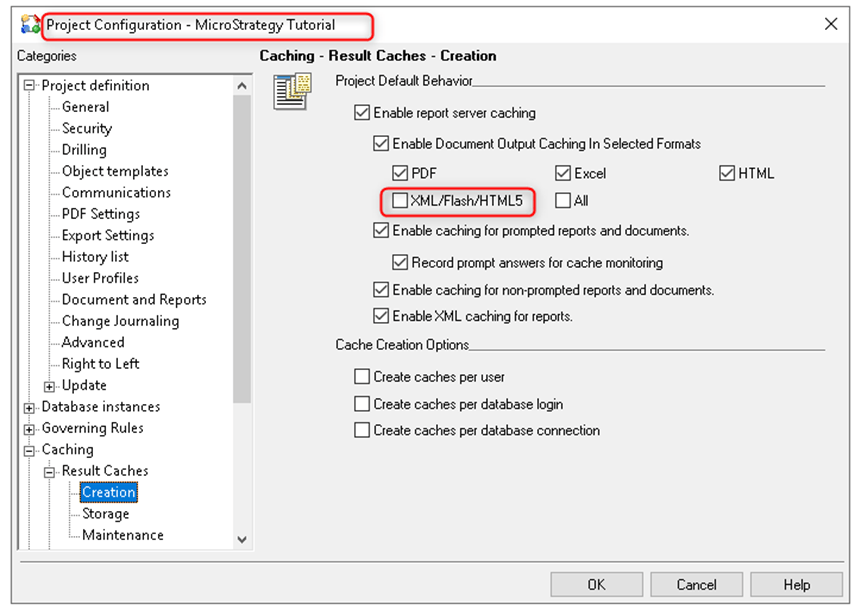
According to the Help Section:
Enable Document Output Caching In Selected Formats: Select this check box to enable document output caching in various formats. You can enable document caching for PDF, Excel, HTML, or XML/Flash/HTML5 documents. Select All to select all formats. By default, this check box is selected.
The issue originates in the cache settings, where the enabled parameter 'Enable Document Output caching In XML/Flash/HTML5' appears to prevent the dynamic updating of autotexts like {&DOCUMENTMESSAGEID}. This non-updating behavior hinders the dynamic linking between Dashboards, especially when the autotext is used for passing selections between them.
When deactivating the setting 'Enable Document Output Caching In XML/Flash/HTML5' the HTML container changes with each execution of the Dashboard.
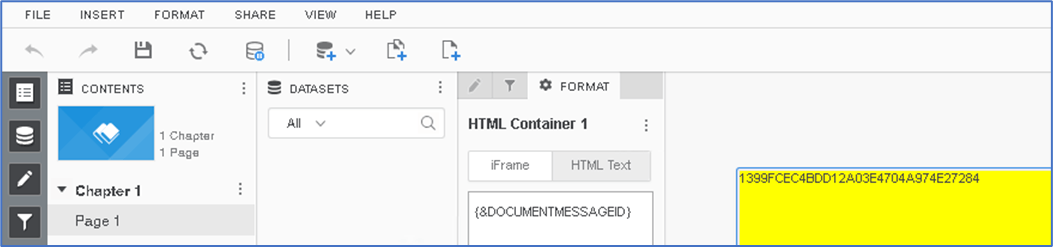

When activating the setting 'Enable Document Output Caching In XML/Flash/HTML5' the HTML container remains static with each execution of the Dashboard.


The expected behavior is that the label {&DOCUMENTMESSAGEID} autotext, should be changed even when the setting 'Enable Document Output Caching In XML/Flash/HTML5' is enabled.
As this issue is actively under review by our Strategy software development team. Please reach out to our support team for further assistance and updates on this issue.
How to pass prompt answers through multiple layers of linked documents https://community.Strategy.com/s/article/KB15611-How-to-pass-prompt-answers-through-multiple-layers-of?language=en_US
https://www2.Strategy.com/producthelp/Current/Workstation/en-us/Content/application_cache_intelligent_cube_settings.htm
