Users might want to query the content of the Security Filters available in their Strategy Environment to enhance productivity, other than Platform Analytics. For big environments manually reviewing Security filters might be tedious and not efficient.
The challenge is to have a method to browse through the Security Filters in bulk. This limitation forces administrators to spend extra time and effort to manually yield the content of each Security Filter.
To automate the process of listing Security Filters with a Python Script, follow these detailed steps in the Strategy WorkStation:
1. Connect to Your Environment: Initialize the connection to your Strategy environment.
2. Navigate to Administration: Access the administration panel to manage scripts.
3. Access Scripts Section: Go to the scripts section where you can create or modify scripts.
4. Select Your Environment: Choose the appropriate environment where the script will be executed.
5. Open Gallery Tab: In the right section of the interface, select the Gallery tab to view available workflows and scripts.
6. Expand Code Snippets: Discover and expand the Code Snippets section to access various scripts. You can also use the search box and enter 'security filters'.
7. Launch ‘security filters' Code Snippet: Double-click on the ‘security filters' Code Snippet to open it.
8. Execute the Script: Hit the run button to execute the script and list ‘security filters.
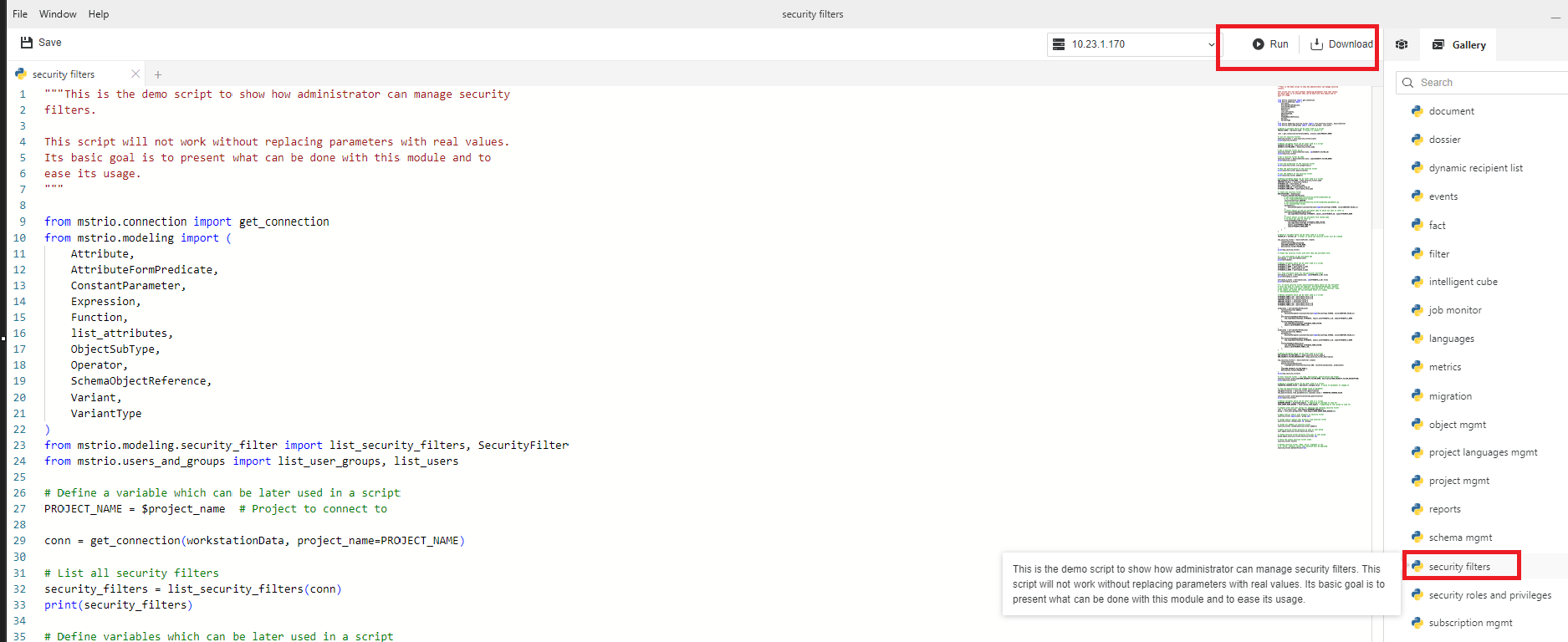
The python script that can be found find within Strategy WorkStation and is also available here mstrio-py/code_snippets/security_filters.py at master · MicroStrategy/mstrio-py · GitHub
A sample Python script is given below, which can be copy-pasted and used in the Project 'Strategy Tutorial' for the Security filter ID '06648A6711D50131C00051916B98494F'
from mstrio.connection import get_connection
from mstrio.modeling import (
    Attribute,
    AttributeFormPredicate,
    ConstantParameter,
    Expression,
    Function,
    list_attributes,
    ObjectSubType,
    Operator,
    SchemaObjectReference,
    Variant,
    VariantType
)
from mstrio.modeling.security_filter import list_security_filters, SecurityFilter
from mstrio.users_and_groups import list_user_groups, list_users

# Define a variable which can be later used in a script
PROJECT_NAME = 'Strategy Tutorial'  # Project to connect to

conn = get_connection(workstationData, project_name=PROJECT_NAME)

# List all security filters
security_filters = list_security_filters(conn)
print(security_filters)

# Define variables which can be later used in a script
SECURITY_FILTER_ID = '06648A6711D50131C00051916B98494F'
# SECURITY_FILTER_NAME = $security_filter_name

# Get a security filter by id
security_filter = SecurityFilter(conn, id=SECURITY_FILTER_ID)
print(security_filter)

# List the properties of the security filter
print(security_filter.list_properties())

# Show the qualification of the security filter
print(security_filter.qualification)

# List the members of the security filter
print(security_filter.members)
Customization Warning: This customization is provided as a convenience to Strategy users and is only directly applicable to the version stated. While this code may apply to other releases directly, Strategy Technical Support makes no guarantees that the code provided will apply to any future or previous builds. In the event of a code change in future builds, Strategy Technical Support makes no guarantee that an updated version of this particular customization will be provided. For enhancements to this customization or to incorporate similar functionality into other versions, contact your Account Executive to inquire about Strategy Consulting assistance.
Python within Workstation https://www2.microstrategy.com/producthelp/Current/Workstation/en-us/Content/intro_scripts.htm
Preview Python Scripts https://www2.microstrategy.com/producthelp/Current/Workstation/en-us/Content/preview_scripts.htm
mstrio-py https://github.com/MicroStrategy/mstrio-py
https://www2.microstrategy.com/producthelp/Current/Workstation/en-us/Content/intro_scripts.htm
