In large Strategy environments, administrators may need to assign ACLs to folders and propagate these to all child objects frequently. Performing this operation manually can be time-consuming and prone to errors, especially in extensive and complex systems.
The challenge is to have a method for administrators to bulk assign ACLs to a folder and propagate them to its children, leading to increased time and effort spent on these operations.
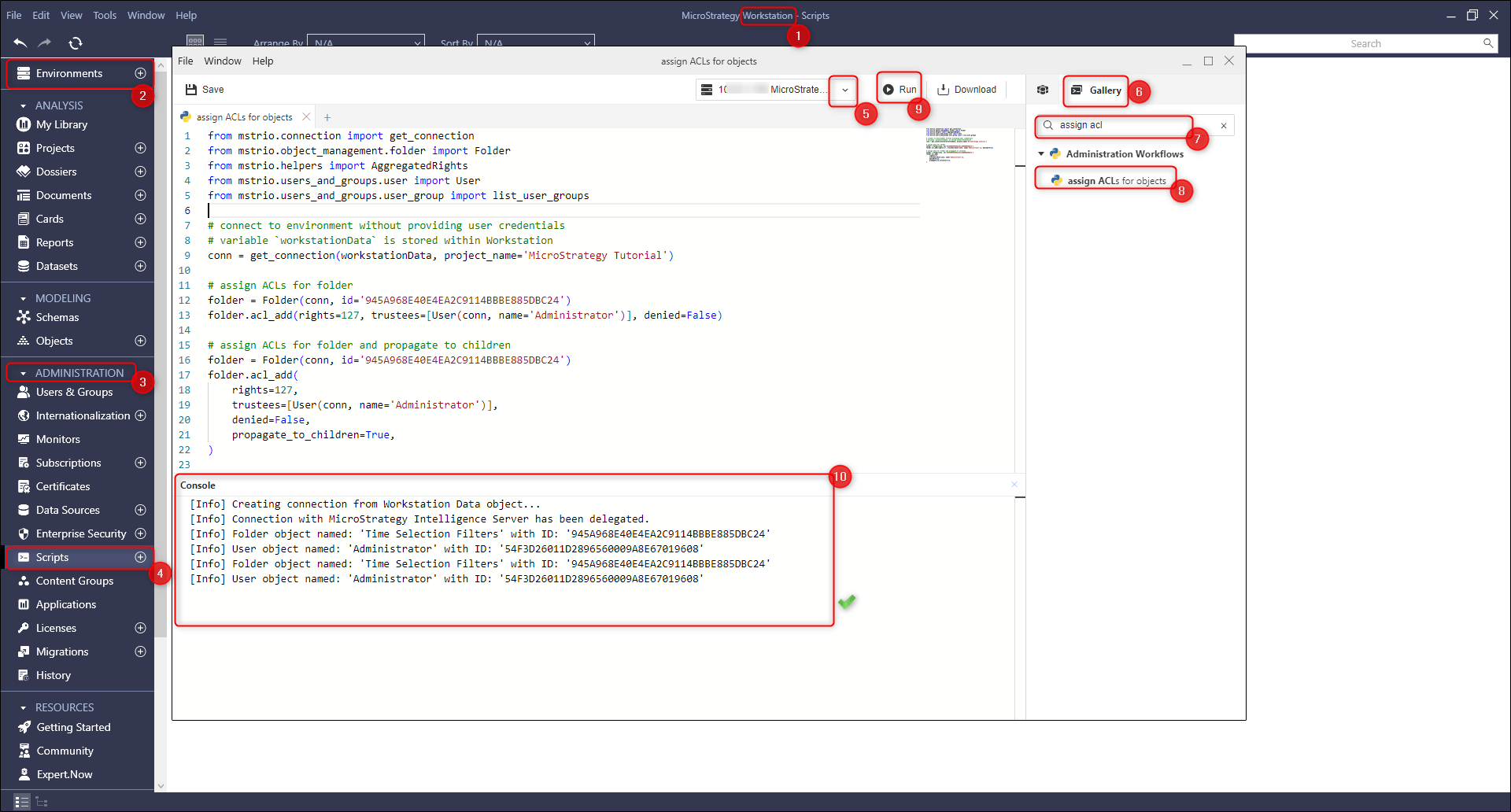
To programmatically assign ACLs to a folder and propagate them to child objects in Strategy Workstation, follow these steps:
1. Connect to Your Environment: Initialize the connection to your Strategy environment.
2. Navigate to Administration: Access the administration panel to manage scripts.
3. Access Scripts Section: Go to the scripts section where you can create or modify scripts.
4. Select Your Environment: Choose the appropriate environment where the script will be executed.
5. Open Gallery Tab: In the right section of the interface, select the Gallery tab to view available workflows and scripts.
6. Expand Administration Workflows: Discover and expand the Administration Workflows section to access various scripts. You can also use the search box and enter 'assign ACLs for objects’.
7. Launch ' assign ACLs for objects’ Administration Workflow: Double-click on ' assign ACLs for objects’ Administration Workflow to open it.
8. Execute the Script: Hit the run button to execute the script and programmatically ' assign ACLs for folder and propagate to children '.
A complete script detailing this functionality is available in the Strategy GitHub repository at https://github.com/MicroStrategy/mstrio-py/blob/master/workflows/assign_ACLs_for_objects.py
A sample Python script is given below, which can be copy-pasted and used in the Project 'Strategy Tutorial' for a particular Folder.
from mstrio.connection import get_connection
from mstrio.object_management.folder import Folder
from mstrio.helpers import AggregatedRights
from mstrio.users_and_groups.user import User
from mstrio.users_and_groups.user_group import list_user_groups

# connect to environment without providing user credentials
# variable `workstationData` is stored within Workstation
conn = get_connection(workstationData, project_name='Strategy Tutorial')

# assign ACLs for folder
folder = Folder(conn, id='945A968E40E4EA2C9114BBBE885DBC24')
folder.acl_add(rights=127, trustees=[User(conn, name='Administrator')], denied=False)

# assign ACLs for folder and propagate to children
folder = Folder(conn, id='945A968E40E4EA2C9114BBBE885DBC24')
folder.acl_add(
    rights=127,
    trustees=[User(conn, name='Administrator')],
    denied=False,
    propagate_to_children=True,
)
Customization Warning: This customization is provided as a convenience to Strategy users and is only directly applicable to the version stated. While this code may apply to other releases directly, Strategy Technical Support makes no guarantees that the code provided will apply to any future or previous builds. In the event of a code change in future builds, Strategy Technical Support makes no guarantee that an updated version of this particular customization will be provided. For enhancements to this customization or to incorporate similar functionality into other versions, contact your Account Executive to inquire about Strategy Consulting assistance.
Python within Workstation https://www2.Strategy.com/producthelp/Current/Workstation/en-us/Content/intro_scripts.htm
Preview Python Scripts https://www2.Strategy.com/producthelp/Current/Workstation/en-us/Content/preview_scripts.htm
mstrio-py https://github.com/MicroStrategy/mstrio-py
https://www2.Strategy.com/producthelp/Current/Workstation/en-us/Content/intro_scripts.htm
